Whisper Snapper is a Mac-based AI transcription application that converts audio and video into accurate, searchable text using powerful local and cloud AI models. It supports offline transcription for enhanced privacy, speaker identification, timestamps, and multiple export formats, including PDF, Markdown, SRT, and TXT. Designed for...
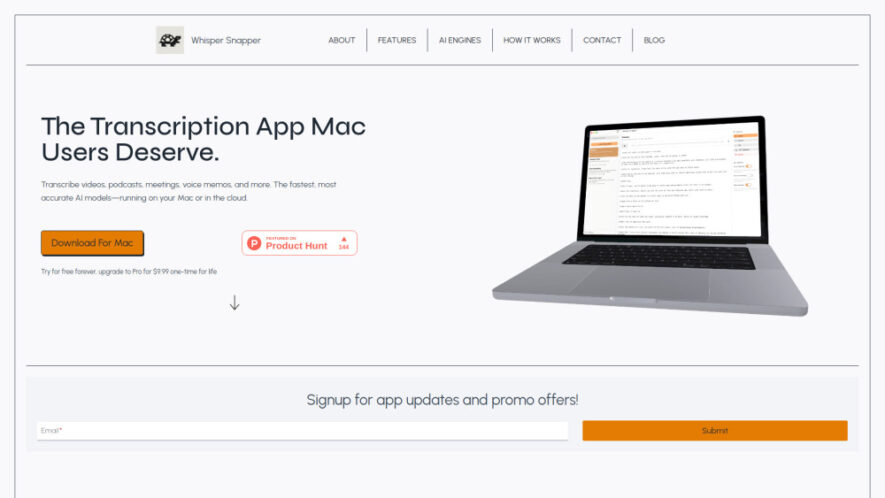
Whisper Snapper is a Mac-based AI transcription application that converts audio and video into accurate, searchable text using powerful local and cloud AI models. It supports offline transcription for enhanced privacy, speaker identification, timestamps, and multiple export formats, including PDF, Markdown, SRT, and TXT. Designed for creators, professionals, educators, and journalists, Whisper Snapper simplifies transcription while keeping workflows fast, secure, and highly efficient.
Support popular audio and video formats for flexible transcription workflows every day.
Record audio directly within the application for instant transcription and documentation tasks.
Export transcripts easily into PDF, Markdown, SRT, TXT, CSV, and VTT formats.
Perform completely offline transcription while protecting privacy and sensitive audio recordings securely.
Add precise timestamps automatically for improved transcript navigation and editing convenience always.
Search, edit, and organize transcripts efficiently through an intuitive Mac application interface.
You Got Questions,We Got Answers
1. What AI models power Whisper Snapper transcription capabilities effectively?
Whisper Snapper supports leading AI models including Whisper, WhisperKit, Parakeet, Deepgram Nova-2, and GPT-4o Diarize. Users can choose local or cloud processing depending on their priorities for speed, privacy, and transcription accuracy.
2. Can Whisper Snapper transcribe audio completely without an internet connection?
Yes, Whisper Snapper supports fully offline transcription using downloadable local AI models. Your recordings remain on your Mac, providing enhanced privacy while eliminating the need for an active internet connection.
3. Which file formats are compatible with Whisper Snapper transcription processing?
Whisper Snapper supports popular audio and video formats including MP4, MOV, M4A, MP3, and WAV. Users can also capture recordings directly inside the application for immediate AI-powered transcription.
4. Does Whisper Snapper automatically identify different speakers during transcription sessions?
Yes, Whisper Snapper includes AI-powered speaker identification that labels different speakers throughout conversations. This feature improves readability and organization for meetings, interviews, podcasts, lectures, and collaborative discussions.
5. Can users export transcripts into multiple document and subtitle formats easily?
Yes, completed transcripts can be exported as PDF, Markdown, TXT, CSV, SRT, and VTT files. These formats support documentation, editing, subtitle creation, publishing, and professional content management workflows.
6. Is Whisper Snapper suitable for professional transcription and content creation projects?
Absolutely. Journalists, educators, businesses, podcasters, researchers, and content creators can efficiently transcribe interviews, meetings, lectures, podcasts, and recordings while maintaining excellent accuracy and streamlined productivity.
7. Does Whisper Snapper offer a free version before purchasing the Pro edition?
Yes, users can access a free version with essential transcription capabilities. Those needing advanced features and lifetime access can upgrade to the Pro version through a one-time payment option.
8. Why should users choose local transcription instead of cloud-based processing methods?
Local transcription keeps audio files on your Mac, improving privacy and data security. It also enables offline usage, making Whisper Snapper an excellent choice for handling confidential or sensitive recordings.
Use cases
Podcasts
Transcribe podcast episodes accurately for editing, searchable archives, accessibility improvements, and detailed episode show notes.
Subtitles
Generate accurate subtitle files for videos using timestamps and multiple export formats supporting content distribution.
Meetings
Create searchable meeting transcripts that improve collaboration, documentation, follow-up actions, and long-term organizational recordkeeping.
Interviews
Convert interview recordings into structured text for journalism, legal documentation, academic research, and professional reporting.
Lectures
Transform classroom lectures into organized transcripts for reviewing, studying, sharing, and educational reference purposes efficiently.
Research
Document recorded research discussions, observations, and interviews with reliable AI transcription and organized searchable text.
Journalism
Produce accurate transcripts from news interviews, press conferences, and recorded conversations for faster article preparation.
Memos
Convert voice memos into editable text for personal notes, reminders, documentation, and productivity workflows.
Traffic and Engagement
May 2026 - Jul 2026
World wide
Monthly visitors (July)
1.8k
Page/Visit
1.72
Visit Duration
4s
Bounce Rate
40.80%
Pricing
Freemium
$9.99
Whisper Snapper Embeds
Copied!
Let your community know you're live on Skillcurb! Just drop a badge on your site’s homepage with just a few clicks. Showcasing the badge helps increase your visibility and connects you with users actively exploring top AI tools.