SaveSora is a free online downloader designed for saving Sora-generated videos in high-quality MP4 format. It provides a simple browser-based experience for downloading videos without registration or complicated setup. Users can copy a publicly accessible Sora video link, paste it into the downloader, and receive a...
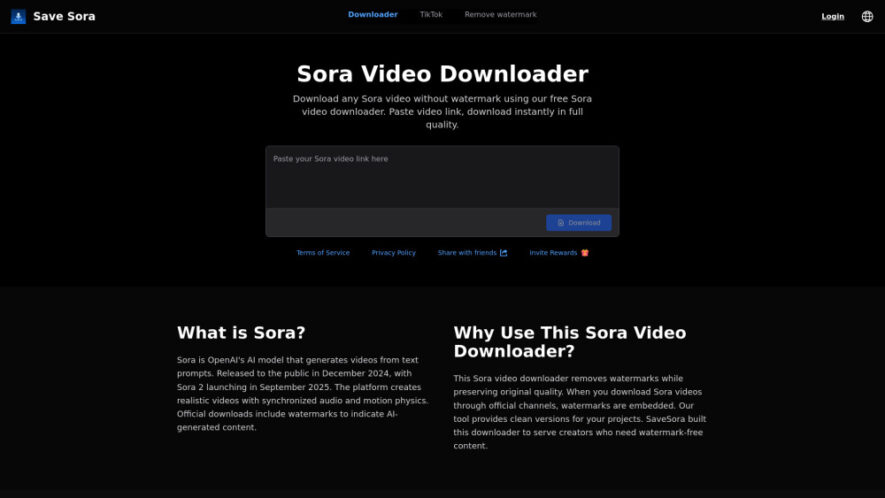
SaveSora is a free online downloader designed for saving Sora-generated videos in high-quality MP4 format. It provides a simple browser-based experience for downloading videos without registration or complicated setup. Users can copy a publicly accessible Sora video link, paste it into the downloader, and receive a clean version for personal projects, presentations, editing, or offline viewing. The tool works across phones, tablets, and computers.
Downloads Sora videos quickly while maintaining high-quality visual output.
Removes watermarks from supported Sora videos during the download process.
Preserves video quality with resolutions available up to 1080p.
Provides MP4 files compatible with most modern devices and editors.
Works directly through browsers without requiring software installation or registration.
Supports convenient downloading across smartphones, tablets, and desktop computers.
Offers a straightforward interface designed for fast and simple downloads.
Processes individual video links for reliable and convenient downloading.
You Got Questions,We Got Answers
Is SaveSora free to use for downloading videos?
Yes, SaveSora is presented as a completely free online downloader without hidden charges. Users can download supported Sora videos without purchasing subscriptions or paying additional fees. The service is designed for convenient browser-based access.
What format does SaveSora provide for downloaded videos?
SaveSora provides downloaded videos in MP4 format, which is widely supported across modern smartphones, tablets, computers, media players, and video editing applications. This makes saved videos convenient for playback, editing, storage, and sharing.
Can I use SaveSora on mobile devices?
Yes, SaveSora works through web browsers on smartphones and tablets, making mobile downloading convenient. Users can copy a supported Sora video link, open SaveSora, paste the link, and start the download without installing additional software.
Does SaveSora require registration before downloading?
No, SaveSora does not require users to create an account or complete registration before downloading supported videos. The browser-based process is designed to remain simple, allowing users to paste a video link and download it directly.
What should I do when a download fails?
First, check that the copied Sora video link is correct and publicly accessible. If the link appears valid, try pasting it again or refreshing the downloader page. Some unsupported, private, or unavailable videos may not process successfully.
Does SaveSora support batch video downloads?
Currently, SaveSora is designed to process one video link at a time rather than multiple downloads simultaneously. This single-video approach keeps the process straightforward and helps users manage individual Sora video downloads more easily.
Is SaveSora affiliated with OpenAI or Sora?
No, SaveSora is described as an independent third-party downloader and is not affiliated with OpenAI. Sora is an OpenAI product, while SaveSora provides a separate browser-based service for processing supported Sora video links.
What devices are compatible with SaveSora?
SaveSora can be accessed using modern web browsers on smartphones, tablets, laptops, and desktop computers. Because it operates online, users generally do not need to install dedicated applications to access its downloading functionality.
Use cases
Projects
Download Sora videos without watermarks for personal creative projects and presentations.
Editing
Save high-quality Sora videos for editing, enhancements, and creative production workflows.
Presentations
Obtain clean AI-generated videos suitable for presentations, demonstrations, and visual storytelling.
Offline
Save Sora videos as MP4 files for convenient offline viewing anytime.
Social
Prepare clean AI-generated video versions for sharing across supported social platforms.
Archiving
Keep selected Sora creations stored locally for future reference or creative reuse.
Content
Collect high-quality AI videos for content development, visual concepts, and promotional materials.
Mobile
Download Sora videos directly through mobile browsers without installing additional applications.
Traffic and Engagement
Jun 2026 - Aug 2026
World wide
Monthly visitors (August)
33k
Page/Visit
1.36
Visit Duration
16s
Bounce Rate
37.53%
Pricing
Free
$0
SaveSora: Sora Video Downloader Embeds
Copied!
Let your community know you're live on Skillcurb! Just drop a badge on your site’s homepage with just a few clicks. Showcasing the badge helps increase your visibility and connects you with users actively exploring top AI tools.