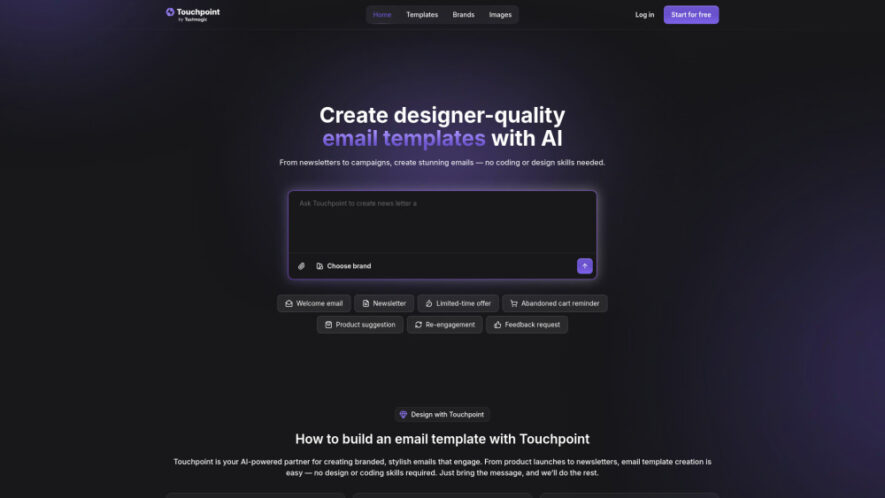
Touchpoint is an AI-powered email template builder that transforms simple ideas into polished, on-brand email designs. It automatically imports brand elements such as logos, colors, images, and social links from a website, then uses AI to create reusable HTML email templates. Touchpoint helps marketers, founders, and...
Touchpoint is an AI-powered email template builder that transforms simple ideas into polished, on-brand email designs. It automatically imports brand elements such as logos, colors, images, and social links from a website, then uses AI to create reusable HTML email templates. Touchpoint helps marketers, founders, and teams manage multiple brands, explore ready-made layouts, customize campaigns, and export clean HTML for use across email platforms.
Generates professional email templates aligned with your established brand identity.
Automatically imports logos, colors, images, and social links from websites.
Manages templates efficiently across multiple brands, products, and clients.
Provides ready-made layouts inspired by email design best practices.
Exports clean HTML templates ready for use across email platforms.
Uses AI assistance to generate and refine email campaign designs.
Supports reusable templates for consistent marketing and communication campaigns.
Requires no coding or professional design skills to create emails.
You Got Questions,We Got Answers
What are Touchpoint tokens used for?
Tokens are credits used for AI-powered actions such as generating, refining, and applying brand styles to email templates. Each subscription plan includes a monthly token allowance designed around different levels of email creation and AI usage.
What happens when I run out of tokens?
If you use all available tokens, you can upgrade to a higher subscription plan to continue using AI features. Enterprise customers can also contact Touchpoint to discuss options designed for larger or ongoing workloads.
How do the 100K free test tokens work?
Touchpoint provides a one-time allocation of 100K test tokens for exploring its AI-powered features. These testing tokens do not renew and remain separate from the monthly token allowance included with paid subscription plans.
Do I need coding or design skills to use Touchpoint?
No, Touchpoint is designed for users without technical or professional design experience. You describe the email you want, while its AI assistant handles the layout, styling, and template generation, allowing you to focus primarily on your message.
Can I use Touchpoint templates with other email platforms?
Yes, Touchpoint allows users to copy clean HTML and use templates with compatible email platforms. This provides flexibility for teams that already have established email marketing workflows or prefer using tools other than Touchpoint.
Can Touchpoint send emails directly?
Yes, Touchpoint integrates with Textmagic for sending completed email templates. After exporting a template, users can add recipients, personalize fields, send campaigns, and monitor performance metrics such as opens, clicks, and bounces.
Can I manage multiple brands with Touchpoint?
Yes, Touchpoint supports multi-brand template management, making it useful for agencies, businesses, and teams handling several products or clients. Users can maintain different brand styles and create consistent email templates for each organization.
What types of emails can Touchpoint create?
Touchpoint can create various email types, including promotional campaigns, newsletters, product announcements, onboarding messages, sales follow-ups, nurture sequences, and customer communications. Its AI assistant generates templates based on the user's requested purpose and brand style.
Use cases
Marketing
Create branded promotional emails for campaigns, offers, launches, and marketing initiatives.
Announcements
Design polished product updates and release announcements matching your established brand identity.
Onboarding
Build consistent customer onboarding emails that guide users through activation journeys.
Sales
Create professional sales follow-ups and nurture sequences for potential customers.
Newsletters
Design branded newsletters and content digests with attractive reusable layouts.
Clients
Manage customized email templates efficiently for multiple clients, products, or brands.
Create polished email templates for recurring customer communication and lifecycle workflows.
Traffic and Engagement
Jun 2026 - Aug 2026
World wide
Monthly visitors (August)
4.1k
Page/Visit
1.67
Visit Duration
14s
Bounce Rate
35.95%
Pricing
Freemium
$20
Touchpoint Embeds
Copied!
Let your community know you're live on Skillcurb! Just drop a badge on your site’s homepage with just a few clicks. Showcasing the badge helps increase your visibility and connects you with users actively exploring top AI tools.