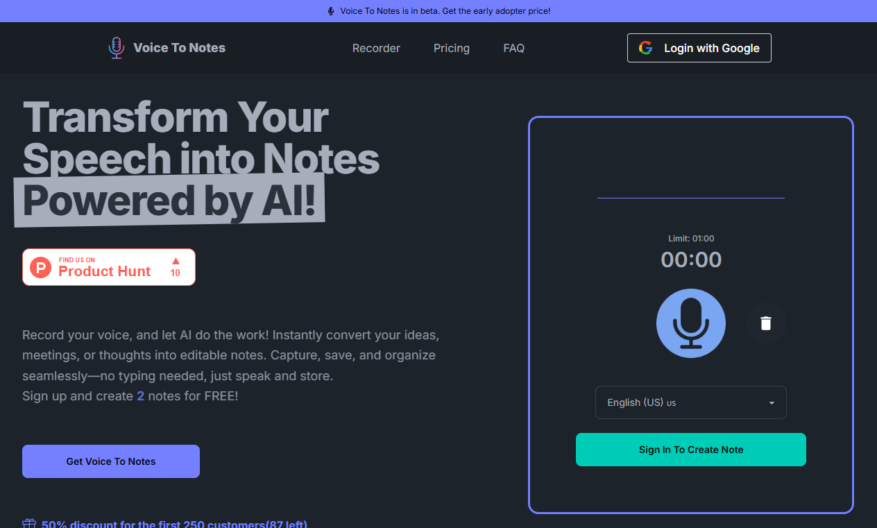
Voice To Notes is an AI-powered platform designed to streamline the process of capturing thoughts and insights. With its intuitive capabilities, this tool allows users to effortlessly convert voice recordings into editable text, making it easier than ever to organize and review important information. Whether you...
Voice To Notes is an AI-powered platform designed to streamline the process of capturing thoughts and insights. With its intuitive capabilities, this tool allows users to effortlessly convert voice recordings into editable text, making it easier than ever to organize and review important information. Whether you need to capture brainstorming sessions, record meeting notes, or transcribe interviews and podcasts, Voice To Notes provides a versatile solution. The platform supports multiple languages, ensuring accessibility for a wide range of users. You can record sessions of up to 2 hours, enabling you to capture extensive conversations without interruption. The final notes can be easily edited and organized for efficient storage. Experience the power of voice conversion with Voice To Notes and elevate your productivity today. Discover more about the features and pricing on their official website. For support, email the team at their designated support address for assistance.
Automated audio to text conversion with high-quality transcription results.
Support for multiple audio and video file formats including MP3, WAV, and AVI.
Fast and accurate transcription of podcasts, lectures, interviews, and meetings.
Customizable transcription settings for speaker identification and formatting.
Integration with popular platforms like YouTube, Vimeo, and Zoom.
Secure and confidential handling of uploaded files with GDPR compliance.
Optional human review and editing for high-accuracy transcripts.
Bulk upload and transcription of large files and folders simultaneously.
You Got Questions,We Got Answers
What is Voice to Notes?
Voice to Notes is an innovative online tool that converts spoken words into written notes, allowing users to capture ideas, meetings, and lectures with ease, and organize them into a searchable database for future reference
What languages does it support?
Voice to Notes currently supports English, French, Spanish, Portuguese, Italian, and many more languages, with continuous updates to expand language support, ensuring global accessibility and inclusivity
How accurate is the transcription?
Voice to Notes utilizes advanced AI algorithms to ensure accurate transcriptions, boasting an impressive 90% accuracy level, making it a reliable tool for capturing important information
Is it secure?
Yes, Voice to Notes prioritizes user data security, ensuring that all recordings and transcriptions are encrypted, stored securely, and accessible only to authorized users, adhering to stringent data protection standards
Can I edit the transcriptions?
Voice to Notes allows users to edit and refine transcriptions in real-time, ensuring accuracy and precision, with features like auto-save and version history, making collaboration seamless
What file formats are supported?
Voice to Notes supports a range of formats, including MP3, WAV, and TXT, allowing users to export and import files easily, and integrate with other tools and workflows
Use cases
Healthcare
Doctors use VoiceToNotes to dictate patient diagnoses, treatment plans, and medication instructions, reducing transcription time and increasing accuracy, allowing them to focus on patient care
Finance
Financial advisors use VoiceToNotes to record client meetings, ensuring accurate notes and compliance with regulatory requirements, and streamlining the advisory process
Retail
Sales associates use VoiceToNotes to document customer interactions, including product recommendations and sales, enabling personalized customer service and targeted marketing efforts
Manufacturing
Quality control inspectors use VoiceToNotes to record defect reports, enabling swift identification and correction of production flaws, and improving overall product quality
Marketing
Marketing teams use VoiceToNotes to brainstorm campaign ideas, outline content strategies, and capture meeting notes, accelerating project timelines and enhancing collaboration
Education
Professors use VoiceToNotes to record lectures, taking clear and concise notes, and reviewing material at their own pace, improving student outcomes and academic performance
Traffic and Engagement
N/A
World wide
Monthly visitors (January)
N/A
Page/Visit
N/A
Visit Duration
N/A
Bounce Rate
N/A
Pricing
Paid
$12
Voice To Notes Embeds
Copied!
Let your community know you're live on Skillcurb! Just drop a badge on your site’s homepage with just a few clicks. Showcasing the badge helps increase your visibility and connects you with users actively exploring top AI tools.