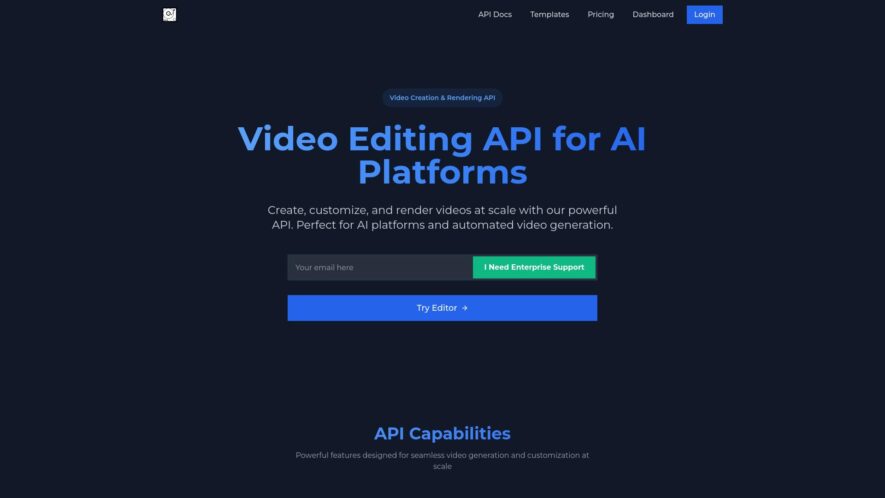
VideoAiditor is an online video editing platform that offers a range of tools and features to help users create professional-looking videos without requiring extensive video editing experience the platform allows users to trim clip and arrange video segments add text overlays transitions and effects and customize...
VideoAiditor is an online video editing platform that offers a range of tools and features to help users create professional-looking videos without requiring extensive video editing experience the platform allows users to trim clip and arrange video segments add text overlays transitions and effects and customize audio tracks VideoAiditor also offers a library of royalty-free music and sound effects and supports direct uploads to social media and video sharing platforms.
Automatically generate subtitles, translations, and captions for video content.
Supports multiple file formats, including MP4, AVI, and MOV.
Advanced AI-powered speech recognition technology for accurate transcriptions.
Customizable font styles, sizes, and colors for branding.
Integrated video editing capabilities for trimming and cutting clips.
Real-time collaboration features for team workflow and feedback.
Automated keyword tagging and metadata organization for video assets.
Direct export to YouTube, Vimeo, and other popular video platforms.
You Got Questions,We Got Answers
What is VideoAiditor and what does it do?
VideoAiditor is an online video editing platform that allows users to edit, trim, crop, and merge videos with ease, providing a range of advanced features and effects to enhance video content without requiring extensive video editing experience.
How do I upload my video to VideoAiditor?
Simply click the "Upload" button, select your video from your device, and VideoAiditor will automatically upload and process your video, making it ready for editing in just a few minutes, depending on the file size and internet connection.
Can I edit videos on VideoAiditor for free?
Yes, VideoAiditor provides a free plan that allows users to edit videos with limited features and watermarked output, suitable for personal and non-commercial use, with optional upgrade to a paid plan for advanced features and commercial use.
What kind of video formats does VideoAiditor support?
VideoAiditor supports a wide range of video formats, including MP4, AVI, MOV, and more, ensuring that users can edit videos in various formats without having to convert them beforehand, making the editing process more convenient and efficient.
How do I add music to my video on VideoAiditor?
To add music to your video, simply click the "Add Music" button, select your desired audio track from the built-in music library or upload your own audio settings, and VideoAiditor will automatically synchronize the music with your video.
Can I download my edited video from VideoAiditor?
Yes, once you have completed editing your video, you can download it in various resolutions and qualities, depending on your plan, and share it on social media, YouTube, or embed it on your website or blog.
Use cases
Healthcare
Medical researchers use videoaiditor to analyze patient videos and identify patterns in disease progression, enabling personalized treatment plans and improved patient outcomes
Finance
Compliance officers utilize videoaiditor to monitor trader communications, detecting potential fraud and ensuring regulatory adherence
Retail
E-commerce companies employ videoaiditor to analyze customer product review videos, identifying areas for product improvement and enhancing customer satisfaction
Manufacturing
Quality control teams leverage videoaiditor to examine production line videos, identifying inefficiencies and implementing process improvements
Marketing
Ad agencies use videoaiditor to assess the effectiveness of video ad campaigns, refining targeting and increasing ROI
Education
Teachers utilize videoaiditor to analyze student video submissions, providing personalized feedback and improving student learning outcomes
Traffic and Engagement
N/A
World wide
Monthly visitors (January)
N/A
Page/Visit
N/A
Visit Duration
N/A
Bounce Rate
N/A
Pricing
Freemium
$0.10
Video AIditor Embeds
Copied!
Let your community know you're live on Skillcurb! Just drop a badge on your site’s homepage with just a few clicks. Showcasing the badge helps increase your visibility and connects you with users actively exploring top AI tools.