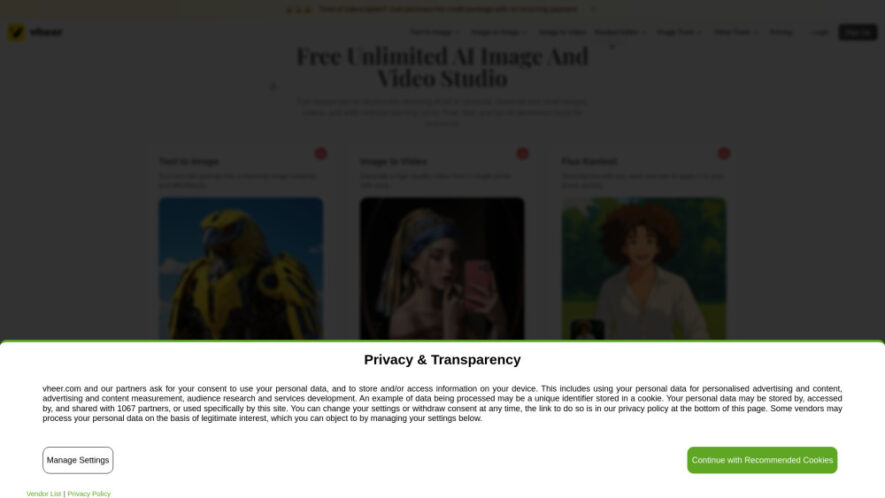
Vheer is an AI-powered creative platform that lets users generate images and videos from text or photos while providing a range of intelligent photo editing tools. Its features include text-to-image generation, image-to-video conversion, image restyling, context-aware editing, background removal, and AI image description. Many tools are...
Vheer is an AI-powered creative platform that lets users generate images and videos from text or photos while providing a range of intelligent photo editing tools. Its features include text-to-image generation, image-to-video conversion, image restyling, context-aware editing, background removal, and AI image description. Many tools are available free without signup, while Pro and Max models provide advanced quality and commercial-use options through subscriptions or credits.
Image-to-Image Generator Restyles existing photos while preserving important structures, details, and compositions.
Background Remover Automatically removes image backgrounds with support for batch processing.
AI Image Describer Analyzes images and generates detailed descriptions and useful visual prompts.
Batch Processing Removes backgrounds from up to twenty uploaded images simultaneously.
Creative Visual Tools Supports avatars, wallpapers, logos, fashion concepts, album covers, and artistic designs.
You Got Questions,We Got Answers
What Is Vheer AI And What Can It Do?
Vheer is an AI creative platform for generating images, creating videos from photos, and editing visuals with intelligent tools. It supports text-to-image generation, image-to-video conversion, restyling, background removal, image description, and context-aware photo editing.
How Does Vheer's Text-To-Image Generator Work?
Users enter a descriptive text prompt, and Vheer generates visuals based on the requested concept, style, and details. It can create portraits, logos, anime artwork, fantasy maps, tattoos, wallpapers, and various other creative images.
Can Vheer Create Videos From A Single Image?
Yes. Vheer's image-to-video generator can transform a single still image into a cinematic video. Users do not need to provide additional reference images, making the process straightforward for creating animated visual content.
Can I Restyle Or Remix Existing Images With Vheer?
Yes. Vheer's image-to-image tool allows users to transform existing photos while retaining their original structure and layout. Users can modify elements such as lighting, style, backgrounds, and overall visual appearance.
How Does Vheer's Batch Background Remover Work?
Vheer's background remover can process multiple images simultaneously, supporting uploads of up to twenty images. Its AI automatically detects subjects and removes backgrounds while handling detailed elements such as hair, jewelry, and thin objects.
What Is The Vheer AI Image Describer Tool?
The AI Image Describer analyzes an uploaded image and produces a detailed description of its visible content. It identifies important objects, elements, and visual styles while helping users create prompts for similar or new images.
What Edits Can The Flux Kontext Editor Perform?
Flux Kontext supports context-aware edits including color adjustments, filters, object replacement, text modifications, photo colorization, and style transformations. Users can describe desired changes naturally, allowing the AI to apply targeted visual modifications.
Do I Need Design Or Technical Skills To Use Vheer?
No. Vheer is designed to be beginner-friendly and does not require advanced technical or design knowledge. Users can create images, videos, and edits by entering prompts or uploading photos through its intuitive tools.
Can Vheer Generated Content Be Used Commercially?
Commercial-use availability depends on the specific model or tool. Some free quality models are limited to personal use, while Pro and Max models can provide commercial-use options through applicable subscriptions or plans.
What Are Credits Used For On Vheer?
Credits are primarily used when generating images with Pro or Max models in Text-to-Image and Kontext Editor features. Other tools remain free, while subscriptions can provide access to advanced models and additional capabilities.
Use cases
Image Creation
Create unique visuals from prompts, including fantasy maps, anime artwork, logos, portraits, and tattoos.
Video Creation
Transform individual still photographs into cinematic videos without requiring additional reference images.
Photo Editing
Edit colors, objects, text, backgrounds, and visual elements through natural-language instructions.
Restyling
Reimagine existing photographs while maintaining their original composition, structure, and important visual details.
Background Removal
Remove backgrounds from multiple images efficiently for product graphics, presentations, and professional visual content.
Image Analysis
Generate detailed descriptions and reusable prompts by analyzing objects, styles, and visual elements.
Avatars
Design personalized avatars, profile pictures, fashion concepts, and creative character visuals for digital platforms.
Design
Create custom wallpapers, music artwork, promotional graphics, and other visually engaging creative assets.
Traffic and Engagement
Jun 2026 - Aug 2026
World wide
Monthly visitors (August)
751k
Page/Visit
5.45
Visit Duration
3m 58s
Bounce Rate
38.42%
Pricing
Freemium
$9.99
Vheer Embeds
Copied!
Let your community know you're live on Skillcurb! Just drop a badge on your site’s homepage with just a few clicks. Showcasing the badge helps increase your visibility and connects you with users actively exploring top AI tools.