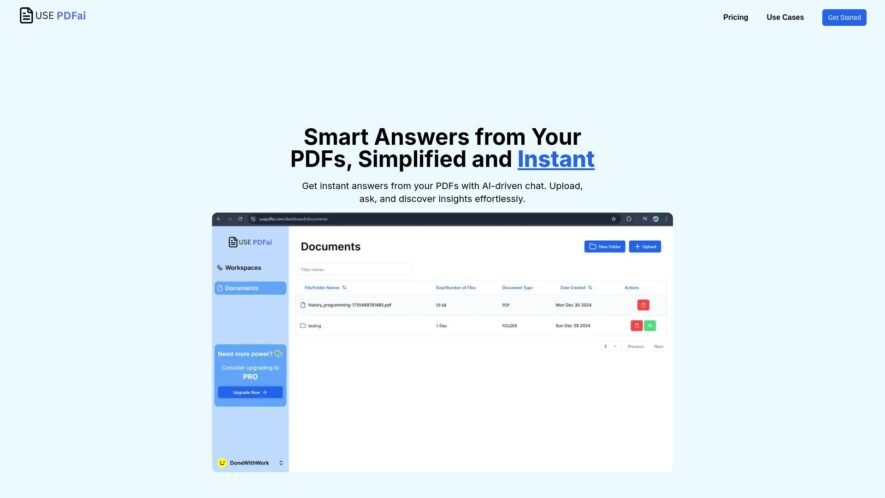
UsePDF.ai is an AI-powered PDF tool that offers a range of features to manage and optimize PDF files. It allows users to compress, convert, edit, and merge files with ease. The platform also provides OCR technology to extract text from scanned documents and images. Additionally, UsePDF.ai...
UsePDF.ai is an AI-powered PDF tool that offers a range of features to manage and optimize PDF files. It allows users to compress, convert, edit, and merge files with ease. The platform also provides OCR technology to extract text from scanned documents and images. Additionally, UsePDF.ai offers a PDF reader, annotator, and signer, making it a comprehensive PDF solution. With its user-friendly interface and affordable pricing, UsePDF.ai is suitable for both personal and business use cases.
Automatically extract data from PDFs with high accuracy and speed.
Supports multiple languages, including English, French, German, and many more.
Extract data from tables, forms, and invoices with ease and precision.
Integrates with popular workflow automation tools like Zapier and Integromat.
Supports bulk PDF processing, allowing for efficient large-scale document extraction.
Provides a user-friendly interface for easy data extraction and review.
Offers advanced data extraction features, including OCR and barcode recognition.
Supports PDF files of various sizes and complexities, ensuring reliable extraction.
You Got Questions,We Got Answers
What is PDF AI and what does it do?
PDF AI is a cutting-edge online tool that utilizes artificial intelligence to convert PDFs into editable formats, such as Word, Excel, and PowerPoint, with high accuracy and speed,
How does PDF AI work?
PDF AI's advanced algorithms analyze the uploaded PDF file, identifying and extracting text, layout, and formatting to recreate an identical editable document,
What file formats can I convert with PDF AI supports a wide range of input formats, including PDF, scanned documents, and images, and can convert them into Word, PowerPoint, Excel, and more, Can I use PDF AI for free?
Yes, PDF AI offers a free plan that allows users to process up to 3 files per day, with no watermarks or limitations,
What makes PDF AI unique?
PDF AI's proprietary AI technology enables it to learn from user feedback, ensuring continuous improvement in conversion accuracy and quality,
Can I use PDF AI on my mobile device?
PDF AI is a web-based tool, accessible from any device with an internet connection, including smartphones and tablets, Is my data secure with PDF AI? Absolutely, PDF AI employs robust security measures, including GDPR compliance, SSL encryption, and secure servers to protect user data,
Use cases
Healthcare
Automate extraction of patient data from unstructured medical reports, such as doctor's notes and medical histories, to streamline clinical workflows and improve patient care
Finance
Extract financial data from invoices, receipts, and contracts to automate accounting and bookkeeping processes, reducing errors and increasing efficiency
Retail
Use AI-powered document analysis to extract product information from supplier contracts, invoices, and receipts, streamlining inventory management and supply chain logistics
Marketing
Extract insights from customer feedback forms, surveys, and social media comments to inform marketing strategies and improve customer satisfaction
Manufacturing
Automate the processing of quality control reports, certificates of compliance, and other documentation, freeing up staff to focus on production and innovation
Traffic and Engagement
N/A
World wide
Monthly visitors (January)
N/A
Page/Visit
N/A
Visit Duration
N/A
Bounce Rate
N/A
Pricing
Freemium
$5
UsePdfAi Embeds
Copied!
Let your community know you're live on Skillcurb! Just drop a badge on your site’s homepage with just a few clicks. Showcasing the badge helps increase your visibility and connects you with users actively exploring top AI tools.