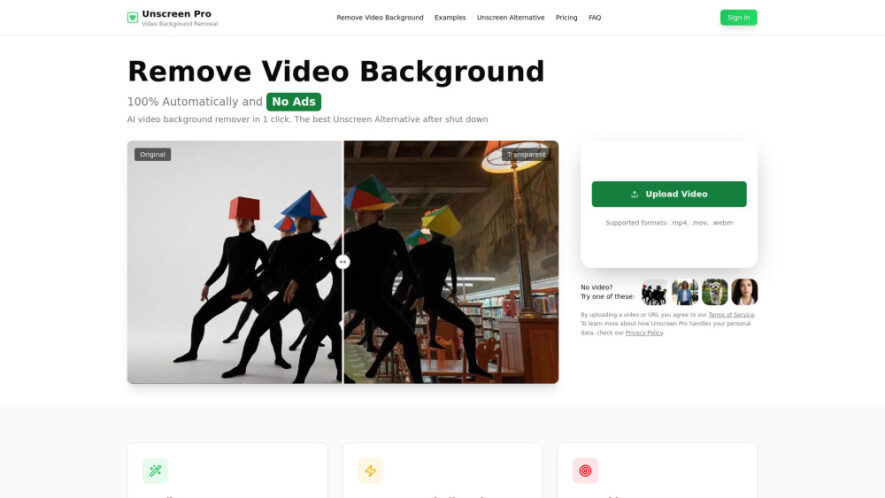
Unscreen is an AI-powered video editing tool that automatically removes video backgrounds and unwanted objects without requiring a greenscreen or manual masking. It supports popular video formats, delivers fast processing with live previews, and provides clean, professional-quality results for creators, businesses, and marketers. With API access,...
Unscreen is an AI-powered video editing tool that automatically removes video backgrounds and unwanted objects without requiring a greenscreen or manual masking. It supports popular video formats, delivers fast processing with live previews, and provides clean, professional-quality results for creators, businesses, and marketers. With API access, commercial licensing on paid plans, and an intuitive workflow, Unscreen simplifies video editing while saving significant production time.
Automatically removes video backgrounds without requiring greenscreens or manual editing.
AI detects and removes unwanted objects from videos with precision.
Supports multiple popular video formats for seamless upload and processing.
Provides live preview before downloading professionally edited video results instantly.
Powered by advanced AI technology for accurate background segmentation performance.
Offers developer-friendly API for integrating automated video editing workflows easily.
Delivers high-quality exports suitable for commercial and professional video production.
Simple upload process enables fast editing without technical video editing expertise.
You Got Questions,We Got Answers
Can Unscreen Remove Backgrounds Without Using Greenscreen Technology?
Yes. Unscreen uses advanced AI to detect subjects and automatically remove backgrounds from videos without requiring a greenscreen, manual masking, or complicated editing tools, making professional editing accessible for everyone.
Which Video Formats Does Unscreen Support For Uploads?
Unscreen supports major video formats including MP4, MOV, AVI, WebM, and several other commonly used formats, ensuring compatibility with most cameras, smartphones, and professional editing workflows.
Can Unscreen Remove Objects Besides Video Backgrounds Automatically?
Yes. Besides removing backgrounds, Unscreen can identify and remove unwanted objects from videos using AI, helping users create cleaner, more professional-looking visual content with minimal effort.
Is Unscreen Suitable For Commercial Video Production Projects?
Yes. Paid plans include commercial usage rights, allowing businesses, agencies, and creators to use edited videos for marketing campaigns, advertisements, client work, and professional productions without restrictions.
Does Unscreen Provide Live Preview Before Exporting Videos?
Yes. Users can preview AI-generated editing results before downloading, allowing quick verification of background removal quality and ensuring the final output meets project expectations.
Can Developers Integrate Unscreen Using Available API Services?
Yes. Unscreen offers an API that enables developers and businesses to automate video background removal and integrate AI-powered editing directly into websites, applications, or production workflows.
Will Free Version Videos Include Watermarks After Processing?
Yes. Videos processed using the free plan include a watermark, while paid subscriptions remove the watermark and unlock additional commercial and premium editing capabilities.
Is Unscreen Easy For Beginners Without Editing Experience?
Yes. The platform is designed for simplicity, requiring only a video upload before AI automatically processes the background removal, making it ideal for beginners and professionals alike.
Use cases
Content Creation
Produce engaging YouTube, TikTok, and social media videos with clean, distraction-free backgrounds in just minutes.
Marketing
Create professional promotional videos featuring custom backgrounds that strengthen branding and product presentations.
Education
Develop interactive educational videos with polished visuals for online courses, tutorials, and virtual learning platforms.
Business
Enhance corporate presentations, training videos, and internal communications using automatically removed video backgrounds.
Advertising
Generate eye-catching advertisements by replacing backgrounds and removing unwanted visual distractions effortlessly.
Entertainment
Edit creative videos with cinematic backgrounds and seamless object removal for engaging audience experiences.
Development
Integrate automated background removal into applications using the provided API for scalable video processing.
Freelancing
Deliver polished client video projects faster by eliminating time-consuming manual masking and background editing.
Traffic and Engagement
Jun 2026 - Aug 2026
World wide
Monthly visitors (August)
19.4k
Page/Visit
2.3
Visit Duration
16s
Bounce Rate
36.18%
Pricing
Freemium
$4.99
Unscreen Embeds
Copied!
Let your community know you're live on Skillcurb! Just drop a badge on your site’s homepage with just a few clicks. Showcasing the badge helps increase your visibility and connects you with users actively exploring top AI tools.