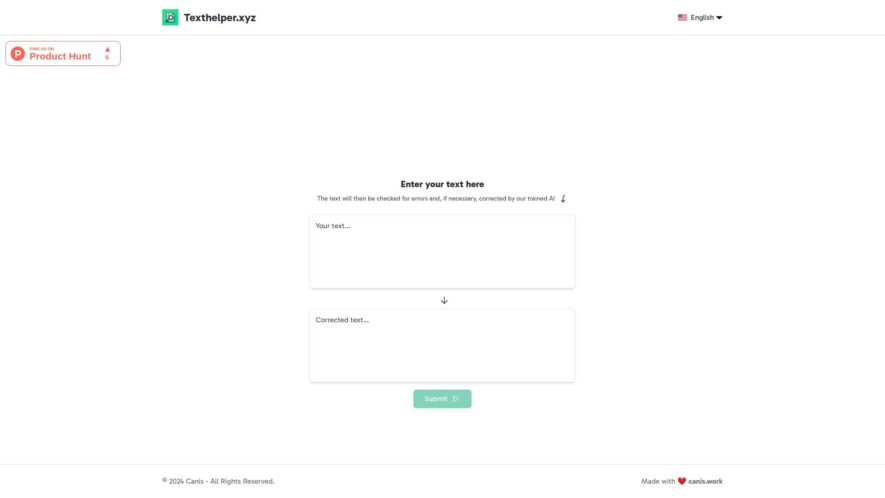
Texthelper is an innovative AI-powered tool developed by Canis that is designed to enhance and refine your written content. With its advanced algorithms, Texthelper automatically identifies and corrects errors in your text, ensuring clarity and effectiveness in communication. The user-friendly interface allows anyone to input their...
Texthelper is an innovative AI-powered tool developed by Canis that is designed to enhance and refine your written content. With its advanced algorithms, Texthelper automatically identifies and corrects errors in your text, ensuring clarity and effectiveness in communication. The user-friendly interface allows anyone to input their text effortlessly, making it an invaluable resource for writers, students, and professionals alike. Whether you are composing an email, essay, or any other type of document, Texthelper is equipped to improve your writing. The tool not only focuses on grammar and spelling but also enhances the overall quality of your content. By utilizing Texthelper, users gain instant access to expert-level text correction without the need for extensive editing skills. As a free-to-use platform, it provides powerful support for various text types, making it accessible to all. Experience the convenience of AI-driven assistance and elevate your writing to new heights with Texthelper from Canis. Unlock the potential of your words and let Texthelper guide you towards clearer and more polished communication.
Automatically generate human-like text based on given prompts or topics.
Supports multiple languages including English, Spanish, French, and more.
Offers advanced customization options for tone, style, and format to fit specific needs.
Generates high-quality content quickly, saving time and effort for users.
Provides a user-friendly interface with a simple and intuitive design.
Allows users to input their own content and edit generated text easily.
Offers a range of content types including articles, social media posts, and more.
Supports collaboration and teamwork with multi-user access and real-time feedback.
You Got Questions,We Got Answers
What is Text Helper?
Text Helper is a free online tool that provides various text editing and formatting features to help with writing and editing tasks, making it easier to create and refine text content
What features does it offer?
Text Helper offers a range of features including text summarization, word counting, character counting, grammar checking, and spell checking, as well as tools for formatting text to uppercase or lowercase, and converting text to HTML
How do I use Text Helper?
To use Text Helper, simply enter or type the text you want to edit into the input box, select the desired feature or tool from the menu, and click the "Process" button to see the results, which will be displayed in the output box
Is Text Helper free to use?
Yes, Text Helper is completely free to use, with no subscription or registration required, and it accessible to anyone who needs to edit or format text online or offline, at any time
Can I use Text Helper offline?
Yes, Text Helper can be used offline, as it is a web-based application that can be accessed from any device with a web browser, making it a convenient tool for anyone, anywhere, at any time
What browsers does it support?
Text Helper supports all major web browsers, including Chrome, Mozilla Firefox, Microsoft Edge, Safari, and Opera, ensuring that it can be accessed and used by anyone, regardless of their browser preference
Is my data secure with Text Helper?
Text Helper does not store or collect any user data, ensuring that all text editing and formatting activities are completely private and secure, and that users can work with sensitive or confidential information without risk
Can I suggest new features?
Yes, Text Helper welcomes feedback and suggestions from users, and encourages them to submit their ideas and proposals for new features or tools, which will be considered and implemented if feasible, to improve the tool
Use cases
Healthcare
Texthelper's AI-powered summarization helps medical professionals quickly digest complex patient data, reducing diagnosis time and improving treatment plans
Finance
Financial analysts use Texthelper to condense lengthy market reports, identifying key trends and opportunities, and informing data-driven investment decisions
Retail
E-commerce companies leverage Texthelper to auto-generate product summaries, enhancing customer experience, and driving sales through concise product descriptions
Manufacturing
Texthelper streamlines production by summarizing complex technical documentation, enabling efficient knowledge sharing, and improving supply chain communication
Marketing
Marketers utilize Texthelper to condense lengthy social media content, increasing engagement, and amplifying brand voice through concise, attention-grabbing summaries
Education
Educators use Texthelper to create concise lesson summaries, enhancing student learning, and improving knowledge retention through clear, easy-to-understand study materials
Traffic and Engagement
N/A
World wide
Monthly visitors (January)
N/A
Page/Visit
N/A
Visit Duration
N/A
Bounce Rate
N/A
Pricing
Free
$0
Texthelper Embeds
Copied!
Let your community know you're live on Skillcurb! Just drop a badge on your site’s homepage with just a few clicks. Showcasing the badge helps increase your visibility and connects you with users actively exploring top AI tools.