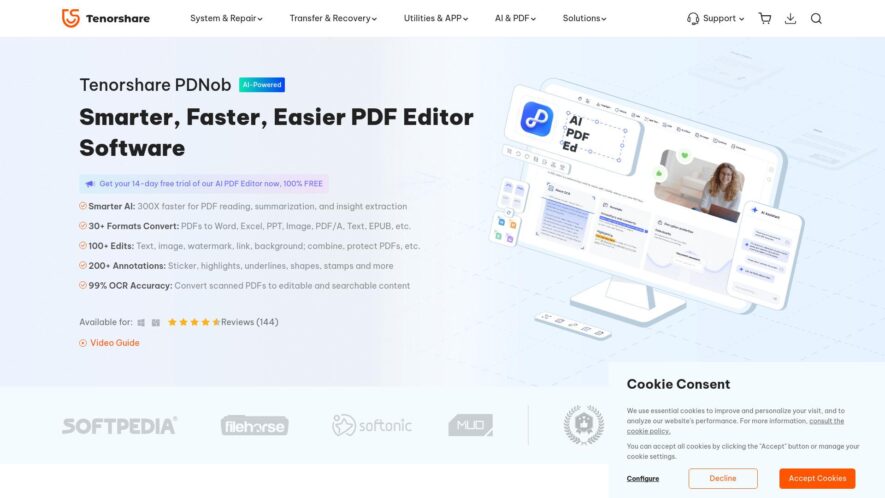
Tenorshare PDF Editor is a free PDF editing software that allows users to edit, convert, and sign PDF files with ease. The software supports editing PDF text, images, and pages, as well as converting PDF to Word, Excel, and PowerPoint formats. Additionally, it allows users to...
Tenorshare PDF Editor is a free PDF editing software that allows users to edit, convert, and sign PDF files with ease. The software supports editing PDF text, images, and pages, as well as converting PDF to Word, Excel, and PowerPoint formats. Additionally, it allows users to add electronic signatures, annotate PDF files, and protect PDF files with encryption. With a user-friendly design, Tenorshare PDF Editor is an ideal solution for individuals and businesses to manage their PDF documents efficiently.
Edit and modify PDF text, images, and objects with ease and precision.
Annotate and add comments, highlights, and stamps to PDF files.
Convert PDF to Word, Excel, PPT, EPUB, and image formats.
Merge and split PDF files, and rearrange PDF pages easily.
Add, remove, and edit PDF bookmarks, and create a table of contents.
Protect and encrypt PDF files with passwords and permissions.
Fill out and create PDF forms, and sign digitally with ease.
Batch process PDF files, and convert multiple files at once.
You Got Questions,We Got Answers
What is Tenorshare PDF Editor?
Tenorshare PDF Editor is a powerful tool for editing, annotating, and managing PDF documents. It offers various features such as text editing, conversion, and secure file handling for both personal and professional use.
Who can benefit from using Tenorshare PDF Editor?
Tenorshare PDF Editor is ideal for individuals, students, professionals, and businesses that frequently work with PDF documents and require easy-to-use, feature-rich editing capabilities.
What features does Tenorshare PDF Editor offer?
Tenorshare PDF Editor allows you to edit text and images, add annotations, convert PDFs to other formats (like Word and Excel), merge and split PDFs, and secure documents with passwords and watermarks.
Is Tenorshare PDF Editor free to use?
Tenorshare PDF Editor offers a free version with basic features, and a paid version with advanced tools like OCR support, batch processing, and full access to PDF editing capabilities.
Can I convert PDFs to other formats with Tenorshare PDF Editor?
Tenorshare PDF Editor allows you to convert PDF files to multiple formats, including Word, Excel, PowerPoint, and image files, making it easy to repurpose and share your documents.
Does Tenorshare PDF Editor support OCR?
Tenorshare PDF Editor includes Optical Character Recognition (OCR) technology, allowing users to convert scanned or image-based PDFs into editable text.
Is Tenorshare PDF Editor compatible with Windows and macOS?
Tenorshare PDF Editor is compatible with both Windows and macOS, offering cross-platform support for users on different operating systems.
How secure is Tenorshare PDF Editor?
Tenorshare PDF Editor provides secure handling of sensitive documents, with features like password protection, digital signatures, and encryption to ensure your data is kept safe.
Use cases
Healthcare
Doctors can use the PDF editor to update patient records, annotate medical images, and highlight critical information, ensuring accurate diagnosis and treatment
Finance
Auditors can edit PDF financial reports to highlight discrepancies, add comments, and update charts, streamlining the auditing process
Manufacturing
Quality control teams can annotate PDF design files to specify changes, add notes, and update production schedules, improving product quality
Marketing
Designers can edit PDF marketing materials, update graphics, and change text, ensuring brand consistency
Education
Teachers can edit PDF lesson plans, add notes, and highlight important concepts, creating engaging learning materials
Traffic and Engagement
Feb 2026 - Apr 2026
World wide
Monthly visitors (April)
4.3m
Page/Visit
2.1
Visit Duration
1m 45s
Bounce Rate
0.6%
Pricing
Freemium
$14.99
Tenoshare Embeds
Copied!
Let your community know you're live on Skillcurb! Just drop a badge on your site’s homepage with just a few clicks. Showcasing the badge helps increase your visibility and connects you with users actively exploring top AI tools.