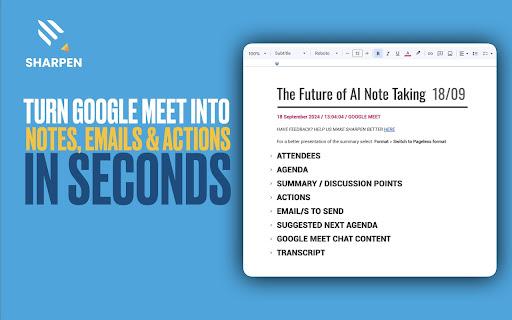
Introducing the SHARPEN AI Chrome extension, a revolutionary tool designed to enhance your meeting experience. With its ability to provide real-time transcriptions, this extension ensures that no detail is missed during your Google Meet sessions. After each meeting, users receive automated summaries that are automatically saved...
Introducing the SHARPEN AI Chrome extension, a revolutionary tool designed to enhance your meeting experience. With its ability to provide real-time transcriptions, this extension ensures that no detail is missed during your Google Meet sessions. After each meeting, users receive automated summaries that are automatically saved to Google Drive for easy access. The integration with Google Workspace means you can seamlessly incorporate SHARPEN AI into your existing workflow. Say goodbye to the hassle of manual note-taking and inefficient follow-ups. SHARPEN AI not only simplifies the process but also enhances productivity by providing clear and concise meeting notes. Designed for professionals striving for efficiency, this tool is your ultimate meeting companion. With a solid emphasis on data protection, your information is securely stored and managed. Embrace the future of collaboration with SHARPEN AI and elevate your meeting experience to new heights.
Enhance video quality in real-time with AI-powered super resolution.
Automatically upscale low-resolution videos to HD and 4K.
Remove noise and grain from videos with advanced denoising algorithms.
Improve video stabilization with advanced motion interpolation techniques.
Boost video brightness and color with AI-powered color grading.
Enhance audio quality with AI-powered noise reduction and equalization.
Supports popular video conferencing platforms like Google Meet and Skype.
Works seamlessly in the background without affecting system resources.
You Got Questions,We Got Answers
What is Sharpen AI?
Sharpen AI is a Chrome extension that uses AI to enhance and sharpen Google Meet video quality in real-time, providing a more professional and engaging video conferencing experience
Does it work on all devices?
Sharpen AI is compatible with most devices, including laptops, desktops, and Chromebooks, as long as they meet the system requirements and have a stable internet connection
Is Sharpen AI free?
Sharpen AI offers a free trial, and after that, it requires a subscription, which provides access to premium features and unlimited video enhancement
How does Sharpen AI work?
Sharpen AI uses advanced AI technology to analyze and enhance it in real-time, improving video quality, reducing pixelation, and providing a more stable video conferencing experience
Is Sharpen AI secure my video calls?
Sharpen AI takes video call security seriously, ensuring that all video data is encrypted, and no sensitive information is stored or accessed during the video enhancement process
Does Sharpen AI support multiple languages?
Sharpen AI supports multiple languages, including English, Spanish, French, and many more, making it a great tool for global teams and international video conferencing
Can I use Sharpen AI on mobile devices?
Currently, Sharpen AI is only available on desktop devices, but the developers are working on a mobile version in the future, so stay tuned for updates
Is Sharpen AI easy to use?
Sharpen AI is designed to be user-friendly, with a simple and intuitive interface, making it easy to install and use, even for those who are not tech-savvy
Use cases
Healthcare
Doctors can use Sharpen AI to enhance low-quality images of patient scans, allowing for more accurate diagnoses and better patient outcomes
Finance
Financial analysts can utilize Sharpen AI to refine grainy images of financial documents, such as receipts and invoices, to improve data extraction and reduce errors
Retail
Online retailers can employ Sharpen AI to enhance product images, providing customers with a more immersive shopping experience and increasing the likelihood of sales
Marketing
Marketing teams can leverage Sharpen AI to improve the quality of images in advertisements, resulting in higher engagement rates and more effective campaigns
Traffic and Engagement
Mar 2026 - May 2026
World wide
Monthly visitors (May)
197.3m
Page/Visit
2.8
Visit Duration
1m 54s
Bounce Rate
0.6%
Pricing
Free
$0
SHARPEN AI – Chrome Extension Embeds
Copied!
Let your community know you're live on Skillcurb! Just drop a badge on your site’s homepage with just a few clicks. Showcasing the badge helps increase your visibility and connects you with users actively exploring top AI tools.