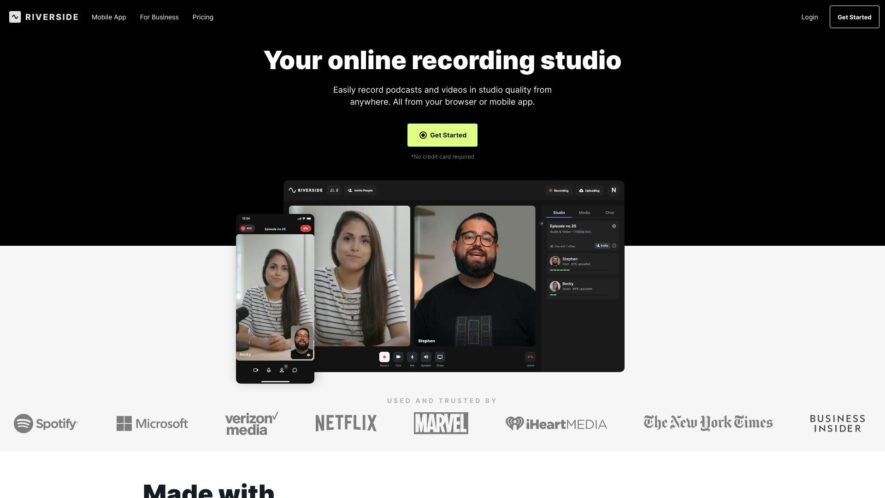
Riverside.fm is a cloud-based platform for recording, editing, and publishing high-quality audio and video podcasts, interviews, and live streams, allowing users to produce engaging content remotely, with guests, and in studio-like conditions, featuring tools such as automatic noise reduction, echo cancellation, and audio/video syncing, with seamless...
Riverside.fm is a cloud-based platform for recording, editing, and publishing high-quality audio and video podcasts, interviews, and live streams, allowing users to produce engaging content remotely, with guests, and in studio-like conditions, featuring tools such as automatic noise reduction, echo cancellation, and audio/video syncing, with seamless integration with popular platforms like Spotify, Apple Podcasts, and YouTube, making it an all-in-one solution for creators and professionals.
High-quality audio and video recording with automatic synchronization.
Customizable branding and whitelabeling for professional appearances.
Real-time audio waveform monitoring for precise editing and mixing.
Seamless integration with popular podcasting and video editing software.
Automatic backup and storage for secure and reliable file management.
Real-time collaboration and communication tools for efficient teamwork.
Advanced noise reduction and echo cancellation for crystal-clear audio.
One-click distribution to popular platforms and podcast directories.
You Got Questions,We Got Answers
What is Riverside.fm?
Riverside.fm is a cloud-based audio and video recording platform designed for podcasters, content creators, and businesses to produce high-quality, professional-sounding recordings from anywhere.
How does Riverside.fm work?
Riverside.fm works by allowing users to invite guests or co-hosts to join a virtual recording studio, where they can record audio and video in real-time, with automatic syncing and post-production editing capabilities.
Can I use Riverside.fm for free?
Yes, Riverside.fm offers a free plan with limited features, allowing users to test the platform and record up to 30 minutes of audio and video per month, with optional paid upgrades for more features and storage.
What kind of equipment do I need?
You don't need any special equipment, just a computer, internet connection, and a browser, as Riverside.fm is a web-based platform, and it will handle the rest, including audio and video syncing.
Is Riverside.fm easy to use?
Yes, Riverside.fm is designed to be user-friendly, with an intuitive dashboard and simple recording process, making it accessible to users of all skill levels, from beginners to professionals.
Can I edit my recordings on Riverside.fm?
Yes, Riverside.fm offers a built-in editor, allowing users to trim, cut, and arrange their recordings, add music, and adjust audio levels, with optional advanced editing features available in paid plans.
How do I download my recordings?
Once you've finished recording, you can download your files in various formats, including WAV, MP3, and MOV, directly from the Riverside.fm dashboard, with optional cloud storage integration.
What kind of customer support does Riverside.fm offer?
Riverside.fm offers 24/7 email support, as well as a comprehensive knowledge base and tutorial resources, to help users get started and resolve any issues they may encounter.
Use cases
Healthcare
Riverside.fm's high-quality audio and video recording capabilities enable healthcare professionals to create educational content, such as patient testimonials and doctor interviews, to inform and engage patients about various medical conditions and treatments
Finance
Riverside.fm's automated post-production features allow financial analysts to create engaging video content, such as market updates and company overviews, to inform and advise clients on investment opportunities
Retail
Riverside.fm's easy-to-use interface allows retail companies to create high-quality video content, such as product demos and customer testimonials, to enhance customer engagement and drive sales
Manufacturing
Riverside.fm's cloud-based recording capabilities enable manufacturing companies to create video content, such as product tutorials and factory tours, to educate customers and improve product understanding
Marketing
Riverside.fm's advanced audio and video editing features enable marketing professionals to create high-quality video content, such as brand stories and customer testimonials, to build brand awareness and drive conversions
Education
Riverside.fm's user-friendly interface allows educators to create video content, such as online lectures and tutorials, to engage students and enhance the learning experience
Traffic and Engagement
Feb 2026 - Apr 2026
World wide
Monthly visitors (April)
3.1m
Page/Visit
6.8
Visit Duration
5m 55s
Bounce Rate
0.4%
Pricing
Freemium
$19
Riverside Embeds
Copied!
Let your community know you're live on Skillcurb! Just drop a badge on your site’s homepage with just a few clicks. Showcasing the badge helps increase your visibility and connects you with users actively exploring top AI tools.