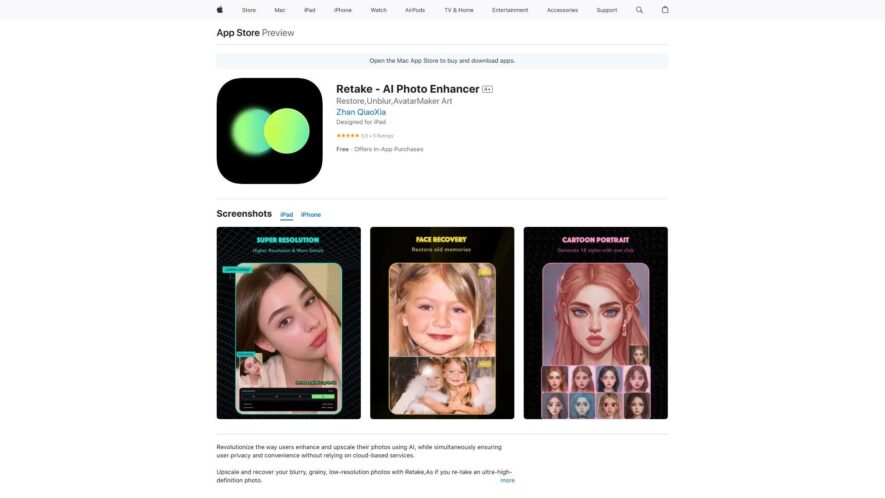
Retake AI Photo Enhancer is a powerful editing app that uses artificial intelligence to transform your photos into stunning, professional-looking images. With a single tap, Retake removes noise, enhances details, and adjusts colors to create breathtaking results. Its advanced AI technology detects and corrects issues like...
Retake AI Photo Enhancer is a powerful editing app that uses artificial intelligence to transform your photos into stunning, professional-looking images. With a single tap, Retake removes noise, enhances details, and adjusts colors to create breathtaking results. Its advanced AI technology detects and corrects issues like low light, blur, and haze, giving you vibrant and lifelike photos. Retake also offers advanced tools for fine-tuning, allowing you to adjust brightness, contrast, and saturation to achieve the perfect look.
Enhance accuracy and precision with Retake AI's state-of-the-art algorithms.
Take advantage of Retake AI to simplify complex processes and accelerate results.
Stay ahead of the competition with Retake AI, your go-to solution for efficiency.
Transform your workflow with Retake AI, leveraging AI for smarter automation.
Optimize your productivity with Retake AI's user-friendly and intuitive platform.
Designed for professionals and businesses, Retake AI adapts to your needs effortlessly.
Seamlessly integrate Retake AI with your favorite tools for hassle-free operations.
Enhance old and blurry images effortlessly with Retake AIs powerful enhancement tools.
Restore and colorize black and white photos with Retake AIs advanced editing features.
Improve portrait photos automatically with Retake AIs AI-driven retouching technology.
You Got Questions,We Got Answers
What is Retake AI Photo Enhancer?
Retake AI Photo Enhancer is a powerful photo editing app that uses artificial intelligence to enhance and improve your photos, giving you professional-looking results with just a few taps
How does Retake work?
Retake uses advanced AI algorithms to analyze your photo and make adjustments to brightness, contrast, and color balance, resulting in a more vibrant and detailed image that pops with clarity and color
Can I enhance multiple photos at once?
Yes, Retake allows you to batch edit multiple photos simultaneously, saving you time and effort, and making it easy to enhance entire albums or collections of photos with just a few taps
Are my original photos affected?
No, Retake creates a duplicate copy of your original photo and applies the enhancements to the copy, leaving your original photo untouched and intact, so you can always revert back if needed
Can I undo changes if I'm not satisfied?
Yes, Retake offers a robust undo feature that allows you to easily revert back to previous versions of your edited photo, giving you complete control and flexibility over the editing process
Does Retake offer any filters or effects?
Yes, Retake includes a range of stylish filters and effects that you can apply to your photos to give them a unique look and style, from vintage to modern, and everything in between
Is Retake available for Android devices?
Currently, Retake AI Photo Enhancer is only available for iOS devices, but the developers are working on an Android version, which will be released soon, so stay tuned for updates
Can I share my enhanced photos on social media?
Yes, with Retake, you can easily share your enhanced photos directly to social media platforms like Instagram, Facebook, and Twitter, or save them to your camera roll for later use
Use cases
Healthcare
Retake AI can assist medical professionals by enhancing patient images for clearer documentation and record-keeping, ensuring more accurate visual references for diagnoses and consultations.
Retail
Retake AI allows e-commerce and retail businesses to improve the quality of product images effortlessly, ensuring visually appealing listings that attract and engage customers, ultimately boosting conversions.
Marketing
Retake AI enables marketers to enhance visual assets quickly, ensuring high-quality, professional-looking images for social media campaigns, advertisements, and website content, helping maintain brand consistency and engagement.
Education
Teachers and students can use Retake AI to refine educational visuals, presentations, and research materials, ensuring clarity and professionalism in digital and printed content.
Traffic and Engagement
Apr 2026 - Jun 2026
World wide
Monthly visitors (June)
112.9m
Page/Visit
1.6
Visit Duration
50s
Bounce Rate
0.8%
Pricing
Freemium
$4.99
Retake Embeds
Copied!
Let your community know you're live on Skillcurb! Just drop a badge on your site’s homepage with just a few clicks. Showcasing the badge helps increase your visibility and connects you with users actively exploring top AI tools.