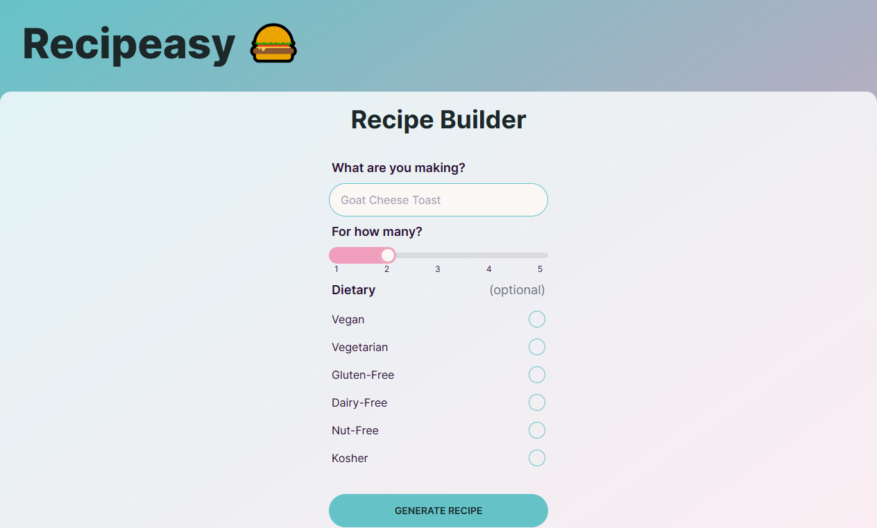
Recipeasy is a free online recipe organizer that allows users to easily save, tag, and search their favorite recipes from around the web, import from popular cooking websites and blogs, and add personal notes and ratings, with features like meal planning, grocery lists, and nutritional information,...
Recipeasy is a free online recipe organizer that allows users to easily save, tag, and search their favorite recipes from around the web, import from popular cooking websites and blogs, and add personal notes and ratings, with features like meal planning, grocery lists, and nutritional information, making it a one-stop-shop for home cooks and meal planners, with a clean and user-friendly interface, and available on desktop and mobile devices.
Search for recipes by ingredient, cooking time, or dietary restriction easily.
Filter recipes by meal type, cuisine, or cooking method instantly.
Access a vast library of recipes with step-by-step cooking instructions.
Save and organize favorite recipes in personalized cookbooks effortlessly.
Generate automatic grocery lists and meal planning calendars seamlessly.
Customize recipe serving sizes and unit measurements with ease.
Discover new recipes with personalized recommendations based on preferences.
Upload and share personal recipes with the Recipeasy community quickly.
You Got Questions,We Got Answers
What is Recipeasy?
Recipeasy is a free online recipe organizer that allows users to easily save, tag, and search their favorite recipes from around the web
How do I add recipes?
Users can add recipes by copying and pasting the URL of the recipe into the Recipeasy website, or by using the Recipeasy browser extension to clip recipes with one click
Can I upload my own recipes?
Yes, users can upload their own recipes by creating an account and using the "Add a Recipe" feature, which allows them to enter ingredients, instructions, and other details
How do I organize my recipes?
Recipeasy allows users to organize their recipes using tags, which can be used to categorize recipes by ingredient, course, cooking method, and more, making it easy to find specific recipes later
Can I access my recipes offline?
Yes, Recipeasy allows users to access their recipes offline, making it easy to cook even without an internet connection, and recipes can be synced across devices when the user comes back online
How do I print my recipes?
Recipeasy allows users to print their recipes in a clean and easy-to-read format, with options to customize the printout by hiding or showing specific details such as images or nutrition information
Is Recipeasy free?
Yes, Recipeasy is completely free to use, with no limits on the number of recipes users can save or access, and no ads or pop-ups to disrupt the user experience
How do I sync my recipes?
Recipeasy allows users to sync their recipes across devices by creating an account and logging in, which ensures that users can access their recipes from any device with an internet connection
Use cases
Healthcare
Recipeasy helps dietitians and nutritionists create personalized meal plans for patients with specific dietary needs, such as diabetes or celiac disease, ensuring they receive optimal nutrition for their health conditions
Finance
Financial advisors use Recipeasy to educate clients on budget-friendly meal planning, helping them save money and achieve long-term financial goals, such as retirement or buying a home
Retail
Grocery stores utilize Recipeasy to provide customers with easy-to-follow recipes and meal planning ideas, increasing sales and customer loyalty, while also promoting their private label products
Manufacturing
Food manufacturers leverage Recipeasy to develop and test new product recipes, streamlining their research and development process, and reducing time-to-market for new products
Marketing
Marketing agencies partner with Recipeasy to create engaging, interactive recipe content for their food and beverage clients, increasing brand awareness and driving sales
Education
Culinary schools and cooking instructors use Recipeasy to create interactive, multimedia lesson plans, enhancing the learning experience for students and making complex cooking techniques more accessible
Traffic and Engagement
N/A
World wide
Monthly visitors (January)
N/A
Page/Visit
N/A
Visit Duration
N/A
Bounce Rate
N/A
Pricing
Free
$0
Recipeasy Embeds
Copied!
Let your community know you're live on Skillcurb! Just drop a badge on your site’s homepage with just a few clicks. Showcasing the badge helps increase your visibility and connects you with users actively exploring top AI tools.