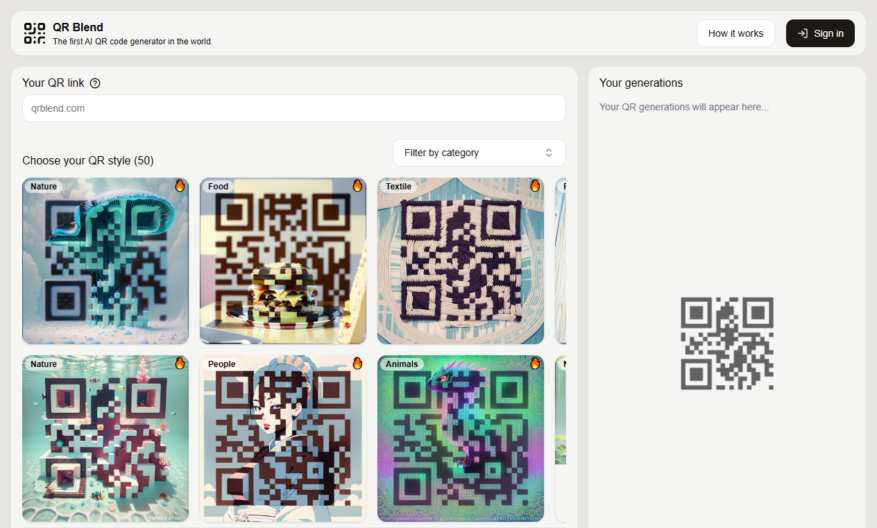
Introducing our innovative tool designed to enhance productivity and streamline workflows. This tool allows users to seamlessly integrate various processes, improving overall efficiency. With an intuitive interface, users can quickly navigate through functions, making it accessible for all skill levels. The robust features ensure that teams...
Introducing our innovative tool designed to enhance productivity and streamline workflows. This tool allows users to seamlessly integrate various processes, improving overall efficiency. With an intuitive interface, users can quickly navigate through functions, making it accessible for all skill levels. The robust features ensure that teams operate collaboratively, fostering creativity and innovation. By automating routine tasks, you can focus on what truly matters, driving results that matter. Harness the power of real-time analytics to gain insights and make informed decisions effortlessly. Additionally, our tool supports multiple platforms, ensuring accessibility from anywhere, at any time. With advanced security measures in place, your data is always protected. Upgrade your toolkit today and experience the transformation in how you work. Join countless others who have already discovered the power of this essential tool and redefine your operational capabilities.
Generate custom QR codes with logos, images, and colors to match brand identities.
Create dynamic QR codes that update in real-time without reprinting or redistributing.
Track and analyze QR code scans with detailed insights and analytics reports.
Design and manage multiple QR code campaigns from a single dashboard interface.
Use password-protected QR codes to secure sensitive information and data.
Integrate QR codes with social media, email, and SMS marketing campaigns easily.
Customize QR code shapes, sizes, and error correction levels for optimal performance.
Schedule and automate QR code deployments with customizable triggers and rules.
You Got Questions,We Got Answers
What is QRBlend and what does it do?
QRBlend is a QR code generator that enables users to create custom, blended QR codes by combining multiple QR codes into one, allowing for more information to be stored and shared in a single code
How do I create a blended QR code?
To create a blended QR code, simply visit QRBlend.com, enter the URLs or information you want to combine, select the design and layout options, and click generate to create your custom QR code
Can I customize the design of my QR code?
Yes, QRBlend offers various design and layout options, including colors, patterns, and logos, allowing you to create a unique and visually appealing QR code that matches your brand or style
What types of information can I store in a QR code?
QRBlend supports a wide range of information types, including URLs, text, emails, phone numbers, SMS, WhatsApp, and more, making it easy to share various types of content with your audience
Is QRBlend free to use?
Yes, QRBlend is a free online QR code generator, and you can create and download unlimited QR codes without any subscription or payment requirements
How do I scan a QR code?
To scan a QR code, simply open the camera app on your smartphone, point it at the QR code, and hold it steady until the code is recognized and the associated information is displayed
Use cases
Healthcare
QRBlend can help hospitals and clinics create customized QR codes for patient records, lab results, and medical histories, allowing healthcare professionals to quickly access and share sensitive information while maintaining HIPAA compliance
Finance
QRBlend enables banks and financial institutions to generate secure QR codes for transactions, account information, and payment processing, reducing fraud and increasing customer trust
Retail
Retailers can use QRBlend to create personalized QR codes for product information, promotions, and loyalty programs, enhancing the shopping experience and driving sales
Manufacturing
QRBlend helps manufacturers create custom QR codes for product tracking, inventory management, and supply chain optimization, streamlining logistics and improving operational efficiency
Marketing
Marketers can leverage QRBlend to generate dynamic QR codes for campaigns, events, and product launches, tracking engagement and conversion rates in real-time
Education
Educational institutions can utilize QRBlend to create interactive QR codes for course materials, assignments, and resources, enhancing student engagement and facilitating collaborative learning
Traffic and Engagement
N/A
World wide
Monthly visitors (January)
N/A
Page/Visit
N/A
Visit Duration
N/A
Bounce Rate
N/A
Pricing
Free
$0
QRblend Embeds
Copied!
Let your community know you're live on Skillcurb! Just drop a badge on your site’s homepage with just a few clicks. Showcasing the badge helps increase your visibility and connects you with users actively exploring top AI tools.