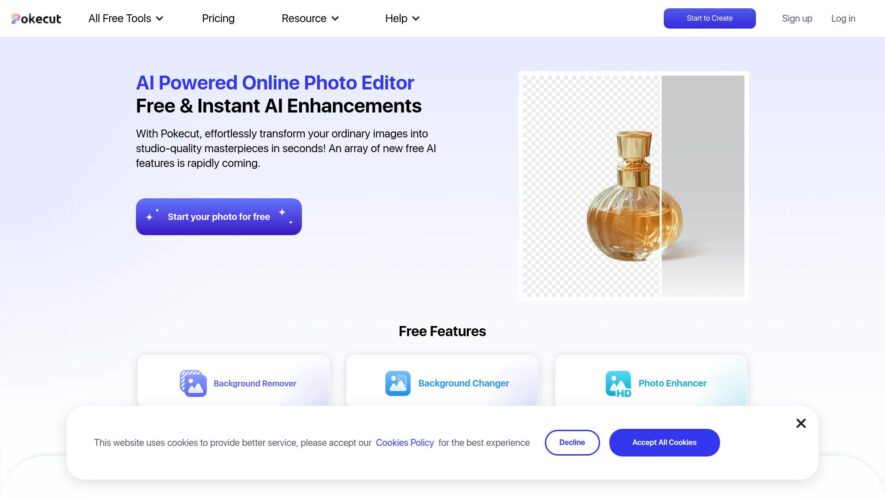
Pokecut-AI Powered Online Photo Editor is an AI-powered background remover and image editing tool designed to help users create professional visuals effortlessly. It allows users to remove backgrounds, enhance images, and generate high-quality graphics for various purposes, including e-commerce, social media, and marketing. Pokecut streamlines the...
Pokecut-AI Powered Online Photo Editor is an AI-powered background remover and image editing tool designed to help users create professional visuals effortlessly. It allows users to remove backgrounds, enhance images, and generate high-quality graphics for various purposes, including e-commerce, social media, and marketing. Pokecut streamlines the design process and improves efficiency, making it an essential tool for content creators and businesses.
Quickly and accurately removes backgrounds from images using advanced AI technology.
Offers a wide selection of colors and studio-quality templates for customizing photo backgrounds.
Enhances image clarity and resolution with an AI photo enhancer tailored to specific scenes.
Allows users to easily cut out objects like people, logos, and signatures for versatile editing.
Provides intelligent sharpening features to enhance image effects comprehensively.
Access to over 1,000 beautifully designed background templates covering various styles and scenes.
User-friendly interface designed for both beginners and experienced users, making editing accessible.
No registration required, allowing users to start editing photos quickly and hassle-free.
Basic features are available for free, providing great value for users.
Available as a mobile app, enabling users to edit photos on the go.
Subscription plans for unlimited access to all features, with flexible pricing options.
Privacy settings that allow users to manage their data and review the app's privacy policy.
You Got Questions,We Got Answers
What is PokeCut?
PokeCut PokeCut is an AI-powered background remover and image editing tool. It helps users easily remove backgrounds, enhance product images, and create professional designs without requiring advanced editing skills.
How does PokeCut work?
PokeCut PokeCut uses artificial intelligence to detect and remove backgrounds from images automatically. Users simply upload an image, and the tool processes it to provide a clean, transparent background. Additional editing features allow further customization.
Is PokeCut free to use?
PokeCut PokeCut offers both free and premium plans. The free version provides basic background removal and editing options, while the premium version includes advanced features and higher-resolution exports.
Can I edit images after removing the background with PokeCut?
PokeCut Yes, PokeCut provides editing tools that allow users to refine images, add new backgrounds, adjust colors, and enhance details after the background has been removed.
Is PokeCut available on mobile?
PokeCut Yes, PokeCut is accessible via mobile browsers and also has a dedicated app for a seamless experience on smartphones and tablets.
Does PokeCut store user images?
PokeCut PokeCut may store uploaded images temporarily for processing, but it follows standard privacy policies to ensure data protection. Users can check privacy settings to manage stored images.
How accurate is PokeCuts background removal?
PokeCut PokeCut provides high-accuracy background removal using AI, but results may vary based on image complexity. Users can fine-tune the output with manual adjustments if needed.
Can I integrate PokeCut with other tools?
PokeCut PokeCut supports integration with various design and e-commerce platforms, allowing users to enhance workflow efficiency. Integration options depend on the specific use case.
Is PokeCut safe to use?
PokeCut Yes, PokeCut follows security protocols to protect user data and images. It uses encryption and complies with data protection policies to ensure a safe user experience.
How can I contact PokeCut support?
PokeCut Users can reach PokeCut support through the official website, email, or help center. The platform provides FAQs, tutorials, and direct customer support for assistance.
Use cases
Ecommerce
Instantly remove backgrounds and apply professional templates to create appealing product images for online storefronts.
Batch Editing
Process 50+ photos at once using AI background removal and enhancement for efficient workflows.
Portrait Enhancement
Automatically retouch selfies or travel photos by removing unwanted elements and increasing resolution.
Social Media Posts
Use over 1,000 design templates to craft eye-catching content for Instagram, Facebook, and more.
ID Photos
Generate compliant passport or visa photos with background removal and resizing tools.
Marketing Creatives
Design promotional visualslike thumbnails and bannersusing pre-designed templates and text overlays.
Magic Eraser
Remove unwanted objects or photo bombers automatically for cleaner, distraction-free images.
Custom Collages
Combine images, stickers, and text to produce creative layouts for storytelling or sharing.
Traffic and Engagement
Apr 2026 - Jun 2026
World wide
Monthly visitors (June)
245.2k
Page/Visit
2.5
Visit Duration
1m 47s
Bounce Rate
0.5%
Pricing
Freemium
$6.99
Pokecut-AI Powered Online Photo Editor Embeds
Copied!
Let your community know you're live on Skillcurb! Just drop a badge on your site’s homepage with just a few clicks. Showcasing the badge helps increase your visibility and connects you with users actively exploring top AI tools.