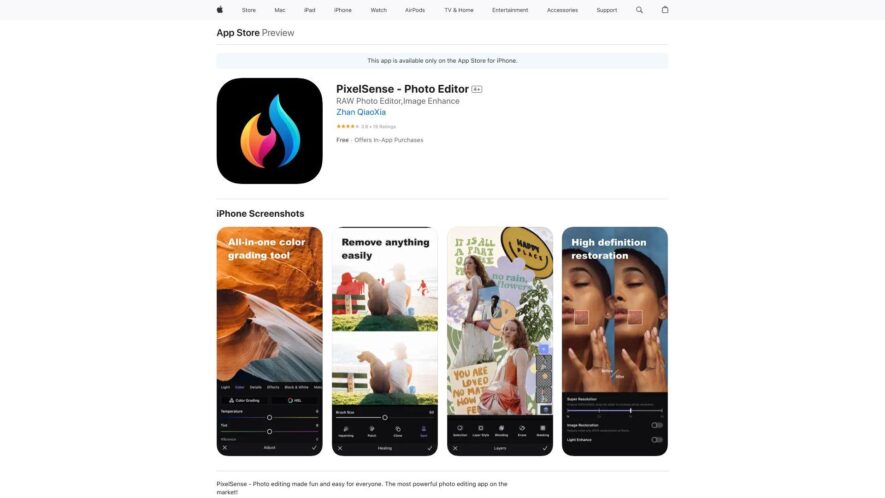
Pixelsense Photo Editor is a powerful and intuitive editing app that offers a wide range of advanced tools and filters to transform your photos. With a user-friendly interface, it provides precise control over tone, texture, and color, allowing for subtle or dramatic enhancements. Adjust exposure, contrast,...
Pixelsense Photo Editor is a powerful and intuitive editing app that offers a wide range of advanced tools and filters to transform your photos. With a user-friendly interface, it provides precise control over tone, texture, and color, allowing for subtle or dramatic enhancements. Adjust exposure, contrast, and saturation, or apply film-inspired presets, textures, and effects to create stunning visuals. Additionally, it features advanced noise reduction, chromatic aberration correction, and selective editing capabilities, making it an ideal choice for photographers and creatives seeking professional-grade results.
Effortlessly retouch and refine images with Pixelsense Photo Editor's powerful editing tools.
Unlock creative possibilities with Pixelsense Photo Editor's array of filters and effects.
You Got Questions,We Got Answers
What is Pixelsense Photo Editor?
Pixelsense Photo Editor is a powerful and intuitive photo editing app that allows users to enhance, retouch, and stylize their photos with ease, offering a wide range of advanced tools and features
Can I use it for free?
Yes, Pixelsense Photo Editor offers a free version with limited features, allowing users to try out the app before upgrading to the premium subscription for full access to all features and tools
What devices is it compatible with?
Pixelsense Photo Editor is compatible with iPhone, iPad, and iPod touch devices running iOS 14.0 or later, ensuring a seamless and optimized editing experience across various Apple devices
How do I get started with the app?
To get started, simply download and install Pixelsense Photo Editor from the App Store, then launch the app and follow the in-app tutorials and guides to learn the basics of the app and start editing your photos
Can I undo changes in the app?
Yes, Pixelsense Photo Editor features a robust undo and redo system, allowing users to easily revert back to previous versions of their edited photos, giving them complete control over their editing process
Is my data and privacy secure?
Pixelsense Photo Editor takes user data and privacy very seriously, ensuring that all user information and photos are stored securely and privately, with robust encryption and secure servers to protect against unauthorized access
Are there any tutorials or guides available?
Yes, Pixelsense Photo Editor offers in-app tutorials, guides, and tips to help users get the most out of the app, as well as online resources and customer support to assist with any questions or issues
Can I use it for commercial purposes?
Yes, Pixelsense Photo Editor can be used for commercial purposes, such as editing photos for social media, advertising, or business use, with the premium subscription offering advanced features and tools to meet the needs of professional photographers and creatives
Use cases
Marketing
Pixelsense Photo Editor enables marketers to create visually appealing social media graphics, promotional materials, and ad creatives with ease. Its tools allow for quick enhancements and modifications, ensuring brand consistency and professional-quality visuals for campaigns.
Retail
Pixelsense Photo Editor helps retailers enhance product images for e-commerce listings and social media promotions. By improving image quality and making creative edits, retailers can attract customers and boost sales through visually compelling content.
Traffic and Engagement
Apr 2026 - Jun 2026
World wide
Monthly visitors (June)
112.9m
Page/Visit
1.6
Visit Duration
50s
Bounce Rate
0.8%
Pricing
Freemium
$3.99
PixelSense Embeds
Copied!
Let your community know you're live on Skillcurb! Just drop a badge on your site’s homepage with just a few clicks. Showcasing the badge helps increase your visibility and connects you with users actively exploring top AI tools.