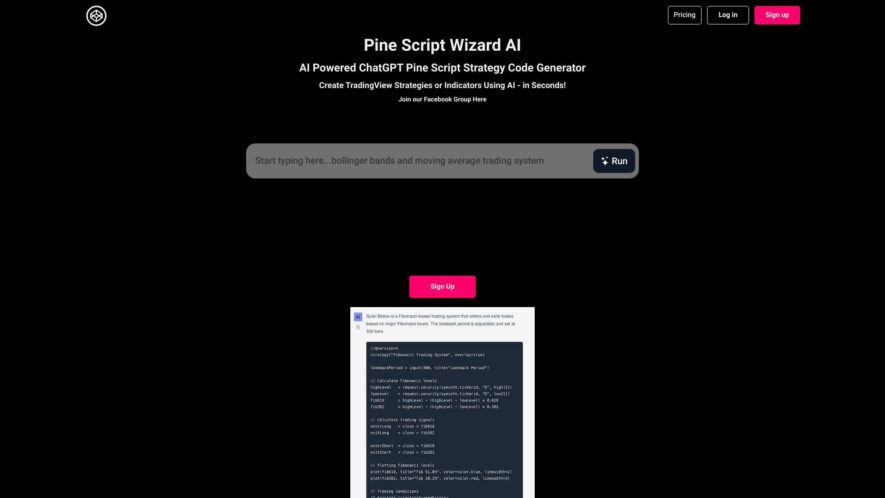
PineScript Wizard is a web-based platform that helps users create and customize PineScript indicators for TradingView charts without requiring extensive coding knowledge. The platform offers a user-friendly interface with a drag-and-drop builder, a library of pre-built indicators, and a code editor for advanced users. It supports...
PineScript Wizard is a web-based platform that helps users create and customize PineScript indicators for TradingView charts without requiring extensive coding knowledge. The platform offers a user-friendly interface with a drag-and-drop builder, a library of pre-built indicators, and a code editor for advanced users. It supports various chart types, including candlestick, Renko, and Heikin Ashi, and allows users to backtest and optimize their indicators. PineScript Wizard aims to make PineScript development more accessible and efficient for traders and developers of all skill levels.
Automated pine script generation for TradingView indicators and strategies.
Customizable script templates for various trading strategies and indicators.
User-friendly interface for easy script creation and editing.
Support for multiple programming languages, including PineScript and JavaScript.
Real-time script testing and backtesting on historical data.
Integration with popular trading platforms, including TradingView and MetaTrader.
Advanced script optimization and performance improvement tools.
Comprehensive documentation and tutorial resources for beginners and experts.
You Got Questions,We Got Answers
What is Pine Script Wizard?
Pine Script Wizard is a web-based platform that allows users to create, backtest, and deploy trading strategies using Pine Script, a popular programming language for technical analysis and trading.
How does Pine Script Wizard work?
Pine Script Wizard takes user input, translates it into Pine Script code, and runs it on historical data to generate backtesting results, allowing users to refine and optimize their trading strategies.
What is Pine Script?
Pine Script is a lightweight, open-source programming language developed by TradingView for creating technical indicators and trading strategies, allowing users to automate and customize their trading decisions.
Can I use Pine Script Wizard for free?
Pine Script Wizard offers a free plan with limited features, allowing users to try out the platform and create simple strategies, with optional upgrades to premium plans for more advanced features and support.
What kind of trading strategies can I create?
Pine Script Wizard supports a wide range of trading strategies, including mean reversion, trend following, and breakout strategies, as well as custom indicators and complex algorithms, limited only by the user's creativity and Pine Script knowledge.
Do I need to know how to code?
While Pine Script Wizard is designed to be user-friendly, some basic understanding of Pine Script and programming concepts can be helpful, but the platform also provides resources and tutorials to assist users in learning and improving their skills.
Can I use Pine Script Wizard with other platforms?
Pine Script Wizard is designed to work seamlessly with TradingView, but users can also export their strategies as Pine Script code and use them with other platforms that support Pine Script, such as MetaTrader or other trading software.
How do I get started with Pine Script Wizard?
To get started, simply sign up for a free account on the Pine Script Wizard website, watch the introductory tutorials, and start creating and backtesting your trading strategies, with optional premium features and support available for more advanced users.
Use cases
Finance
Automate technical analysis for cryptocurrency traders by generating PineScript code for popular indicators and strategies, increasing accuracy and reducing manual effort
Healthcare
Develop custom indicators for medical signal processing, such as ECG or EEG analysis, to aid in disease diagnosis and patient monitoring
Gaming
Create custom trading card game strategies using PineScript, allowing players to automate gameplay and optimize deck performance
Energy
Analyze energy market trends and generate PineScript code for predictive models, helping utilities and traders optimize energy production and consumption
Retail
Automate sales forecasting and demand planning using PineScript-generated indicators, enabling retailers to optimize inventory management and reduce stockouts
Agriculture
Develop custom indicators for crop yield prediction, weather pattern analysis, and soil quality monitoring, helping farmers optimize crop management and reduce resource waste
Traffic and Engagement
Apr 2026 - Jun 2026
World wide
Monthly visitors (June)
38.3k
Page/Visit
2
Visit Duration
20s
Bounce Rate
0.4%
Pricing
Paid
$9
Pine Script Wizard Embeds
Copied!
Let your community know you're live on Skillcurb! Just drop a badge on your site’s homepage with just a few clicks. Showcasing the badge helps increase your visibility and connects you with users actively exploring top AI tools.