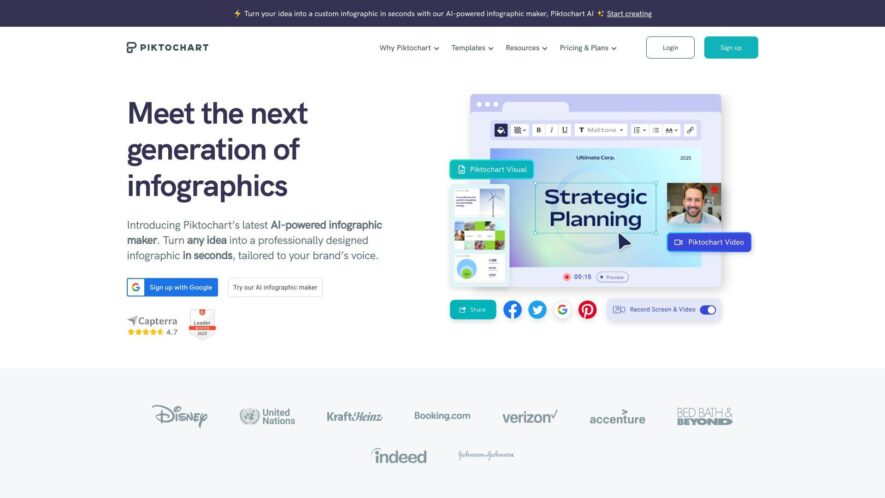
Piktochart is a web-based infographic maker that allows users to create professional-looking visual content without requiring extensive design experience. With a user-friendly interface, and a vast library of customizable templates, users can easily create infographics, reports, presentations, and social media graphics. Piktochart offers a range of...
Piktochart is a web-based infographic maker that allows users to create professional-looking visual content without requiring extensive design experience. With a user-friendly interface, and a vast library of customizable templates, users can easily create infographics, reports, presentations, and social media graphics. Piktochart offers a range of features, including drag-and-drop functionality, a vast icon library, and collaboration tools, making it an ideal platform for marketers, educators, and businesses looking to create engaging visual content quickly and efficiently.
Create professional diagrams and charts with a user-friendly drag-and-drop interface.
Customize templates with a vast library of icons, images, and graphics.
Choose from a wide range of fonts, colors, and backgrounds to match your brand.
Collaborate in real-time with team members and clients using shareable links.
Export high-quality visuals in various formats, including PNG, PDF, and SVG.
Access a vast library of graphics, illustrations, and icons for free.
Easily resize and reformat charts to fit social media, websites, or presentations.
Track and analyze engagement metrics with built-in analytics and click-through rates.
You Got Questions,We Got Answers
What is Piktochart?
Piktochart is a web-based infographic maker that allows users to create visual content without requiring extensive design experience or knowledge, offering a range of templates, customization options, and collaboration features.
Is Piktochart free?
Piktochart offers a free plan with limited features and templates, as well as several paid subscription plans that provide more advanced features, increased storage, and additional support options.
Can I customize templates?
Yes, Piktochart's templates can be fully customized using a drag-and-drop editor, allowing users to add or remove elements, change fonts, and upload their own images and branding assets.
How do I share my infographic?
Piktochart allows users to share their infographics via a link, embed them into websites or social media platforms, or export them as a PDF or image, making it easy to share visual content with others.
Is Piktochart secure?
Piktochart takes the security and privacy of their data seriously, implementing robust measures such as SSL encryption, regular backups, and compliance with major data protection regulations.
Can I use Piktochart offline?
Piktochart is a cloud-based application, which means it requires an active internet connection to access and use its features, and does not offer an offline mode or downloadable software.
What kind of support is available?
Piktochart offers a range of support options, including a comprehensive knowledge base, email support, and live chat feature, as well as a blog with tutorials and design tips.
Is Piktochart suitable for teams?
Yes, Piktochart is suitable for teams, offering collaboration features such as real-time commenting, task assignment, and permission controls, making it easy to work with others on visual content projects.
Use cases
Healthcare
A medical research team uses Piktochart to create interactive infographics showcasing the efficacy of a new treatment, making complex data easily digestible for stakeholders and investors
Finance
A financial analyst leverages Piktochart to build a visually engaging report highlighting market trends and portfolio performance, helping them secure client trust and drive business growth
Retail
An e-commerce company utilizes Piktochart to design an interactive product catalog, enhancing customer engagement and driving sales through immersive and shareable content
Manufacturing
A quality control team employs Piktochart to create interactive dashboards tracking production metrics and defect rates, enabling data-driven decision-making and process optimization
Marketing
A social media manager uses Piktochart to craft eye-catching, data-driven content for Instagram and Facebook, boosting engagement and conversions through compelling storytelling
Education
A university professor incorporates Piktochart into their curriculum, empowering students to create interactive presentations and posters that effectively communicate complex research findings and concepts
Traffic and Engagement
Feb 2026 - Apr 2026
World wide
Monthly visitors (April)
1.9m
Page/Visit
4.8
Visit Duration
3m 24s
Bounce Rate
0.5%
Pricing
Freemium
$29
Piktochart Embeds
Copied!
Let your community know you're live on Skillcurb! Just drop a badge on your site’s homepage with just a few clicks. Showcasing the badge helps increase your visibility and connects you with users actively exploring top AI tools.