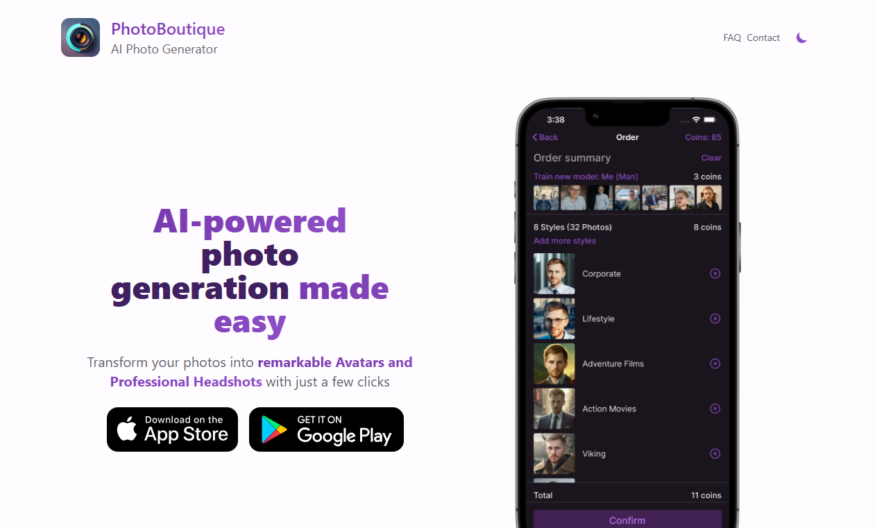
PhotoBoutique is an AI-powered platform designed to transform ordinary photos into unique avatars and professional headshots. Users can upload between 10 to 35 photos of themselves, and the AI takes about an hour to process the images, creating high-quality, realistic avatars or enhanced headshots. The tool...
PhotoBoutique is an AI-powered platform designed to transform ordinary photos into unique avatars and professional headshots. Users can upload between 10 to 35 photos of themselves, and the AI takes about an hour to process the images, creating high-quality, realistic avatars or enhanced headshots. The tool offers a variety of customization options, allowing users to explore different styles and artistic transformations for their images. Ideal for professionals and individuals looking to elevate their online presence, PhotoBoutique simplifies the process of creating standout profile pictures and digital representations with its easy-to-use interface.
Easily create and customize stunning photo albums with various templates and designs.
Organize and categorize photos by events, dates, or custom tags for easy access.
Enhance and edit photos with advanced tools, filters, and effects for professional results.
Share and collaborate on albums with friends and family through secure links.
Order high-quality prints and products, such as photo books and canvas wraps, directly.
Store and backup photos safely in the cloud with automatic syncing.
Create and manage multiple albums, with options for private or public viewing.
View and enjoy albums on any device, with a responsive and user-friendly interface.
You Got Questions,We Got Answers
What is PhotoBoutique?
PhotoBoutique PhotoBoutique is a tool designed to enhance and edit photos with advanced features. It provides users with a range of editing options to create professional-quality images. The platform is suitable for both beginners and experienced photographers.
How does PhotoBoutique work?
PhotoBoutique PhotoBoutique uses intuitive tools and algorithms to allow users to edit and enhance their photos. Users can upload images, apply filters, adjust settings, and save or share their work. The platform is designed to be user-friendly and efficient.
Is PhotoBoutique free to use?
PhotoBoutique PhotoBoutique offers both free and premium versions. The free version includes basic editing tools, while the premium version unlocks advanced features and additional customization options. Users can choose a plan based on their needs.
Can I customize PhotoBoutique's features?
PhotoBoutique Yes, PhotoBoutique allows users to customize various editing settings to achieve their desired results. Users can adjust filters, colors, and other parameters to create unique and personalized images.
Is PhotoBoutique available on mobile?
PhotoBoutique Yes, PhotoBoutique is accessible via mobile browsers and may have dedicated apps for a seamless editing experience. It is optimized for mobile devices to ensure smooth performance.
Does PhotoBoutique store user data?
PhotoBoutique PhotoBoutique ensures user privacy and security, but some data may be stored to improve performance and provide better services. Users can manage their privacy settings to control data retention.
How accurate is PhotoBoutique?
PhotoBoutique PhotoBoutique provides high-quality editing results, but the accuracy may vary depending on the input and user adjustments. The platform is regularly updated to enhance its features and performance.
Can I integrate PhotoBoutique with other platforms?
PhotoBoutique PhotoBoutique supports integration with various platforms to enhance functionality. Users can connect it with other tools and software to streamline their workflow.
Is PhotoBoutique safe to use?
PhotoBoutique Yes, PhotoBoutique follows strict security protocols to ensure user safety. It uses encryption and secure access controls to protect user data and images.
How can I contact PhotoBoutique support?
PhotoBoutique Users can reach PhotoBoutique support through the official website, email, or help center. There are FAQs, tutorials, and customer service representatives available to assist with any issues.
Use cases
Healthcare
Medical professionals use Photoboutique to create personalized patient profiles, storing medical images and records in a secure, organized manner, enhancing patient care and streamlining diagnosis
Finance
Financial institutions utilize Photoboutique to securely store and manage sensitive documents, such as identification and transaction records, ensuring compliance with regulatory requirements
Retail
E-commerce businesses leverage Photoboutique to manage product images, enabling efficient cataloging, and enhancing customer experience through high-quality visuals
Manufacturing
Quality control teams employ Photoboutique to document and track product defects, streamlining issue resolution and improving overall manufacturing efficiency
Marketing
Marketing agencies use Photoboutique to organize and manage visual assets, such as campaign images and brand logos, ensuring consistent brand representation across all channels
Education
Educational institutions utilize Photoboutique to store and manage visual learning materials, such as diagrams and illustrations, enhancing student engagement and understanding
Traffic and Engagement
N/A
World wide
Monthly visitors (January)
N/A
Page/Visit
N/A
Visit Duration
N/A
Bounce Rate
N/A
Pricing
Free
$0
PhotoBoutique – AI Photo Generator Embeds
Copied!
Let your community know you're live on Skillcurb! Just drop a badge on your site’s homepage with just a few clicks. Showcasing the badge helps increase your visibility and connects you with users actively exploring top AI tools.