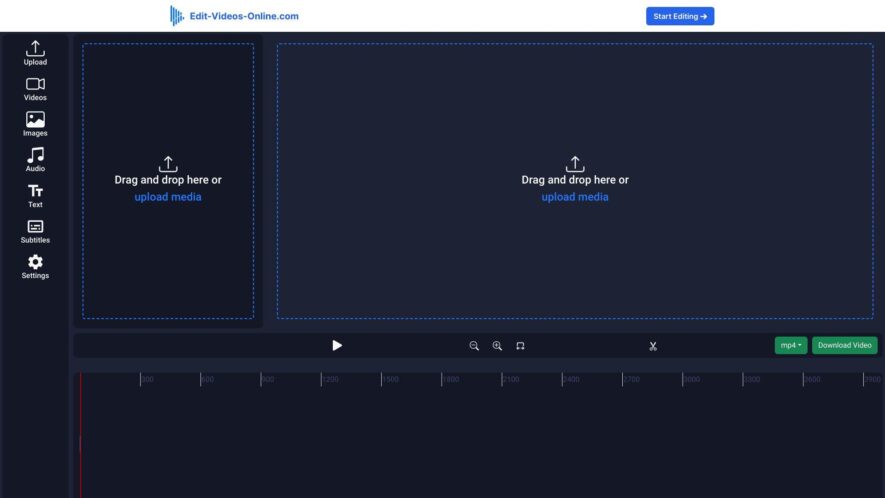
Edit-videos-online.com is a free online video editor that allows users to edit videos directly in their web browser without requiring any software downloads or installations. The platform offers a range of features including trimming, splitting, and merging clips, adding text, filters, and transitions, and adjusting audio...
Edit-videos-online.com is a free online video editor that allows users to edit videos directly in their web browser without requiring any software downloads or installations. The platform offers a range of features including trimming, splitting, and merging clips, adding text, filters, and transitions, and adjusting audio and video settings. Users can import videos from their computer, Google Drive, or Dropbox, and export edited videos in various formats and resolutions. The editor is user-friendly and suitable for beginners and professionals alike, making it an ideal solution for quick and easy video editing tasks.
Edit videos effortlessly with Edit-Videos-Online's intuitive platform.
Enhance your video projects with Edit-Videos-Online's precision editing tools.
Streamline your workflow with Edit-Videos-Online's fast and efficient processing.
Achieve professional-quality edits with Edit-Videos-Online's advanced features.
Cut, trim, and merge videos seamlessly with Edit-Videos-Online's easy-to-use interface.
Save time with Edit-Videos-Online's straightforward and hassle-free editing tools.
No software installation requiredEdit-Videos-Online is fully web-based.
Supports multiple video formats for versatile video editing needs.
Perfect for beginners and professionals alike with Edit-Videos-Online's accessible tools.
Export high-quality videos effortlessly with Edit-Videos-Online's optimized output settings.
You Got Questions,We Got Answers
What is Edit Videos Online?
Edit Videos Online is a free online video editor that allows users to edit videos online without downloading any software or installing any plugins, making it accessible from anywhere and on any device
How do I start editing?
To start editing, simply click on the "Upload Video" button, select the video you want to edit, and wait for it to upload, then you can start trimming, cropping, adding text, and applying filters and effects
Can I edit videos on my phone?
Yes, Edit Videos Online is a mobile-friendly editor, which means you can access it and edit videos on your smartphone or tablet, making it easy to edit on-the-go, anywhere and anytime
Are there any watermarks?
No, Edit Videos Online does not add any watermarks to your edited videos, so you can download and share your edited videos without any branding or logos, giving you full control over your content
Can I add music to my video?
Yes, Edit Videos Online has a built-in music library that allows you to add royalty-free music to your videos, you can also upload your own music or add voiceovers to make your videos more engaging
How do I download my edited video?
Once you've finished editing, click on the "Download" button, select the resolution and format you want, and wait for the video to process, then you can download it to your device or share it directly to social media
Is Edit Videos Online free?
Yes, Edit Videos Online is completely free to use, with no subscription fees or hidden costs, you can edit and download as many videos as you want without paying a single penny
Can I edit videos with friends?
Yes, Edit Videos Online allows real-time collaboration, which means you can invite friends or team members to edit videos with you, making it easy to work together on projects and share ideas
Use cases
Healthcare
Edit-Videos-Online.com can be utilized by healthcare professionals to create informative videos for patient education, such as explaining medical procedures or health tips, enhancing patient understanding and engagement.
Finance
In the finance sector, Edit-Videos-Online.com allows financial advisors to produce engaging video content that explains complex financial concepts, investment strategies, or market updates, making it easier for clients to grasp important information.
Retail
Retailers can use Edit-Videos-Online.com to create promotional videos showcasing products, sales, or customer testimonials, which can be shared on social media and websites to attract customers and drive sales.
Marketing
Edit-Videos-Online.com empowers marketers to craft compelling video advertisements and social media content, incorporating text, captions, and audio to enhance storytelling and improve audience engagement.
Education
Educators can leverage Edit-Videos-Online.com to develop instructional videos, adding captions and images to support learning materials, which can help in delivering content more effectively to students.
Traffic and Engagement
Apr 2026 - Jun 2026
World wide
Monthly visitors (June)
3.1k
Page/Visit
1.7
Visit Duration
9s
Bounce Rate
0.5%
Pricing
Paid
$29
Online Video Editor Embeds
Copied!
Let your community know you're live on Skillcurb! Just drop a badge on your site’s homepage with just a few clicks. Showcasing the badge helps increase your visibility and connects you with users actively exploring top AI tools.