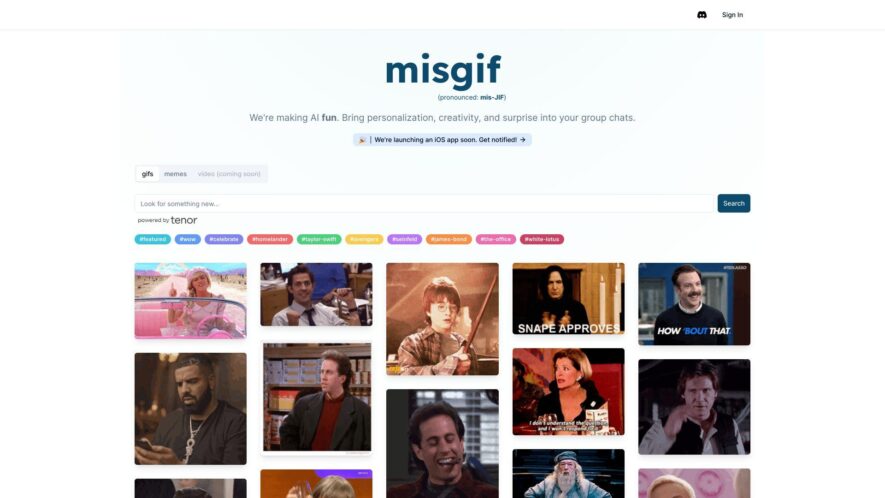
Misgif is a web-based GIF maker that allows users to create custom GIFs from YouTube videos, images, or by recording their screen. The platform offers a range of editing tools, including trimming, cropping, and adding text, filters, and stickers. Users can also adjust the GIF's speed,...
Misgif is a web-based GIF maker that allows users to create custom GIFs from YouTube videos, images, or by recording their screen. The platform offers a range of editing tools, including trimming, cropping, and adding text, filters, and stickers. Users can also adjust the GIF's speed, add music, and customize the output format. With a user-friendly interface and no watermarks or ads, Misgif is a popular choice for creating and sharing engaging GIFs on social media, messaging apps, and websites.
Enhance accuracy and precision with MisGif's state-of-the-art algorithms.
Take advantage of MisGif to simplify complex processes and accelerate results.
Stay ahead of the competition with MisGif, your go-to solution for efficiency.
Transform your workflow with MisGif, leveraging AI for smarter automation.
Optimize your productivity with MisGif's user-friendly and intuitive platform.
Designed for professionals and businesses, MisGif adapts to your needs effortlessly.
Seamlessly integrate MisGif with your favorite tools for hassle-free operations.
Create stunning and engaging GIFs effortlessly with MisGif's advanced customization options.
Enhance your content with MisGif's AI-powered effects and editing capabilities.
Save time with MisGifs fast processing and instant download features.
Elevate your brands online presence with high-quality, shareable GIFs from MisGif.
Streamline your content creation process with MisGifs innovative automation tools.
You Got Questions,We Got Answers
What is MisGif?
MisGif MisGif is an AI-powered tool that allows users to generate personalized GIFs with their own face. It combines advanced AI with creative animations to offer a fun and unique way to create GIFs for personal or social media use.
How does MisGif work?
MisGif MisGif uses AI technology to map a users facial features onto animated GIF templates. Users upload a photo, and the tool processes it to generate a customized animation that integrates their likeness into the GIF seamlessly.
Is MisGif free to use?
MisGif MisGif offers both free and premium options. The free version provides basic GIF generation, while the premium plan unlocks additional templates, higher resolution outputs, and other advanced customization features.
Can I customize my GIFs in MisGif?
MisGif Yes, MisGif allows users to customize their GIFs by selecting different templates, adjusting facial features, and applying effects. Some customization options may be available only in the premium version.
Is MisGif available on mobile?
MisGif Yes, MisGif is accessible via mobile browsers and may also have a dedicated app. The platform is optimized for mobile devices to ensure a smooth and responsive user experience.
Does MisGif store my photos?
MisGif MisGif may store uploaded images temporarily to generate GIFs but follows privacy guidelines to ensure data protection. Users can review the platforms privacy policy to understand how their data is handled.
How accurate is MisGifs face mapping?
MisGif MisGif uses advanced AI algorithms to ensure accurate and realistic face integration into GIFs. However, results may vary depending on the quality of the uploaded image and the chosen animation template.
Can I share my created GIFs directly from MisGif?
MisGif Yes, MisGif provides easy sharing options, allowing users to share their creations directly to social media platforms or download them for personal use.
Is MisGif safe to use?
MisGif Yes, MisGif follows security protocols to protect user data. The platform ensures encrypted uploads and a secure processing environment to maintain privacy and prevent unauthorized access.
How can I contact MisGif support?
MisGif Users can reach MisGif support through the official website, email, or help center. There are FAQs, tutorials, and customer service representatives available to assist with any issues.
Use cases
Marketing
Use personalized GIFs in light-hearted campaigns or brand social media to grab attention.
Social Content
Generate custom GIFs and memes to share on Instagram, Twitter, TikTok with personal flair.
TV Scenes
Insert yourself into favorite TV show clips or iconic movie scenes using AI face swapping.
Greeting Cards
Create humorous or themed GIF greetings that feature your face for birthdays or holidays.
Team Spirit
Share custom memes in remote work chats to boost morale and add personality at work.
Trend Reactions
Quickly respond to trending moments by placing yourself in popular meme formats.
Feedback Fun
Make internal feedback or updates memorable with entertaining customized GIFs or meme responses.
Storytelling
Visualize your narratives by starring in GIF clips themed around dialogue or personal anecdotes.
Traffic and Engagement
Apr 2026 - Jun 2026
World wide
Monthly visitors (June)
21.1k
Page/Visit
5
Visit Duration
1m 17s
Bounce Rate
0.4%
Pricing
Freemium
$24
Misgif Embeds
Copied!
Let your community know you're live on Skillcurb! Just drop a badge on your site’s homepage with just a few clicks. Showcasing the badge helps increase your visibility and connects you with users actively exploring top AI tools.