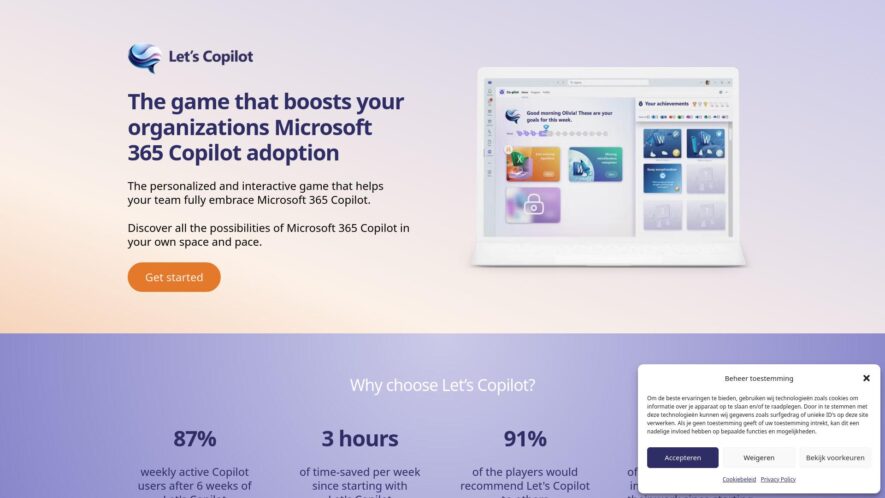
Let's Copilot is a gamified application integrated within Microsoft Teams, designed to equip employees with the necessary skills and mindset to fully utilize Microsoft Copilot. It offers interactive, hands-on learning experiences to help employees become proficient in using AI tools, ultimately boosting productivity. The platform provides...
Let's Copilot is a gamified application integrated within Microsoft Teams, designed to equip employees with the necessary skills and mindset to fully utilize Microsoft Copilot. It offers interactive, hands-on learning experiences to help employees become proficient in using AI tools, ultimately boosting productivity. The platform provides personalized lessons, exercises, and real-world success stories, and includes features to track progress and engage in friendly competition with colleagues.
Guided Onboarding Process Provides step-by-step instructions and support to help new users get started effectively
Interactive Tutorials and Guides Offers engaging learning materials to teach users how to utilize the platform's various functionalities
Contextual Help and Tooltips Displays relevant information and guidance directly within the interface as users navigate
Progress Tracking and Checklists Allows users to monitor their progress through setup and key tasks with clear indicators
Resource Library and FAQs Offers a collection of helpful articles, documentation, and frequently asked questions for self-service support
Personalized Recommendations and Tips Provides tailored advice and suggestions based on user behavior and goals.
You Got Questions,We Got Answers
What is LetsCopilot?
LetsCopilot is an AI-powered platform that provides automated workflows and tools to enhance productivity for teams and businesses. It simplifies processes, automates repetitive tasks, and integrates seamlessly into existing systems.
Who can benefit from using LetsCopilot?
LetsCopilot is designed for teams across various industries such as marketing, sales, customer support, and operations, helping them streamline their workflows and increase efficiency.
How does LetsCopilot automate tasks?
LetsCopilot automates tasks through pre-built workflows, AI-driven task management, and integrations with popular tools like Slack, Trello, and Gmail. Users can set up rules and triggers to automate manual processes.
Does LetsCopilot integrate with other tools?
LetsCopilot integrates with a wide variety of third-party applications, including CRM systems, project management tools, and email platforms, to ensure seamless data exchange and workflow automation.
Is LetsCopilot suitable for non-technical users?
LetsCopilot is user-friendly, with an intuitive interface and no-code automation options, making it easy for both technical and non-technical teams to set up and manage workflows.
Does LetsCopilot offer analytics and reporting?
LetsCopilot includes built-in analytics and reporting features that provide insights into workflow performance, team productivity, and automation effectiveness, helping businesses optimize their processes.
Is LetsCopilot secure?
LetsCopilot follows industry-standard security protocols, including data encryption and secure authentication, ensuring that your data is safe and compliant with privacy regulations.
Can LetsCopilot scale with my business?
LetsCopilot is scalable, offering customizable features and plans to grow with your business. It supports small teams as well as large enterprises, providing flexibility for any organization size.
Use cases
Marketing
Marketers utilize Let's Copilot to train teams on Microsoft 365 Copilot features through gamified modules, enhancing adoption rates and streamlining campaign workflows
Education
Educational institutions employ Let's Copilot to familiarize faculty and students with AI tools in Microsoft 365, promoting effective integration into teaching and learning processes
Retail
Retailers use Let's Copilot to onboard staff to Microsoft 365 Copilot, improving operational efficiency and customer service through better utilization of AI-driven tools
Manufacturing
Manufacturers implement Let's Copilot to educate employees on Microsoft 365 Copilot functionalities, facilitating smoother communication and project management across departments
Healthcare
Healthcare providers leverage Let's Copilot to train administrative and clinical staff on Microsoft 365 Copilot, enhancing documentation accuracy and patient data management
Finance
Financial institutions adopt Let's Copilot to upskill employees in using Microsoft 365 Copilot, leading to improved data analysis, reporting, and compliance workflows.
Traffic and Engagement
N/A
World wide
Monthly visitors (January)
N/A
Page/Visit
N/A
Visit Duration
N/A
Bounce Rate
N/A
Pricing
Contact Sales
Let’s Copilot Embeds
Copied!
Let your community know you're live on Skillcurb! Just drop a badge on your site’s homepage with just a few clicks. Showcasing the badge helps increase your visibility and connects you with users actively exploring top AI tools.