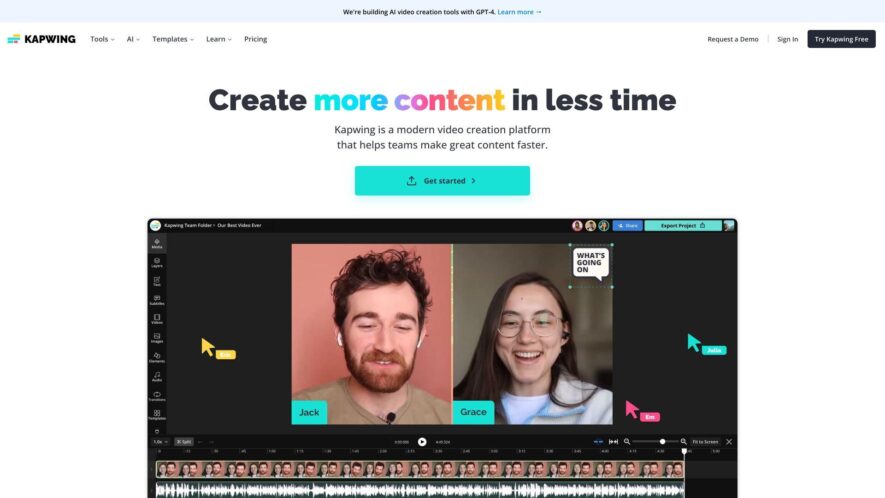
Kapwing is a cloud-based video editing platform that allows users to create, edit, and share videos online without requiring any video editing experience or software downloads. The platform provides a range of tools and features, including video trimming, cropping, and resizing, as well as adding text,...
Kapwing is a cloud-based video editing platform that allows users to create, edit, and share videos online without requiring any video editing experience or software downloads. The platform provides a range of tools and features, including video trimming, cropping, and resizing, as well as adding text, images, and audio to videos. Kapwing also offers a range of templates and effects to help users customize their videos and make them more engaging.
Upload and edit videos, images, and audio files in one intuitive workspace.
Trim, split, and merge clips to create seamless video transitions.
Customize font styles, colors, and animations for text overlays.
Add music tracks and sound effects to enhance audio quality.
Resize and crop images and videos to fit social media dimensions.
Apply filters, effects, and adjustments for professional-grade video editing.
Export and share content directly to YouTube, Instagram, and more.
Access a library of free, high-quality, and customizable templates.
You Got Questions,We Got Answers
What is Kapwing?
Kapwing is a free online editor for videos, GIFs, and images, providing an intuitive and user-friendly interface for individuals and businesses to create engaging content without requiring extensive design experience or software downloads.
Can I use Kapwing free?
Yes, Kapwing offers a free plan with limited features, allowing users to create and edit content with minor limitations, such as watermarks and limited storage, making it an excellent option for casual users and small businesses.
What file formats does Kapwing support?
Kapwing supports a wide range of file formats, including MP4, AVI, MOV, GIF, PNG, and JPG, ensuring compatibility with most devices and platforms, and allowing users to easily import and export files.
Does Kapwing have a mobile app?
Currently, Kapwing does not have a mobile app, but its web-based interface is optimized for mobile browsers, allowing users to create and edit content on-the-go using their mobile devices.
Can I collaborate on Kapwing projects?
Yes, Kapwing offers real-time collaboration features, enabling users to invite others to edit projects, and track changes, making it an ideal platform for teams and businesses to work on content together.
Does Kapwing have customer support?
Yes, Kapwing provides customer support through its contact form, email, and social media channels, offering assistance with any questions, issues, or feedback, ensuring users receive help when needed.
Does Kapwing have a blog?
Yes, Kapwing maintains an active blog, featuring tutorials, guides, and industry insights, and updates on new features and best practices, helping users improve their content creation skills.
Use cases
Healthcare
Medical professionals can create interactive patient education videos, explaining complex medical procedures and treatment options, using Kapwing's video editing tools
Finance
Financial analysts can create animated explanatory videos, breaking down complex financial data and market trends, to educate clients and stakeholders
Retail
E-commerce businesses can create engaging product demos, showcasing product features and benefits, to increase sales and customer satisfaction
Manufacturing
Quality control teams can create instructional videos, demonstrating equipment operation and maintenance procedures, to reduce errors and improve worker safety
Marketing
Digital marketers can create eye-catching social media ads, using Kapwing's templates and design tools, to increase brand awareness and drive website traffic
Education
Teachers can create interactive lesson plans, incorporating multimedia content and quizzes, to enhance student engagement and learning outcomes
Traffic and Engagement
Feb 2026 - Apr 2026
World wide
Monthly visitors (April)
4.1m
Page/Visit
5.6
Visit Duration
3m 53s
Bounce Rate
0.3%
Pricing
Freemium
$16
Kapwing Embeds
Copied!
Let your community know you're live on Skillcurb! Just drop a badge on your site’s homepage with just a few clicks. Showcasing the badge helps increase your visibility and connects you with users actively exploring top AI tools.