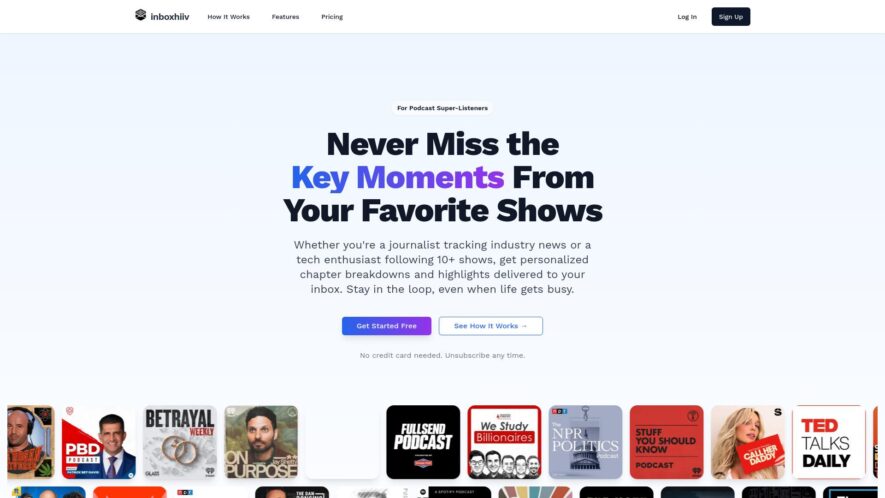
InboxHIIV is a platform that allows users to manage their email inboxes more efficiently, focusing on reducing email clutter and increasing productivity. It offers features such as email tracking, customizable filters, and automated email organization. The platform provides a simple and user-friendly interface, making it easy...
InboxHIIV is a platform that allows users to manage their email inboxes more efficiently, focusing on reducing email clutter and increasing productivity. It offers features such as email tracking, customizable filters, and automated email organization. The platform provides a simple and user-friendly interface, making it easy to navigate and use. InboxHIIV aims to help users regain control over their inboxes, reduce stress, and save time, ultimately improving their overall email management experience.
Automatically organize incoming emails into categorized folders and labels.
Easily track and manage multiple email accounts from a single dashboard.
Customizable filters and rules to automate email sorting and prioritization.
Advanced search functionality to quickly locate specific emails and attachments.
Integrated task management system to convert emails into actionable tasks.
Collaboration features to share email threads and assign tasks to team members.
Real-time notifications and alerts for new emails and task assignments.
Offers customizable filters and rules to automate email workflows.
You Got Questions,We Got Answers
What is InboxHIIV?
InboxHIIV is an AI-powered email management tool that automates email organization, prioritization, and response suggestions to increase productivity and reduce email stress.
How does it work?
InboxHIIV uses machine learning algorithms to analyze email patterns and categorize emails into folders, allowing users to focus on important emails and reduce email clutter.
Is it secure?
InboxHIIV takes data security seriously, using enterprise-grade security measures, including GDPR compliance, to ensure that user emails and data are protected from unauthorized access.
Can I customize it?
Yes, InboxHIIV allows users to customize the platform to fit their specific email needs, including creating custom folders, setting priority levels, and integrating with other productivity tools.
Does it support multiple accounts?
InboxHIIV supports integration with multiple email accounts, including Gmail, Outlook, and Yahoo, allowing users to manage all their email accounts in one platform.
Is there a free trial?
InboxHIIV offers a 14-day free trial, allowing users to test the platform's features and functionality before committing to a paid plan.
How do I cancel a subscription?
Users can easily cancel their InboxHIIV subscription at any time through the platform's settings or by contacting customer support, with no long-term contracts or commitments.
What kind of support is available?
InboxHIIV offers 24/7 customer support through email, chat, and phone, as well as online resources, including tutorials, guides, and FAQs, to ensure users have access to help when they need it.
Use cases
Healthcare
A medical research team uses InboxHIIV to categorize and prioritize emails from various stakeholders, including patients, clinicians, and research partners, ensuring timely responses and accelerating study timelines
Finance
A wealth management firm leverages InboxHIIV to auto-organize client communications, enabling advisors to focus on high-value tasks, such as portfolio analysis and investment recommendations, while ensuring compliance with regulatory requirements
Retail
An e-commerce company utilizes InboxHIIV to streamline customer service operations, automatically routing inquiries to the most suitable agents, and enabling the team to resolve issues efficiently, improving overall customer satisfaction
Manufacturing
A production planning team employs InboxHIIV to categorize and respond to supplier inquiries, ensuring timely procurement of raw materials, and minimizing production delays, while maintaining accurate records for auditing purposes
Marketing
A digital marketing agency uses InboxHIIV to manage incoming leads, automatically assigning them to account managers, and enabling the team to respond promptly, increasing conversion rates and driving revenue growth
Education
A university admissions office leverages InboxHIIV to organize and prioritize emails from prospective students, ensuring timely responses to inquiries, and improving the overall applicant experience, while reducing administrative burdens
Traffic and Engagement
N/A
World wide
Monthly visitors (January)
N/A
Page/Visit
N/A
Visit Duration
N/A
Bounce Rate
N/A
Pricing
Freemium
$5.99
inboxhiiv Embeds
Copied!
Let your community know you're live on Skillcurb! Just drop a badge on your site’s homepage with just a few clicks. Showcasing the badge helps increase your visibility and connects you with users actively exploring top AI tools.