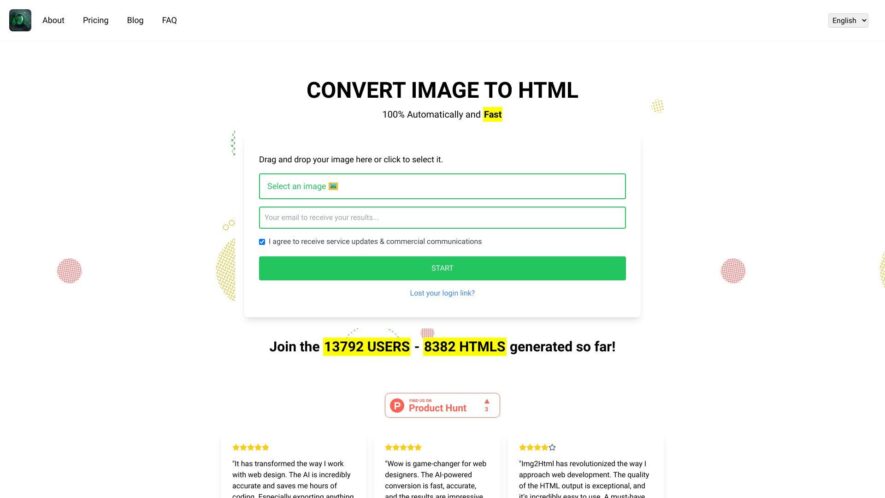
Img2HTML is a free online tool that converts images to HTML code, allowing users to embed it into their website or blog. It supports various image formats, including JPEG, PNG, and GIF. The tool provides customizable options, such as image size, alignment, and border, to tailor...
Img2HTML is a free online tool that converts images to HTML code, allowing users to embed it into their website or blog. It supports various image formats, including JPEG, PNG, and GIF. The tool provides customizable options, such as image size, alignment, and border, to tailor the output to specific needs. The generated HTML code is clean and SEO-friendly, making it easy to integrate into any website or blog, providing a convenient way to add images to online content.
Converts images to HTML code with precise pixel-perfect representation of the original image.
Supports various image formats including JPEG, PNG, GIF, and BMP for conversion.
Allows users to customize the output HTML code with desired attributes and tags.
Provides an intuitive user interface for easy image-to-HTML conversion process.
Offers advanced settings for tweaking the conversion process to meet specific needs.
Supports batch conversion of multiple images to HTML code simultaneously.
Generates responsive HTML code that adapts to different screen sizes and devices.
Provides a live preview of the converted HTML code with the original image comparison.
You Got Questions,We Got Answers
What is img2html used for?
Img2html is a free online tool that converts images to HTML code, allowing users to easily embed images into their websites, blogs, or emails without having to upload them to a server.
Can I use img2html for free?
Yes, img2html is completely free to use, with no limits on the number of conversions, and no watermarks or ads added to the output, making it ideal for personal or commercial use.
How do I use img2html?
Simply upload your image, select the desired output format, and click convert, then copy and paste the generated HTML code into your desired location, such as a website or email.
What file formats are supported?
Img2html accepts a wide range of file formats, including JPEG, PNG, GIF, BMP, and TIFF, ensuring compatibility with most image types and sources.
Can I customize the output?
Yes, img2html allows you to batch convert multiple images at once, and customize the output by selecting the desired image quality, and output format, to suit your specific needs and requirements. Is img2html secure? Yes, img2html uses secure servers and encryption to ensure that your images are protected and secure during the conversion process, and that your data is not shared or stored.
What browsers are supported?
Img2html is compatible with most modern web browsers, including Chrome, Firefox, Safari, Edge, and Internet Explorer, ensuring that the generated HTML code works seamlessly across different platforms.
Can I use img2html offline?
No, img2html requires an active internet connection to function, as it is a cloud-based service, but this allows for easy access and use from anywhere, at any time.
Use cases
Healthcare
Medical illustrators can use img2html to create interactive 3D models of human anatomy, enhancing patient education and surgical planning
Finance
Financial analysts can convert complex charts and graphs into interactive HTML, facilitating clearer communication of market trends and forecasts
Retail
E-commerce sites can utilize img2html to create interactive 360-degree product views, reducing returns and improving customer satisfaction
Manufacturing
Quality control teams can use img2html to create interactive 3D models of complex machinery, streamlining maintenance and reducing downtime
Marketing
Ad agencies can convert print ads into immersive HTML experiences, increasing engagement and driving conversions
Education
Online course creators can use img2html to develop interactive simulations, enhancing student engagement and improving learning outcomes
Traffic and Engagement
Feb 2026 - Apr 2026
World wide
Monthly visitors (April)
18.2k
Page/Visit
2.1
Visit Duration
31s
Bounce Rate
0.5%
Pricing
Freemium
$9.99
IMG2HTML Embeds
Copied!
Let your community know you're live on Skillcurb! Just drop a badge on your site’s homepage with just a few clicks. Showcasing the badge helps increase your visibility and connects you with users actively exploring top AI tools.