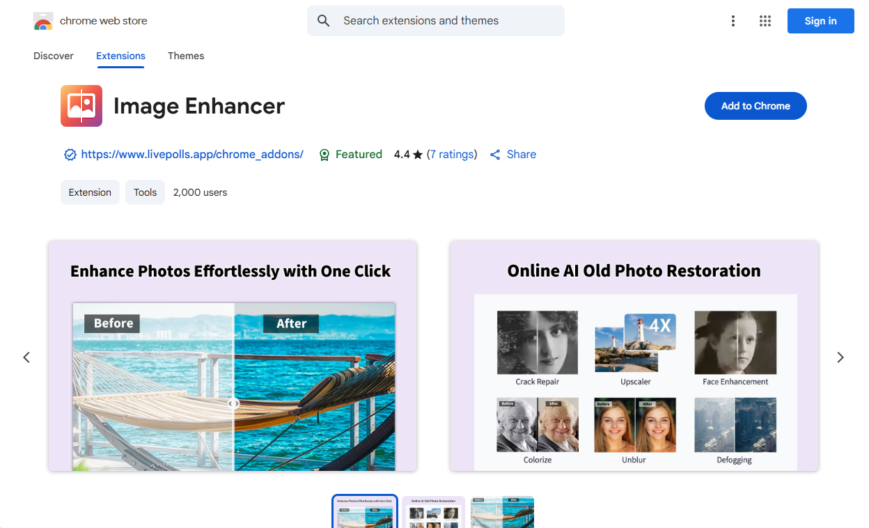
Image Enhancer is a Chrome extension that improves the quality of images on the web by removing noise, blur, and compression artifacts, making them look sharper and more detailed. It supports various image formats, including JPEG, PNG, and GIF. The extension is easy to use, with...
Image Enhancer is a Chrome extension that improves the quality of images on the web by removing noise, blur, and compression artifacts, making them look sharper and more detailed. It supports various image formats, including JPEG, PNG, and GIF. The extension is easy to use, with a simple toggle button to enable or disable image enhancement. It's particularly useful for viewing low-quality images, and it can also help reduce eye strain caused by looking at poor-quality images for extended periods.
Enhance image quality with advanced algorithms and noise reduction techniques.
Apply filters and effects to change image mood and atmosphere instantly.
Resize and compress images without losing quality or clarity.
Crop and trim unwanted parts of the image with precision tools.
Adjust brightness, contrast, and saturation levels to perfect the image.
Remove unwanted objects or blemishes with the touch-up feature.
Convert images to various formats like JPEG, PNG, and GIF.
Batch process multiple images at once for efficient editing.
You Got Questions,We Got Answers
What is Image Enhancer?
Image Enhancer Image Enhancer is a Chrome extension that improves the quality of images by enhancing details, sharpness, and colors. The tool is designed to refine image clarity for a better visual experience.
How does Image Enhancer work?
Image Enhancer Image Enhancer applies smart algorithms to analyze and enhance images in real-time. It improves resolution, contrast, and color saturation to create a more visually appealing image. Users can enable or disable the enhancement as needed.
Is Image Enhancer free to use?
Image Enhancer Yes, Image Enhancer is free to download and use. Some advanced features may require a premium upgrade, but the basic functionalities are available at no cost.
Can I customize the enhancement settings?
Image Enhancer Yes, Image Enhancer allows users to adjust enhancement levels based on their preferences. Users can configure sharpness, color balance, and contrast to achieve the desired image quality.
Does Image Enhancer work on all websites?
Image Enhancer Image Enhancer works on most websites by enhancing the images directly in the browser. However, some websites with restricted image processing may not support enhancements.
Is Image Enhancer safe to use?
Image Enhancer Yes, Image Enhancer is safe to use and does not collect or store personal data. It operates locally in the browser to enhance images without compromising privacy.
Does Image Enhancer affect website performance?
Image Enhancer Image Enhancer is optimized for performance and runs efficiently without slowing down websites. The tool processes images in real-time while minimizing the impact on browsing speed.
How can I install or remove Image Enhancer?
Image Enhancer Users can install Image Enhancer from the Chrome Web Store with a single click. To remove it, navigate to the Chrome Extensions page and select "Remove."
Use cases
Healthcare
Radiologists use Image Enhancer to improve the visibility of subtle details in medical images, such as X-rays and MRIs, to aid in accurate diagnoses and treatment plans
Finance
Financial analysts utilize Image Enhancer to enhance low-quality images of financial documents, such as receipts and invoices, to facilitate accurate expense tracking and auditing
Retail
E-commerce companies employ Image Enhancer to upgrade product images, showcasing products in high definition to increase customer engagement and drive sales
Manufacturing
Quality control inspectors use Image Enhancer to magnify defects in product images, enabling swift identification and correction of manufacturing flaws
Marketing
Graphic designers leverage Image Enhancer to upscale low-resolution images for marketing campaigns, ensuring visually appealing and professional advertisements
Education
Teachers use Image Enhancer to enhance historical images and diagrams, making complex concepts more engaging and accessible for students
Traffic and Engagement
Apr 2026 - Jun 2026
World wide
Monthly visitors (June)
209.8m
Page/Visit
2.9
Visit Duration
1m 55s
Bounce Rate
0.6%
Pricing
FREE
$0
ImageEnhance – Chrome Extension Embeds
Copied!
Let your community know you're live on Skillcurb! Just drop a badge on your site’s homepage with just a few clicks. Showcasing the badge helps increase your visibility and connects you with users actively exploring top AI tools.