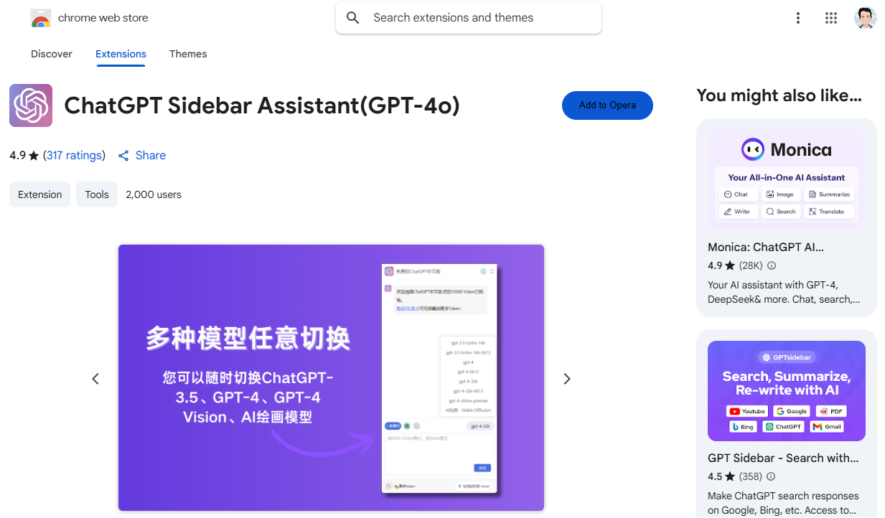
Free ChatGPT Sidebar Assistant is a Chrome extension that brings the power of ChatGPT to your browser sidebar, allowing you to ask questions, generate text, and get instant answers without leaving your current tab, making it easy to multitask and stay productive, with features like customizable...
Free ChatGPT Sidebar Assistant is a Chrome extension that brings the power of ChatGPT to your browser sidebar, allowing you to ask questions, generate text, and get instant answers without leaving your current tab, making it easy to multitask and stay productive, with features like customizable prompts, conversation history, and dark mode support, this extension is a must-have for anyone looking to streamline their workflow and get more done in less time.
Provides instant access to ChatGPT AI assistant in a convenient sidebar.
Offers real-time conversation and response to user queries and prompts.
Supports multiple languages including English, Spanish, French, and many more.
Allows users to customize the chat interface with various themes and colors.
Enables seamless integration with Google search results for enhanced research.
Offers a distraction-free writing experience with AI-powered writing suggestions.
You Got Questions,We Got Answers
What is Free ChatGPT Sidebar Assistant?
Free ChatGPT Sidebar Assistant is a Chrome extension that provides an AI-powered assistant directly in your browser. It allows users to access ChatGPT from a sidebar while browsing different websites, making it easier to generate responses, summarize content, and boost productivity.
How does Free ChatGPT Sidebar Assistant work?
Free ChatGPT Sidebar Assistant integrates ChatGPT functionality into a sidebar within Google Chrome. Users can input queries, generate responses, summarize articles, and perform text-based tasks without switching tabs. The tool enhances efficiency by providing AI-powered insights while browsing.
Is Free ChatGPT Sidebar Assistant free to use?
Free ChatGPT Sidebar Assistant offers a free version that provides core functionalities. Some advanced features may require a premium version or API access. Users can explore both options based on their usage requirements.
Can I customize Free ChatGPT Sidebar Assistant?
Free ChatGPT Sidebar Assistant allows users to personalize certain settings, such as the AI model's behavior, response length, and language preferences. Customization options may vary depending on the plan.
Is Free ChatGPT Sidebar Assistant available on mobile?
Free ChatGPT Sidebar Assistant is primarily designed as a Chrome extension for desktop and laptop users. It may not be fully optimized for mobile browsers, but users can check for any workarounds or upcoming mobile support.
Does Free ChatGPT Sidebar Assistant store user data?
Free ChatGPT Sidebar Assistant may store user interactions to improve functionality and user experience. However, it follows data privacy regulations and offers settings to manage privacy preferences. Users should review its privacy policy for details.
How accurate is Free ChatGPT Sidebar Assistant?
Free ChatGPT Sidebar Assistant provides responses based on ChatGPT's capabilities. While it is highly accurate for most tasks, accuracy may vary depending on the input and context. The AI is continuously improved with updates.
Can I integrate Free ChatGPT Sidebar Assistant with other tools?
Free ChatGPT Sidebar Assistant works within Chrome but may not have direct integrations with other tools. However, users can copy responses and use them in various applications. Future updates may introduce integrations based on user demand.
Is Free ChatGPT Sidebar Assistant safe to use?
Free ChatGPT Sidebar Assistant follows security standards to ensure safe browsing. It does not install malware or track sensitive user data beyond what is necessary for its functionality. Users should check permissions before installation.
How can I contact Free ChatGPT Sidebar Assistant support?
Free ChatGPT Sidebar Assistant provides support through its Chrome Web Store page, email, or official website. Users can find FAQs, guides, and contact support for troubleshooting and general inquiries.
Use cases
Healthcare
Medical professionals use the ChatGPT sidebar to quickly generate patient education materials, summarize medical research, and draft clinical notes, freeing up time for more critical tasks and improving patient care
Finance
Financial analysts leverage the ChatGPT sidebar to analyze market trends, generate investment reports, and summarize complex financial data, enabling data-driven decision-making and improved portfolio performance
Retail
Retailers utilize the ChatGPT sidebar to generate product descriptions, respond to customer inquiries, and develop targeted marketing campaigns, enhancing customer experience and driving sales
Manufacturing
Quality control teams employ the ChatGPT sidebar to analyze production data, generate quality control reports, and identify process improvements, optimizing manufacturing efficiency and reducing defects
Marketing
Marketers use the ChatGPT sidebar to develop targeted ad copy, generate social media content, and analyze customer feedback, streamlining marketing workflows and improving campaign effectiveness
Education
Educators utilize the ChatGPT sidebar to develop personalized lesson plans, generate educational resources, and provide real-time feedback to students, enhancing the learning experience and improving student outcomes
Let your community know you're live on Skillcurb! Just drop a badge on your site’s homepage with just a few clicks. Showcasing the badge helps increase your visibility and connects you with users actively exploring top AI tools.