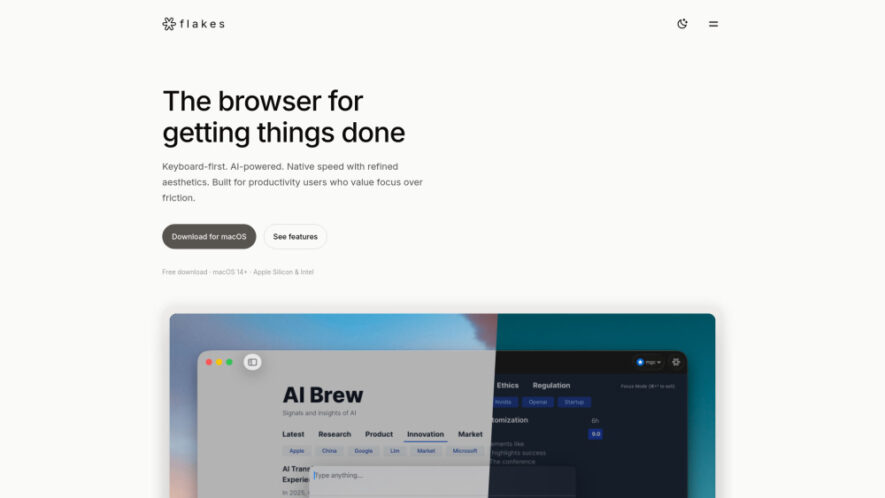
Flakes is an AI-native, keyboard-first browser designed exclusively for macOS users who value focus and efficiency. Built with SwiftUI and WebKit, it delivers native performance, minimal memory usage, Vim-style navigation, and a universal command palette for rapid actions. Flakes also offers Focus Mode with ad blocking...
Flakes is an AI-native, keyboard-first browser designed exclusively for macOS users who value focus and efficiency. Built with SwiftUI and WebKit, it delivers native performance, minimal memory usage, Vim-style navigation, and a universal command palette for rapid actions. Flakes also offers Focus Mode with ad blocking and optional Drift AI for contextual answers, real-time translations, and intelligent assistance across multiple open tabs for distraction-free productivity.
Keyboard-first navigation enables faster browsing without relying on mouse interactions.
Universal Command Palette executes searches, commands, history access, and AI.
Vim-style shortcuts provide efficient page navigation with intuitive keyboard controls.
Drift AI understands context across multiple open browser tabs instantly.
Focus Mode removes distractions and enhances reading productivity significantly.
Built-in ad blocking delivers cleaner, faster, and distraction-free browsing experiences.
Native SwiftUI and WebKit architecture ensures speed and low memory.
Optional AI features maintain privacy with local-first browser functionality.
You Got Questions,We Got Answers
1. What makes Flakes different from traditional browsers designed for everyday use?
Flakes is an AI-native, keyboard-first browser built specifically for productivity users, offering Vim-style navigation, command-driven workflows, native macOS performance, Focus Mode, optional AI assistance, and significantly fewer distractions than conventional browsers.
2. Does Flakes support both Apple Silicon and Intel-based macOS devices?
Yes, Flakes is designed for macOS 14 and newer versions, supporting both Apple Silicon and Intel processors while delivering native performance, efficient resource usage, and a seamless browsing experience across compatible devices.
3. Is the Drift AI feature required to use Flakes effectively every day?
No, Drift AI is completely optional. Users can enjoy Flakes as a fast, privacy-focused local browser without enabling AI features while still benefiting from its keyboard-first productivity experience and native browsing capabilities.
4. How can users quickly access commands, history, and AI features?
Users can press the universal Command Palette shortcut, K, to search browsing history, execute commands, open URLs, switch tasks, and interact with AI from a single centralized interface.
5. Can Flakes help users stay focused while reading online content regularly?
Yes, Flakes includes Focus Mode and built-in ad blocking that remove distractions, reduce visual clutter, improve concentration, and create a cleaner environment for reading, research, and content consumption.
6. Does Flakes provide keyboard shortcuts similar to Vim navigation controls?
Yes, Flakes supports Vim-style navigation shortcuts such as h, j, k, and l, along with link hints, enabling users to browse websites efficiently without frequently touching the mouse.
7. How does Drift AI assist users during research across multiple browser tabs?
Drift AI understands the context of open tabs, allowing users to receive contextual answers, gather insights, perform deeper research, and access real-time translations without constantly switching between applications.
8. Is Flakes optimized for speed and efficient memory usage on macOS?
Yes, Flakes is built with SwiftUI and WebKit, providing native performance, responsive interactions, low memory consumption, and an optimized browsing experience tailored specifically for modern macOS systems.
Use cases
Browsing
Navigate websites rapidly using keyboard shortcuts, link hints, and command-based interactions without relying on mouse movements.
Research
Use Drift AI to analyze information across multiple tabs and receive contextual answers instantly during deep research sessions.
Reading
Enable Focus Mode and ad blocking to create a distraction-free environment for reading articles and online content.
Productivity
Perform browser actions faster with keyboard-first workflows that reduce friction and improve overall efficiency significantly.
Navigation
Switch tabs, open links, access history, and execute commands quickly using the universal Command Palette.
Translation
Utilize Drift AI for real-time translation while reading multilingual content across different websites and resources.
Multitasking
Manage multiple tabs and workflows efficiently while maintaining focus and minimizing unnecessary browser distractions.
Privacy
Browse with optional AI features while maintaining local-first functionality and greater control over personal data.
Traffic and Engagement
May 2026 - Jul 2026
World wide
Monthly visitors (July)
1.7k
Page/Visit
1.08
Visit Duration
0s
Bounce Rate
37.03%
Pricing
Free
$0
Flakes Embeds
Copied!
Let your community know you're live on Skillcurb! Just drop a badge on your site’s homepage with just a few clicks. Showcasing the badge helps increase your visibility and connects you with users actively exploring top AI tools.