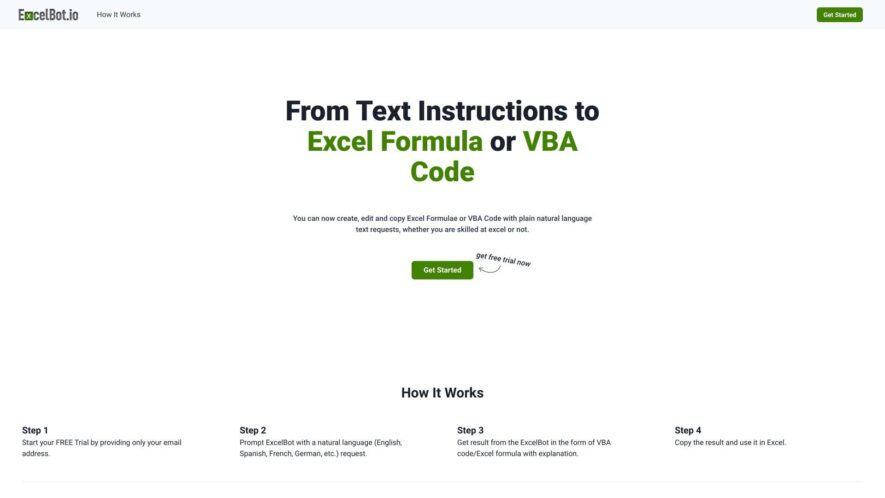
ExcelBot is an AI-powered Excel assistant that instantly generates Excel formulas and VBA code. By describing your needs in plain language, the AI analyzes your request and provides ready-to-use solutions with explanations. This tool enables users to create professional-level formulas and automate repetitive tasks efficiently. Trusted...
ExcelBot is an AI-powered Excel assistant that instantly generates Excel formulas and VBA code. By describing your needs in plain language, the AI analyzes your request and provides ready-to-use solutions with explanations. This tool enables users to create professional-level formulas and automate repetitive tasks efficiently. Trusted by Excel users globally, ExcelBot simplifies complex spreadsheet operations and enhances productivity for data analysts, marketing coordinators, and financial analysts.
Provides access to professional-grade Excel formulas for accurate and reliable calculations
Delivers instant calculation results, significantly enhancing your overall workflow efficiency
Grants users full and unrestricted access to all available features within the application
Comprehensively supports an unlimited range of diverse formula types to meet various needs
Effectively enhances your workflow speed by automating complex formula generation
Ultimately improves the accuracy of your spreadsheet calculations and data analysis.
You Got Questions,We Got Answers
What is ExcelBot?
ExcelBot is an AI-powered tool that enhances your productivity by automating tasks in Microsoft Excel. It helps users analyze data, create formulas, and manage spreadsheets faster.
How does ExcelBot work?
ExcelBot uses natural language processing to understand user queries and generate appropriate Excel formulas, charts, and data manipulations based on simple instructions.
Can ExcelBot automate data analysis tasks?
ExcelBot can automate common data analysis tasks like summarizing data, calculating totals, generating pivot tables, and visualizing trends in charts.
Is ExcelBot compatible with all versions of Excel?
ExcelBot works with the latest versions of Microsoft Excel, including both Office 365 and Excel for desktop and online versions.
Does ExcelBot support multiple languages?
ExcelBot supports multiple languages, allowing users to interact with it in their preferred language for ease of use and accessibility.
Can ExcelBot integrate with other tools or software?
ExcelBot integrates with other productivity tools, including Google Sheets, making it a versatile solution for various data workflows.
Do I need coding skills to use ExcelBot?
ExcelBot is designed for non-technical users, so no coding skills are required. Users can easily create complex functions through simple instructions.
Is there a free version of ExcelBot?
ExcelBot offers both free and premium plans, with the premium version providing additional features like advanced integrations and custom template creation.
Use cases
Healthcare
excelbot.io can be used to generate complex Excel formulas for analyzing patient data, automating reporting tasks, and creating VBA code to streamline administrative processes
Manufacturing
Manufacturing companies can leverage excelbot.io to generate Excel formulas for production tracking, inventory management, and quality control analysis, as well as VBA code for automating repetitive tasks
Retail
Retail businesses can use excelbot.io to create Excel formulas for sales forecasting, customer segmentation, and inventory optimization, and generate VBA code to automate tasks such as data entry and report generation
Marketing
Marketing teams can utilize excelbot.io to generate Excel formulas for campaign performance analysis, ROI calculations, and customer data management, as well as create VBA code for automating reporting and data manipulation
Education
Educational institutions can implement excelbot.io to generate Excel formulas for analyzing student performance data, tracking enrollment trends, and managing budgets, as well as VBA code for automating administrative tasks and report generation
Finance
Financial institutions can leverage excelbot.io to generate Excel formulas for financial modeling, risk assessment, and portfolio analysis, and create VBA code to automate tasks such as data extraction, report generation, and data validation.
Traffic and Engagement
Feb 2026 - Apr 2026
World wide
Monthly visitors (April)
71
Page/Visit
1.1
Visit Duration
N/A
Bounce Rate
0.5%
Pricing
Paid
$5
ExcelBot Embeds
Copied!
Let your community know you're live on Skillcurb! Just drop a badge on your site’s homepage with just a few clicks. Showcasing the badge helps increase your visibility and connects you with users actively exploring top AI tools.