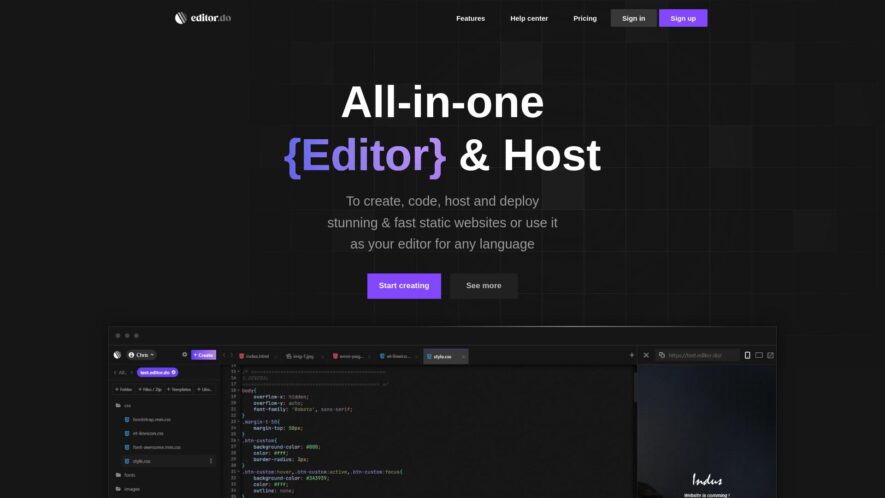
Editor.do is a comprehensive online IDE designed for developers and creators looking to build stunning static websites with ease. It features a full-featured code editor that allows real-time previews of changes, reducing the need for tedious back-and-forth adjustments. The drag and drop visual builder simplifies website...
Editor.do is a comprehensive online IDE designed for developers and creators looking to build stunning static websites with ease. It features a full-featured code editor that allows real-time previews of changes, reducing the need for tedious back-and-forth adjustments. The drag and drop visual builder simplifies website creation, making it accessible for users of all skill levels. With an AI assistant integrated into the platform, users can enjoy assistance with code correction and completion, enhancing their productivity. Editor.do also offers fast and secure web hosting, complete with a free SSL certificate, ensuring that your website is both accessible and trusted by visitors. Whether you are a seasoned developer or a beginner, Editor.do streamlines the process of creating, hosting, and deploying websites. You can easily sign up to start utilizing its rich array of features. For those looking to use their own domain, Editor.do provides that capability as well. Customer support is readily available through their dedicated email. Join the growing community of developers transforming their ideas into reality with Editor.do.
Customizable workflows with drag-and-drop interface builder.
Integrated version control with commit and revert history.
Instant feedback with inline comments and threaded conversations.
Customizable workflows with drag-and-drop interface builder.
Integrated version control with commit and revert history.
Seamless content reuse across documents and projects.
Simple and intuitive interface for easy adoption.
Robust formatting options for customizable content styling.
You Got Questions,We Got Answers
What is Editor.do?
Editor.do is a free online text editor that allows users to create, edit, and share plain text files without requiring any registration or login credentials, making it a convenient and secure solution for collaborative writing and editing tasks
What features does it offer?
Editor.do offers a range of features, including syntax highlighting, auto-save, and real-time collaboration, making it an ideal tool for developers, writers, and teams working on text-based content, including code, articles, and documentation
Is it free to use?
Yes, Editor.do is completely free to use, with no limitations on the number of documents, collaborators, or features, making it an attractive option for individuals and teams of all sizes and types
How does collaboration work?
Collaborators can join a document by sharing a unique URL, and changes are reflected in real-time, allowing multiple users to work together seamlessly, with the option to track changes and revert to previous versions if needed
Can I save my work?
Yes, Editor.do automatically saves your work in real-time, so you don't have to manually save your files, and you can access your documents from any device with an internet connection
Is my data secure?
Yes, Editor.do takes data security seriously, using HTTPS encryption to protect your data in transit, and storing files securely on their servers, with regular backups to ensure data integrity
Can I use it offline?
No, Editor.do requires an active internet connection to function, as it is a cloud-based application, but you can use other offline text editors and sync your work with Editor.do when you're back online
What file formats are supported?
Editor.do supports plain text files, including .txt, .md, and .csv, making it compatible with most text editors and applications, and allowing easy import and export of files
Use cases
Healthcare
Medical writers use Editor.do to collaborate on clinical trial reports, ensuring accuracy and compliance with regulatory requirements, while maintaining a transparent version history and reducing review cycles
Finance
Investment analysts utilize Editor.do to co-author research reports, synchronizing data and insights, and streamlining the publication process, resulting in faster time-to-market and improved portfolio performance
Retail
E-commerce content teams leverage Editor.do to create and review product descriptions, ensuring consistency and accuracy across all sales channels, while reducing content creation time and improving customer satisfaction
Manufacturing
Technical writers employ Editor.do to develop and maintain complex product documentation, collaborating with cross-functional teams, and streamlining the review process, resulting in improved product quality and reduced support requests
Traffic and Engagement
Mar 2026 - May 2026
World wide
Monthly visitors (May)
0.2k
Page/Visit
4.1
Visit Duration
1m 23s
Bounce Rate
0.3%
Pricing
Freemium
$4
Editor.do Embeds
Copied!
Let your community know you're live on Skillcurb! Just drop a badge on your site’s homepage with just a few clicks. Showcasing the badge helps increase your visibility and connects you with users actively exploring top AI tools.