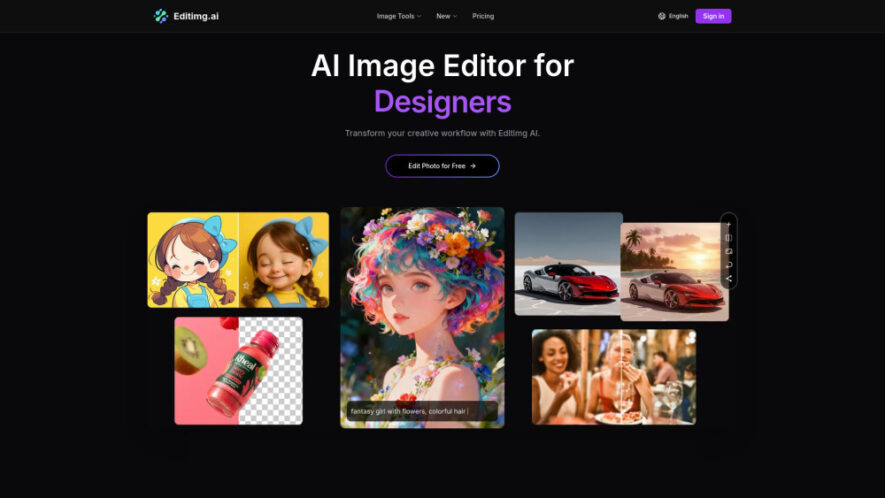
Editimg AI is a powerful AI image editing platform that helps users transform, enhance, and create professional-quality visuals with advanced AI tools. It supports background removal, object replacement, image generation from text, portrait retouching, style transfer, color correction, watermark removal, photo restoration, and image upscaling. With...
Editimg AI is a powerful AI image editing platform that helps users transform, enhance, and create professional-quality visuals with advanced AI tools. It supports background removal, object replacement, image generation from text, portrait retouching, style transfer, color correction, watermark removal, photo restoration, and image upscaling. With integrations featuring leading AI models, Editimg AI enables designers, marketers, creators, and businesses to produce impressive images quickly and efficiently.
Removes backgrounds and replaces objects using intelligent AI-powered editing technology seamlessly.
Generates high-quality images from simple text prompts within seconds effortlessly.
Applies artistic filters, anime effects, and creative style transfer automatically with AI.
Enhances portraits through skin smoothing, facial adjustments, and professional retouching tools.
Upscales low-resolution images into sharp, detailed, high-quality visuals up to 4K.
Restores damaged old photos with AI-powered enhancement and color correction capabilities.
Supports JPG, PNG, and WebP image formats for flexible editing workflows.
Integrates multiple advanced AI models for accurate, fast, and professional image editing.
You Got Questions,We Got Answers
1. What makes Editimg AI a powerful AI image editing platform?
Editimg AI combines advanced AI editing tools with image generation, style transfer, portrait retouching, background removal, upscaling, and restoration features. It integrates multiple AI models to deliver professional-quality image editing results quickly and efficiently.
2. Can Editimg AI generate images from simple text descriptions easily?
Yes. Editimg AI transforms written text prompts into original, high-quality images using advanced AI image generation technology. Users can create creative concepts, illustrations, mockups, and marketing visuals within just a few clicks.
3. Does Editimg AI support automatic background removal and replacement features?
Yes. Editimg AI automatically removes image backgrounds with AI precision and allows users to replace them with custom colors, scenes, transparent backgrounds, or AI-generated environments for professional-looking visual content.
4. Which image formats are supported for editing with Editimg AI?
Editimg AI supports popular image formats including JPG, PNG, and WebP. Users can upload compatible files, edit them using AI-powered tools, and download high-resolution results suitable for personal or professional projects.
5. Can Editimg AI improve blurry or low-resolution images effectively?
Yes. The AI upscaling feature enhances blurry, pixelated, or low-resolution images by increasing sharpness, preserving details, and producing clearer visuals that can reach resolutions up to 4K quality.
6. Does Editimg AI help restore old or damaged photographs automatically?
Yes. Editimg AI restores faded, scratched, or damaged photographs using AI-powered restoration, color correction, and enhancement tools, helping preserve precious memories while improving overall image quality and appearance.
7. Is Editimg AI free for beginners to try before subscribing?
Yes. Editimg AI offers a free plan with limited credits, allowing new users to explore essential editing features before upgrading to premium subscription plans for additional credits and advanced capabilities.
8. Can Editimg AI edit multiple images simultaneously in one session?
The available information does not clearly confirm batch image editing. Users should check the latest platform documentation or updates to verify whether simultaneous multi-image editing is currently supported.
Use cases
Designing
Transform creative ideas into professional-quality visuals using AI-powered editing and image generation tools.
Products
Remove backgrounds and enhance product photos for eCommerce listings, catalogs, and promotional marketing materials.
Enhancement
Improve colors, lighting, and image quality to create polished visuals for professional presentations.
Upscaling
Increase image resolution up to 4K while preserving important details and overall visual clarity.
Extension
Expand image borders naturally using AI-generated content that matches surrounding visual elements seamlessly.
Cleanup
Remove watermarks, unwanted text, or distracting objects to produce clean, professional-looking images effortlessly.
Styling
Apply artistic filters, anime effects, and creative styles for unique visual designs and digital artwork.
Restoration
Repair damaged vintage photographs with AI-powered restoration, colorization, and quality enhancement for lasting preservation.
Traffic and Engagement
May 2026 - Jul 2026
World wide
Monthly visitors (July)
0.2k
Page/Visit
1.01
Visit Duration
0s
Bounce Rate
46.39%
Pricing
Freemium
$9.99
Editimg AI Embeds
Copied!
Let your community know you're live on Skillcurb! Just drop a badge on your site’s homepage with just a few clicks. Showcasing the badge helps increase your visibility and connects you with users actively exploring top AI tools.