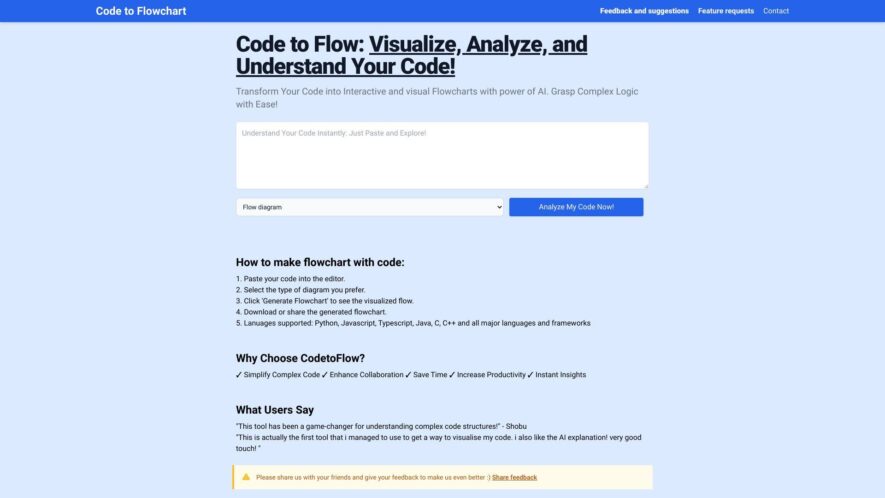
Code to Flowchart is an AI-powered tool that converts code into interactive flowcharts, sequence diagrams, and class diagrams. It supports multiple programming languages, helping users visualize code logic, understand code structure, and debug effectively. The tool identifies code paths and logic flows, offering various diagram options...
Code to Flowchart is an AI-powered tool that converts code into interactive flowcharts, sequence diagrams, and class diagrams. It supports multiple programming languages, helping users visualize code logic, understand code structure, and debug effectively. The tool identifies code paths and logic flows, offering various diagram options and export features. Code to Flow has both free and pro versions, with the pro version offering unlimited visualizations and extended features.
Supports major programming languages like Python, JavaScript, Java, and C++
Helps identify code paths and logic flows
Offers multiple options to understand code, including flowchart, sequence diagram, and class diagram
Diagrams can be exported as SVG, PNG, or PDF
Offers customizable color schemes and themes
Ensures user privacy by not saving the code.
You Got Questions,We Got Answers
What is CodeToFlowchart?
CodeToFlowchart is an AI-powered tool that automatically converts your code into visual flowcharts and diagrams, making it easier to understand and explain complex logic.
Who can benefit from using CodeToFlowchart?
CodeToFlowchart is designed for developers, software engineers, educators, and anyone who needs to visualize their code's flow for documentation, analysis, or teaching purposes.
How does CodeToFlowchart work?
CodeToFlowchart uses advanced algorithms to analyze the structure of your code and generates accurate flowcharts or diagrams that represent its logic visually.
Can I export the diagrams generated by CodeToFlowchart?
CodeToFlowchart allows you to export generated flowcharts and diagrams in various formats like PNG, SVG, or PDF for easy sharing and embedding.
Does CodeToFlowchart support multiple programming languages?
CodeToFlowchart supports a wide range of programming languages, including Python, JavaScript, Java, C++, and more, allowing you to visualize code from different environments.
Is there a free version of CodeToFlowchart?
CodeToFlowchart offers a free plan with limited features, and premium plans are available to unlock additional customization and export options.
Can I customize the generated flowcharts?
CodeToFlowchart provides options for customizing the appearance of your flowcharts, including adjusting colors, shapes, and labels to match your needs.
Does CodeToFlowchart integrate with other tools?
CodeToFlowchart can be integrated with project management tools and code editors, making it easier to incorporate flowchart generation directly into your workflow.
Use cases
Healthcare
codetoflowchart could assist healthcare professionals by visually designing and generating code for patient management systems, creating interactive dashboards for medical data, or automating workflows for appointment scheduling and billing
Manufacturing
Manufacturing companies can leverage codetoflowchart to visually design and generate code for industrial control systems, creating interactive interfaces for monitoring production lines, or automating data collection from IoT sensors
Retail
Retail businesses can use codetoflowchart to visually design and generate code for e-commerce platforms, create interactive product catalogs, or automate customer service chatbots
Marketing
Marketing teams can utilize codetoflowchart to visually design and generate code for marketing automation tools, create interactive dashboards for campaign performance, or automate data analysis workflows
Education
Educational institutions can implement codetoflowchart to visually design and generate code for online learning platforms, create interactive educational games, or automate student progress tracking systems
Finance
Financial institutions can leverage codetoflowchart to visually design and generate code for financial analysis tools, create interactive dashboards for market data, or automate reporting workflows for regulatory compliance.
Traffic and Engagement
Feb 2026 - Apr 2026
World wide
Monthly visitors (April)
42.6k
Page/Visit
2
Visit Duration
42s
Bounce Rate
0.5%
Pricing
Freemium
$9.99
Code to Flowchart Embeds
Copied!
Let your community know you're live on Skillcurb! Just drop a badge on your site’s homepage with just a few clicks. Showcasing the badge helps increase your visibility and connects you with users actively exploring top AI tools.