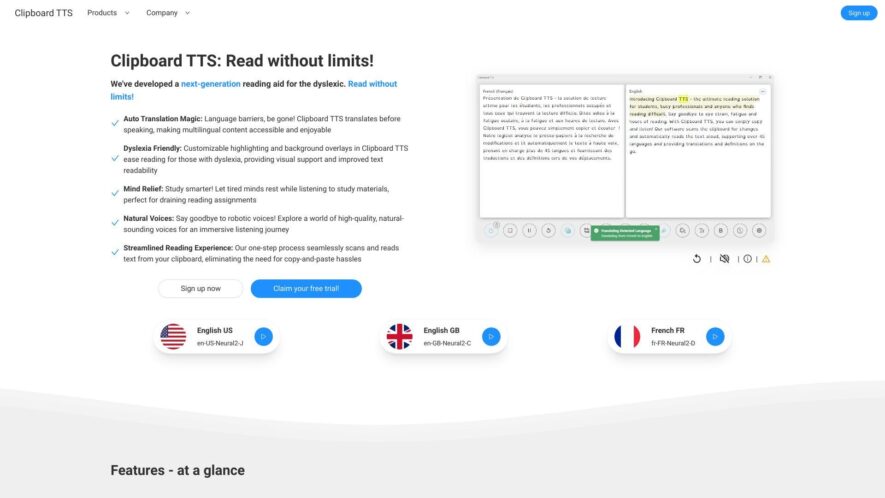
ClipboardTTS is a free online tool that converts written text into natural-sounding speech in various languages and voices, allowing users to create audio files for different purposes, such as educational videos, podcasts, audiobooks, and more. The platform supports multiple formats, including MP3, WAV, and OGG, and...
ClipboardTTS is a free online tool that converts written text into natural-sounding speech in various languages and voices, allowing users to create audio files for different purposes, such as educational videos, podcasts, audiobooks, and more. The platform supports multiple formats, including MP3, WAV, and OGG, and offers customization options for pitch, rate, and volume. With a simple and user-friendly interface, ClipboardTTS provides an efficient way to generate high-quality audio content without requiring extensive audio editing skills or expensive software.
Converts text to natural-sounding speech in various languages and dialects.
Supports popular audio formats including MP3, WAV, and OGG.
Offers a wide range of voices, including male, female, and kid voices.
Allows users to adjust speech rate, pitch, and volume to their preference.
Provides a user-friendly interface for easy text-to-speech conversion.
Supports bulk text conversion, making it ideal for content creators and developers.
Offers a free plan with limited conversions, suitable for personal use.
Provides a secure and reliable platform with high-quality audio output.
You Got Questions,We Got Answers
What is ClipboardTTS used for?
ClipboardTTS is a free online tool that allows users to convert written text into natural-sounding speech in various languages and voices, making it an ideal solution for content creators, marketers, and individuals with reading difficulties.
Can I use it for commercial purposes?
Yes, ClipboardTTS is free for both personal and commercial use cases, including video narrations, audiobooks, and voiceovers, with no royalties or attribution required, making it a cost-effective solution for businesses and individuals alike.
How many languages are supported?
ClipboardTTS currently supports over 30 languages, including English, Spanish, French, German, Italian, Portuguese, Chinese, Japanese, and many more, with new languages being added regularly to cater to the diverse needs of its users.
Is ClipboardTTS easy to use?
Absolutely, the user-friendly interface of ClipboardTTS allows users to simply copy and paste their text, select the desired language and voice, and download the audio file in MP3 format, making it accessible to users of all skill levels.
Can I customize the voice and speed?
Yes, ClipboardTTS offers a range of voices and speeds to choose the perfect fit for your content, from slow and clear to fast and energetic, giving users full control over the audio output to suit their specific needs.
How do I download the audio file?
Once the text is converted to speech, users can simply click the "
Download MP3" button to save the audio file to their device, which can then be shared, uploaded, or used in their preferred application or platform. Is ClipboardTTS secure and private?
Yes, ClipboardTTS takes the privacy and security of its users seriously, ensuring that all text and audio data are encrypted and deleted shortly after processing, with no data being stored or shared with third-party services or vendors.
Does ClipboardTTS offer customer support?
Yes, the ClipboardTTS team is committed to providing excellent customer support, offering responsive email support, a comprehensive FAQ section, and regular updates to ensure a seamless user experience and address any questions or concerns users may have.
Use cases
Healthcare
Doctors can use ClipboardTTS to dictate patient notes, reducing transcription time and increasing accuracy, allowing them to focus on patient care
Finance
Financial analysts can use the tool to create audio summaries of complex financial reports, making it easier to share insights with clients
Retail
Sales associates can use ClipboardTTS to create audio product descriptions, enhancing the shopping experience for visually impaired customers
Manufacturing
Quality control inspectors can use the tool to generate audio reports of product defects, streamlining the defect reporting process
Marketing
Marketers can use ClipboardTTS to create engaging audio content for social media campaigns, increasing brand awareness and customer engagement
Education
Teachers can use ClipboardTTS to create audio versions of lesson plans, making it easier for students with learning disabilities to access educational materials
Traffic and Engagement
N/A
World wide
Monthly visitors (January)
N/A
Page/Visit
N/A
Visit Duration
N/A
Bounce Rate
N/A
Pricing
Freemium
$5.97
Clipboard TTS Embeds
Copied!
Let your community know you're live on Skillcurb! Just drop a badge on your site’s homepage with just a few clicks. Showcasing the badge helps increase your visibility and connects you with users actively exploring top AI tools.