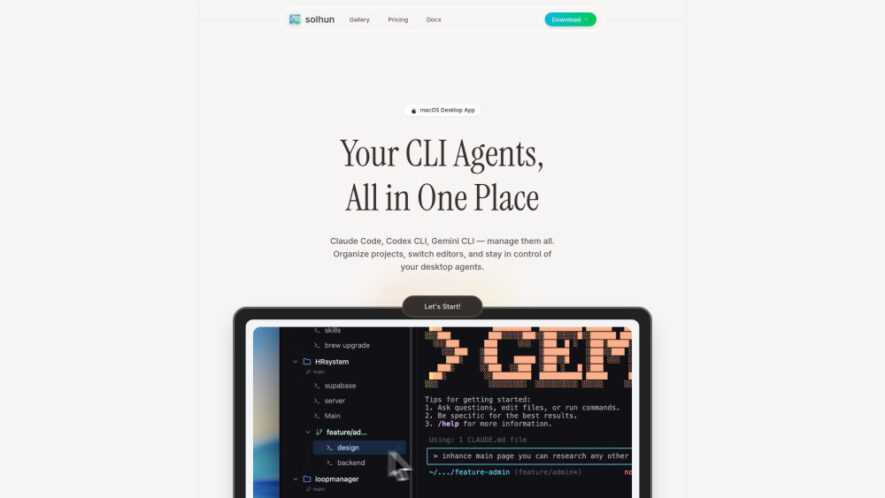
CLI Manager is a unified dashboard that helps developers organize and control multiple AI CLI agents from one centralized workspace. It supports popular coding assistants like Claude Code, Codex CLI, and Gemini CLI while enabling seamless editor switching, agent categorization, and project organization. With customizable agent...
CLI Manager is a unified dashboard that helps developers organize and control multiple AI CLI agents from one centralized workspace. It supports popular coding assistants like Claude Code, Codex CLI, and Gemini CLI while enabling seamless editor switching, agent categorization, and project organization. With customizable agent roles, streamlined workflows, and efficient development tools, CLI Manager simplifies AI-assisted coding and boosts productivity for modern software development teams.
Manage multiple AI CLI agents through one centralized developer dashboard effortlessly.
Rename and categorize AI agents for organized development workflows and responsibilities clearly.
Switch instantly between VS Code, Cursor, and supported code editors seamlessly.
Organize projects efficiently with customized AI agent roles and configurations for developers.
Simplify AI-powered coding workflows using centralized management and quick agent switching capabilities.
Launch development environments rapidly with streamlined project organization and workflow automation features.
Support popular AI coding assistants including Claude Code, Codex CLI, and Gemini.
Improve productivity by managing multiple coding tools without losing workflow continuity ever.
You Got Questions,We Got Answers
1. What is CLI Manager used for exactly?
CLI Manager is a centralized platform that helps developers organize, manage, and control multiple AI CLI agents from one dashboard, simplifying AI-assisted coding workflows while improving productivity and project organization.
2. Which AI CLI agents does CLI Manager support?
CLI Manager supports popular AI coding assistants including Claude Code, Codex CLI, and Gemini CLI, allowing developers to manage them from one convenient and organized interface.
3. Can I switch between different code editors easily?
Yes. CLI Manager enables instant switching between supported editors such as VS Code, Cursor IDE, and other configured development environments without interrupting your coding workflow.
4. Can I rename AI agents for different roles?
Yes. Developers can assign custom names and categories to AI agents, making it easier to organize assistants for specialized roles like frontend, backend, testing, or documentation.
5. How does CLI Manager improve developer productivity?
CLI Manager centralizes AI agent management, reduces context switching, streamlines project organization, and enables faster workflow execution, helping developers spend more time building software and less time managing tools.
6. Is CLI Manager suitable for complex development projects?
Yes. It supports organized project management, Git worktrees, AI agent categorization, and workflow templates, making it valuable for both individual developers and larger software projects.
7. Does CLI Manager offer a free version for users?
Yes. CLI Manager includes a free tier, allowing developers to experience its core AI agent management capabilities before deciding whether advanced features meet their workflow requirements.
8. Who benefits most from using CLI Manager platform?
CLI Manager is ideal for software developers, engineers, AI coding enthusiasts, technical teams, and professionals who regularly work with multiple AI CLI assistants and development environments.
Use cases
Development
Manage multiple AI coding assistants efficiently while maintaining organized workflows across software development projects.
Organization
Categorize AI agents by roles, responsibilities, and project requirements for improved workspace management.
Switching
Move instantly between supported code editors without disrupting coding sessions or project progress.
Collaboration
Coordinate AI-powered development workflows across projects while maintaining consistent agent organization and productivity.
Automation
Launch predefined development workflows quickly using organized AI agents and reusable project configurations.
Worktrees
Manage Git worktrees efficiently while tracking project environments and development resources from one dashboard.
Productivity
Reduce workflow interruptions by controlling multiple AI coding assistants from one unified interface.
Coding
Accelerate software development with centralized AI agent management and streamlined coding environment controls.
Pricing
Free
$0
CLI Manager Embeds
Copied!
Let your community know you're live on Skillcurb! Just drop a badge on your site’s homepage with just a few clicks. Showcasing the badge helps increase your visibility and connects you with users actively exploring top AI tools.