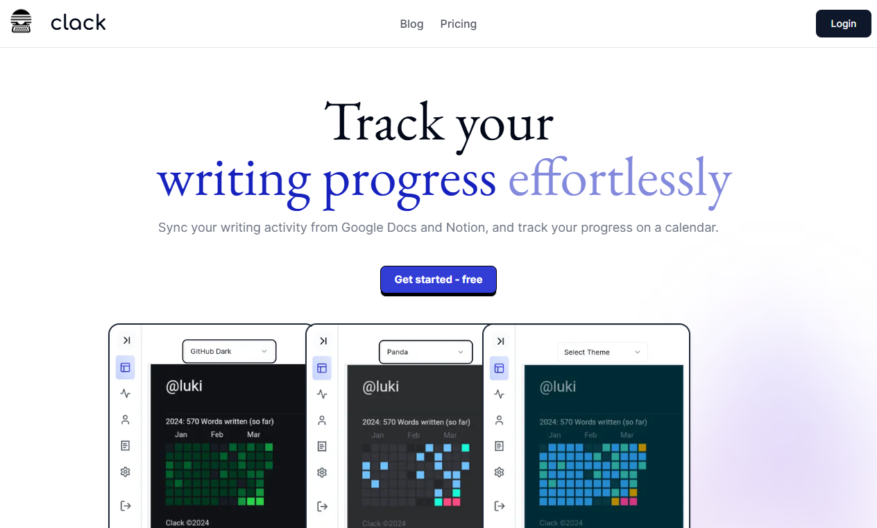
Clack is an innovative tool designed to help writers track their writing progress seamlessly across popular platforms like Notion and Google Docs. By syncing your writing activity, Clack allows you to visualize your daily accomplishments on an intuitive calendar, making it easier to stay motivated and...
Clack is an innovative tool designed to help writers track their writing progress seamlessly across popular platforms like Notion and Google Docs. By syncing your writing activity, Clack allows you to visualize your daily accomplishments on an intuitive calendar, making it easier to stay motivated and focused. With its neat and clean user interface, users can choose from multiple heatmap themes to customize their experience and have everything displayed at a glance. Clack's core features include the ability to keep unlimited documents, a Notion widget for easy integration, and an AI-powered Notion-style editor that enhances productivity. Whether you are a casual writer or a professional author, Clack offers the structure and support you need to reach your writing goals. Explore Clack and elevate your writing journey today by visiting their website for login and pricing options. Join the community on Twitter and check out their GitHub for more insights and updates on this powerful writing companion. Stay organized, motivated, and focused with Clack at your side.
Real-Time Collaboration Tools Enables teams to communicate instantly across platforms.
AI-Powered Meeting Summaries Automatically generates concise recaps from conversations.
Smart Notification Filtering Prioritizes important messages and reduces notification overload.
Voice and Text Integration Seamlessly combines spoken and written team communication.
Context-Aware Suggestions Offers helpful prompts based on ongoing team discussions.
Task Assignment Integration Create and track tasks directly from conversations.
Cross-Platform Syncing Keeps conversations updated across desktop and mobile devices.
Custom Channel Management Organize discussions by project, topic, or team.
You Got Questions,We Got Answers
What is Clack?
A simple, distraction-free online typewriter for writers, providing a minimalistic interface to help you focus on your writing.
What features does Clack offer?
Clack offers a full-screen writing mode, customizable font and size, and automatic saving of your work, allowing you to focus on your writing.
Is Clack free to use?
Yes, Clack is completely free to use, and you don't need to create an account or pay any subscription fees, making it accessible to everyone.
Can I save my work on Clack?
Yes, Clack automatically saves your work as you type, and you can also download your work as a text file or copy it to your clipboard.
Is Clack available on mobile devices?
Yes, Clack is optimized for mobile devices, allowing you to write on-the-go, and its responsive design ensures a seamless writing experience across all devices.
Can I customize Clack's appearance?
Yes, Clack allows you to customize the font, font size, and background color to create a writing environment that suits your preferences.
Does Clack have any formatting options?
Yes, Clack offers basic formatting options, including bold, italic, and underline, allowing you to add some style to your writing without distracting you from your content.
Is my data safe and private when using Clack?
Yes, Clack uses encryption, secure storage, and access controls to protect user data, ensuring privacy and security across all communications and integrations.
Use cases
Healthcare
Medical transcriptionists use Clack to record and transcribe patient consultations, ensuring accurate medical records while maintaining HIPAA compliance
Finance
Financial analysts record and transcribe meetings with clients, streamlining investment advice and portfolio management
Retail
Sales teams record and transcribe customer interactions, improving product feedback and customer service
Manufacturing
Quality control inspectors record and transcribe equipment inspections, ensuring compliance with safety regulations
Marketing
Social media managers record and transcribe influencer interviews, creating engaging content for brand campaigns
Education
Online course instructors record and transcribe video lectures, providing accurate captions for students with disabilities
Traffic and Engagement
N/A
World wide
Monthly visitors (January)
N/A
Page/Visit
N/A
Visit Duration
N/A
Bounce Rate
N/A
Pricing
Freemium
$3.59
Clack Embeds
Copied!
Let your community know you're live on Skillcurb! Just drop a badge on your site’s homepage with just a few clicks. Showcasing the badge helps increase your visibility and connects you with users actively exploring top AI tools.