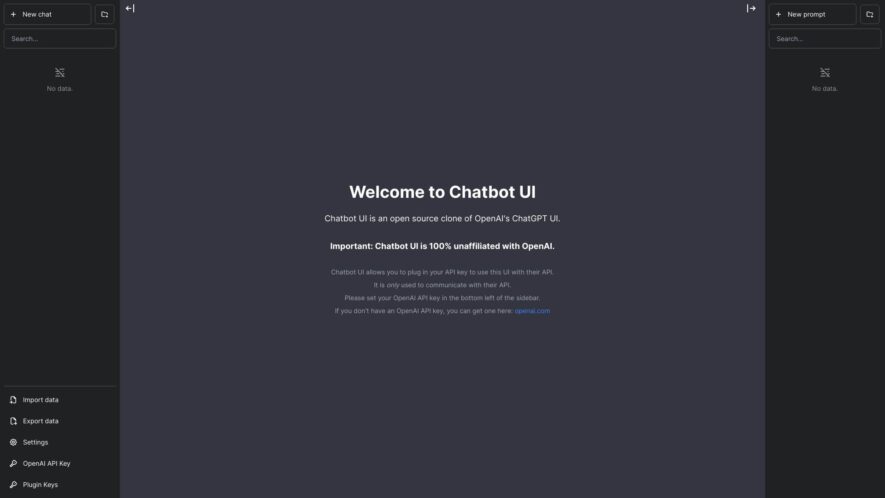
Chatbot UI is an open-source AI chat app that allows users to interact with various AI models. It offers a user-friendly interface with customization options. Key features include support for multiple AI models, customizable temperature for response creativity, and integration of interactive elements like media. It...
Chatbot UI is an open-source AI chat app that allows users to interact with various AI models. It offers a user-friendly interface with customization options. Key features include support for multiple AI models, customizable temperature for response creativity, and integration of interactive elements like media. It also offers a premium tier with advanced features. The platform is designed to be educational and entertaining, allowing users to explore and learn about AI.
Offers a user-friendly interface for building and customizing AI chatbots, making chatbot creation accessible to everyone
Provides a drag-and-drop interface for designing chatbot conversations, simplifying the chatbot creation process significantly
Supports integration with various messaging platforms, including Facebook Messenger, Slack, and Telegram, for broad reach
Allows the creation of chatbots for different use cases, such as customer support, lead generation, and e-commerce
Offers analytics and reporting to track chatbot performance and optimize user interactions for improved results
Provides tools for training chatbots on specific data and knowledge bases, ensuring accurate and relevant responses
Supports multimedia content, including images, videos, and audio, enhancing chatbot engagement and user experience
Enables the creation of multilingual chatbots, facilitating communication with users from diverse linguistic backgrounds.
You Got Questions,We Got Answers
What is Chatbot UI?
Chatbot UI is an intuitive platform designed to create customizable, user-friendly chatbot interfaces for websites, apps, and messaging platforms, enhancing customer interaction and automation.
Who can benefit from using Chatbot UI?
Chatbot UI is ideal for businesses in customer service, e-commerce, and tech industries that want to automate communication, increase user engagement, and streamline support processes.
How does Chatbot UI work?
Chatbot UI allows users to build interactive chatbots with pre-built templates and customizable features. The platform uses natural language processing (NLP) to understand and respond to customer queries.
Can Chatbot UI be integrated with other platforms?
Chatbot UI supports integrations with major platforms like Slack, Facebook Messenger, WhatsApp, and more, enabling seamless communication across multiple channels.
Is Chatbot UI easy to use for non-technical users?
Chatbot UI is designed with a no-code interface, allowing businesses and users with no technical background to build, deploy, and manage chatbots easily.
Does Chatbot UI provide analytics and reporting?
Chatbot UI includes reporting features that track key metrics such as interaction rates, response times, and user satisfaction to help businesses optimize their chatbots.
Is Chatbot UI secure?
Chatbot UI follows industry-standard security practices, including encryption and data protection measures, to ensure that user data and conversations are kept secure.
Is there a free version of Chatbot UI?
Chatbot UI offers a free version with basic features, and premium plans unlock advanced functionalities like integration options, custom templates, and reporting tools.
Use cases
Marketing
Chatbotui.com helps create and deploy AI-powered chatbots for lead generation, customer engagement, and personalized marketing campaigns
Education
Educational institutions use Chatbotui.com to build virtual assistants that answer student inquiries, provide course information, and offer technical support
Retail
Retailers employ Chatbotui.com to create conversational shopping experiences, offer personalized product recommendations, and handle customer service inquiries
Manufacturing
Manufacturers use Chatbotui.com to provide 24/7 support for technical issues, answer product-related questions, and facilitate communication with customers and partners
Healthcare
Healthcare providers apply Chatbotui.com to schedule appointments, answer patient inquiries, provide pre- and post-care instructions, and offer virtual health assistance
Finance
Financial institutions use Chatbotui.com to provide personalized financial advice, answer customer questions about products and services, and automate customer support interactions.
Traffic and Engagement
Feb 2026 - Apr 2026
World wide
Monthly visitors (April)
29.4k
Page/Visit
3.8
Visit Duration
40s
Bounce Rate
0.4%
Pricing
Freemium
$10
Chatbot UI Embeds
Copied!
Let your community know you're live on Skillcurb! Just drop a badge on your site’s homepage with just a few clicks. Showcasing the badge helps increase your visibility and connects you with users actively exploring top AI tools.