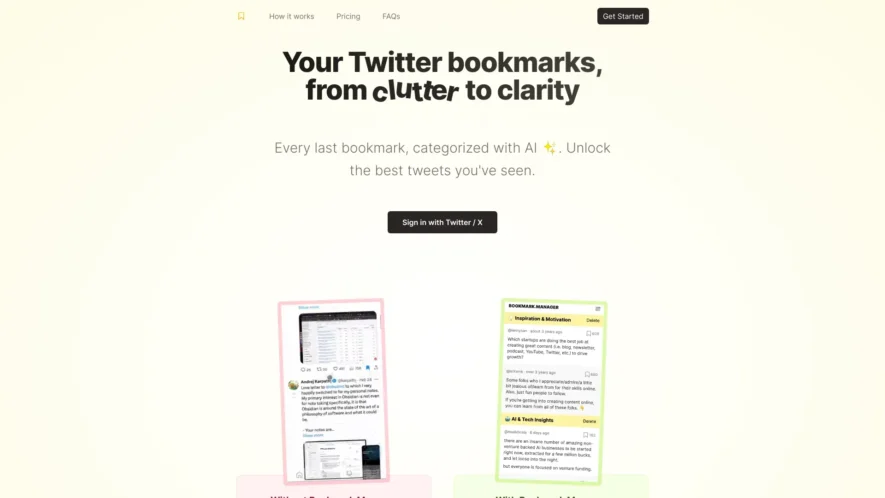
Bookmarks Manager is an essential tool designed to help users organize and optimize their Twitter bookmarks. By importing bookmarks directly from Twitter, users can efficiently categorize their saved tweets using relevant tags, making it easy to reference and act upon the knowledge gathered. The powerful search...
Bookmarks Manager is an essential tool designed to help users organize and optimize their Twitter bookmarks. By importing bookmarks directly from Twitter, users can efficiently categorize their saved tweets using relevant tags, making it easy to reference and act upon the knowledge gathered. The powerful search and filter functions allow for quick access to insights based on specific categories or keywords. This tool is ideal for staying updated on industry trends, tracking competitors, and gathering valuable inspiration for content creation. Bookmarks Manager not only streamlines the process of managing bookmarks but also enhances productivity by turning clutter into actionable insights. Available on multiple devices, this user-friendly platform ensures that you can access your bookmarks anytime, anywhere. Discover the potential of your Twitter bookmarks and transform them into a strategic asset with Bookmarks Manager. For pricing details and more information, visit the official website. Follow Bookmarks Manager on Twitter for the latest updates and tips.
Easily save and organize tweets with customizable folders and tags.
Quickly search and filter bookmarks by keywords, dates, and more.
View bookmarked tweets in a clean and distraction-free reading mode.
Export bookmarks to CSV, Excel, or JSON formats for further analysis.
Get notified when a bookmarked tweet is liked, retweeted, or replied to.
Share individual bookmarks or entire folders with others via a link.
View bookmark analytics, including engagement metrics and tweet performance.
Sync bookmarks across multiple Twitter accounts with a single login.
You Got Questions,We Got Answers
What is Twitter Bookmarks?
Twitter Bookmarks is a third-party service that allows you to easily save and organize your Twitter bookmarks in a clean and intuitive interface, making it easy to find and revisit your saved tweets.
How do I access my bookmarks?
You can access your Twitter bookmarks by logging in with your Twitter credentials on the Twitter Bookmarks website, which will then sync your bookmarks and display them in a organized manner.
What features does it offer?
Twitter Bookmarks offers features such as tagging, categorization, and search functionality, making it easy to find specific bookmarks, as well as a dashboard to view your bookmarking activity and trends.
Is Twitter Bookmarks free?
Twitter Bookmarks is a free service, and you can use it without any cost or subscription, making it a convenient and accessible tool for all Twitter users.
How do I save a tweet?
You can save a tweet by clicking the "Bookmark" button on the tweet, and it will be automatically synced with your Twitter Bookmarks account, where you can organize and view it later. I use Twitter Bookmarks on mobile? Yes, Twitter Bookmarks is a web-based service, and you can access it on your mobile device by visiting the website, where it will adapt to your screen size and provide a smooth user experience.
How secure is Twitter Bookmarks?
Twitter Bookmarks takes security seriously, and it uses OAuth to authenticate with Twitter, which means it doesn't store your Twitter credentials, and it also uses HTTPS to ensure a secure connection.
Use cases
Healthcare
Doctors can bookmark relevant medical articles and research studies to reference later, staying up-to-date on the latest treatments and advancements in their field, and sharing knowledge with colleagues and patients
Finance
Financial analysts bookmark news articles and reports to track market trends and economic changes, making informed investment decisions and staying ahead of competitors
Retail
E-commerce managers bookmark product reviews and ratings to analyze customer preferences, optimizing product offerings and improving customer satisfaction
Manufacturing
Quality control specialists bookmark industry standards and regulations to ensure compliance, reducing the risk of defects and improving overall product reliability
Education
Teachers bookmark online resources and educational articles to create engaging curricula, staying current on best practices and enhancing student learning outcomes
Marketing
Social media managers bookmark brand mentions and industry news to track brand reputation and stay informed about competitor strategies, developing effective marketing campaigns
Traffic and Engagement
Mar 2026 - May 2026
World wide
Monthly visitors (May)
0.2k
Page/Visit
1.1
Visit Duration
N/A
Bounce Rate
0.4%
Pricing
Free
$0.00
Bookmarks Manager Embeds
Copied!
Let your community know you're live on Skillcurb! Just drop a badge on your site’s homepage with just a few clicks. Showcasing the badge helps increase your visibility and connects you with users actively exploring top AI tools.