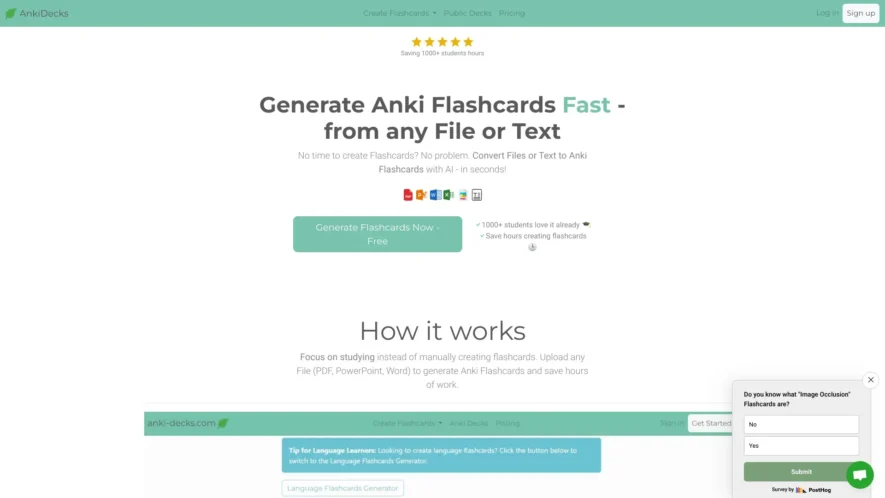
Anki Decks is a powerful tool designed to streamline the creation of flashcards, enabling users to generate study materials quickly and efficiently. With the ability to upload various file types such as PDF, PowerPoint, and Word documents, Anki Decks saves users valuable time while enhancing their...
Anki Decks is a powerful tool designed to streamline the creation of flashcards, enabling users to generate study materials quickly and efficiently. With the ability to upload various file types such as PDF, PowerPoint, and Word documents, Anki Decks saves users valuable time while enhancing their learning experience. The platform features automatic language detection, allowing it to cater to a diverse range of languages and learning needs. Additionally, users can easily create cloze flashcards, which are effective for fill-in-the-blank style learning. Anki Decks is especially beneficial for medical students and language learners, offering a tailored approach to studying complex subjects. The straightforward interface ensures that anyone can generate flashcards from their text or files without hassle. For support, users can reach out to the dedicated customer service team via email, and resources are available to help with importing flashcards to Anki. Whether you are an experienced learner or just starting, Anki Decks provides the tools you need to enhance your study routine and achieve success. Visit the Anki Decks website to get started today and unlock the potential of effective learning through flashcards.
Browse and download pre-made Anki decks from a vast community-driven collection.
Search and filter decks by tags, author, and rating for easy discovery.
Read reviews and ratings from other users to ensure deck quality.
Contribute to the community by uploading and sharing your own Anki creations.
Stay updated with new deck additions and community discussions via the blog.
Easily import decks into Anki with a single click using the AnkiConnect plugin.
Preview deck contents, including cards and tags, to ensure relevance and quality.
Get inspired by the featured decks section, showcasing top-rated and popular decks.
You Got Questions,We Got Answers
What is Anki Decks website about?
Anki Decks is a platform that offers a vast collection of pre-made Anki decks for different subjects, making it easier for users to get started with their learning journey using the Anki flashcard app.
How do I download Anki decks?
To download Anki decks from the website, simply click on the deck you're interested in, and then click the Download" button, and the deck will be downloaded to your computer in a .apkg file format, which can be easily imported into the Anki app.
What types of decks are available?
Anki Decks offers a wide range of pre-made decks covering various subjects, including but not limited to languages, history, science, medicine, and many more, making it a one-stop-shop for all your learning needs.
Can I create my own deck?
Yes, you can create your own Anki deck from scratch, or you can use an existing deck as a template and modify it to fit your needs, giving you full control over your learning materials.
Are the decks regularly updated?
Yes, the decks on the website are regularly updated by the community of users and contributors, who add new cards, correct errors, and improve the overall quality of the decks remain relevant and useful.
Can I request a new deck?
Yes, if you can't find a deck that suits your needs, you can request a new deck to be created, and the community of users and contributors will work together to create a new deck that meets your requirements.
How do I import a deck into Anki?
To import a deck into Anki, simply download the deck from the website, open the Anki app, click on "File" and then "Import", and select the downloaded deck file, and the deck will be imported into your app.
Are the decks compatible with Anki app?
Yes, all the decks available on the website are fully compatible with the Anki app, ensuring a seamless learning experience, and allowing you to focus on learning rather than worrying about the technical aspects.
Use cases
Healthcare
Medical students can create digital flashcards to memorize complex anatomy, pharmacology, and microbiology concepts, improving their understanding and retention of critical patient care information
Finance
Financial analysts can create decks to study and remember financial regulations, industry trends, and company performance metrics, streamlining their workflow and decision-making process.
Retail
Retail Sales associates can create decks to learn product knowledge, features, and benefits, enhancing their ability to effectively communicate with customers and drive sales.
Manufacturing
Manufacturing Quality control specialists can create decks to learn and remember industry standards, regulations, and quality control procedures, ensuring compliance and minimizing defects.
Traffic and Engagement
Mar 2026 - May 2026
World wide
Monthly visitors (May)
250.2k
Page/Visit
4.8
Visit Duration
1m 46s
Bounce Rate
0.4%
Pricing
Paid
Contact Sales
Anki Decks Embeds
Copied!
Let your community know you're live on Skillcurb! Just drop a badge on your site’s homepage with just a few clicks. Showcasing the badge helps increase your visibility and connects you with users actively exploring top AI tools.