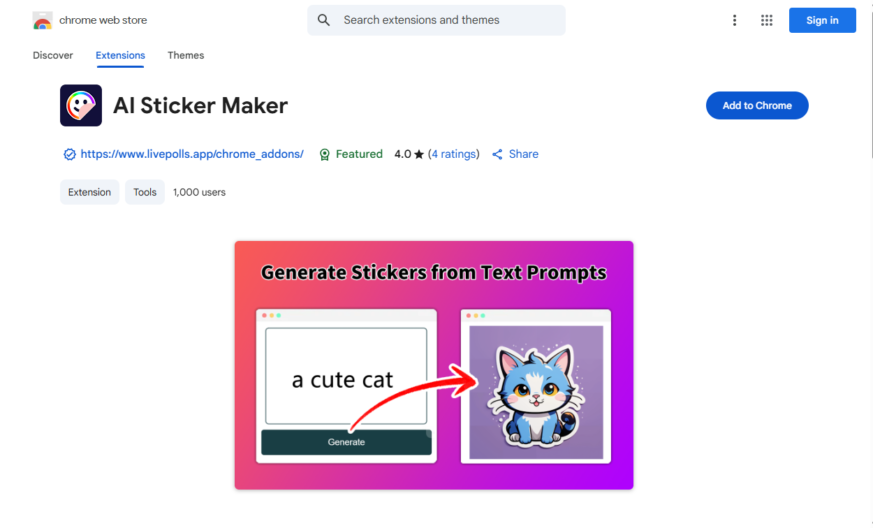
AI Sticker Maker is a Chrome extension that allows users to create custom stickers using artificial intelligence. With a simple and intuitive interface, users can upload an image or take a selfie, and the AI algorithm will automatically generate a sticker. The extension offers various customization...
AI Sticker Maker is a Chrome extension that allows users to create custom stickers using artificial intelligence. With a simple and intuitive interface, users can upload an image or take a selfie, and the AI algorithm will automatically generate a sticker. The extension offers various customization options, including shapes, sizes, and colors. Users can then download their sticker as a PNG file or share it directly to social media platforms like WhatsApp, Telegram, or Facebook.
Create stickers from any image or screenshot with AI-powered automatic detection.
Generate stickers with transparent backgrounds and no watermarks or logos.
Access a vast library of stickers and graphics to customize your creations.
Use advanced editing tools to adjust colors, contrast, and saturation.
Easily share stickers on social media, messaging apps, and online platforms.
Browse and discover new stickers from a community-driven sticker gallery.
Upload and convert videos into animated stickers with a single click.
Customize stickers with text, emojis, and other graphics using a user-friendly interface.
You Got Questions,We Got Answers
What is AI Sticker Maker?
AI Sticker Maker is a browser extension that allows users to generate custom stickers using AI-powered image processing. It helps create unique and creative stickers quickly and easily.
How does AI Sticker Maker work?
AI Sticker Maker works by using advanced AI algorithms to transform images into stickers with customizable features. Users can upload an image, modify it as needed, and generate a sticker for personal or professional use.
Is AI Sticker Maker free to use?
AI Sticker Maker offers both free and premium versions. The free version includes basic sticker-making features, while the premium version unlocks additional customization options and high-quality sticker outputs.
Can I customize my stickers in AI Sticker Maker?
Yes, AI Sticker Maker provides various customization options, allowing users to adjust colors, shapes, and other design elements to create personalized stickers.
Does AI Sticker Maker require an internet connection?
Yes, AI Sticker Maker needs an internet connection to process images and generate stickers, as the AI runs on cloud-based servers for optimal performance.
Is AI Sticker Maker compatible with all browsers?
AI Sticker Maker is specifically designed for Google Chrome, and it can be installed as an extension from the Chrome Web Store. It may not be compatible with other browsers.
Does AI Sticker Maker store user data?
AI Sticker Maker follows privacy policies to ensure data security. Some data may be stored to improve functionality, but users can review and manage their privacy settings.
How can I get support for AI Sticker Maker?
Users can reach out to AI Sticker Maker support through the Chrome Web Store support page or the developers contact information. FAQs and troubleshooting guides are also available.
Use cases
Healthcare
AI Sticker Maker helps medical professionals create engaging visual aids for patient education, illustrating complex medical concepts and treatment plans in an easy-to-understand format, improving patient comprehension and adherence to treatment regimens
Finance
Financial advisors use AI Sticker Maker to create interactive, visual representations of investment portfolios and market trends, enabling clients to make informed decisions and stay up-to-date on their financial performance
Retail
Retailers leverage AI Sticker Maker to design eye-catching, interactive product demonstrations and tutorials, enhancing customer engagement and increasing sales conversions on e-commerce platforms and in-store displays
Manufacturing
Quality control teams utilize AI Sticker Maker to create interactive, step-by-step guides for equipment operation and maintenance, reducing errors and downtime while improving overall manufacturing efficiency
Marketing
Marketers employ AI Sticker Maker to develop interactive, shareable social media content, such as animated GIFs and stickers, increasing brand awareness and engagement across various digital channels
Education
Teachers use AI Sticker Maker to create interactive, multimedia lesson plans and activities, making complex concepts more accessible and engaging for students, and enhancing overall learning outcomes
Traffic and Engagement
Apr 2026 - Jun 2026
World wide
Monthly visitors (June)
209.8m
Page/Visit
2.9
Visit Duration
1m 55s
Bounce Rate
0.6%
Pricing
FREE
$0
AI Sticker Maker – Chrome Extension Embeds
Copied!
Let your community know you're live on Skillcurb! Just drop a badge on your site’s homepage with just a few clicks. Showcasing the badge helps increase your visibility and connects you with users actively exploring top AI tools.