MyLifeOrganized is a task management app that helps users prioritize and organize their daily tasks and projects. It features a hierarchical task list, customizable filters, and a focus on breaking down large projects into smaller, manageable tasks. The app also includes a calendar view, reminders, and...
MyLifeOrganized is a task management app that helps users prioritize and organize their daily tasks and projects. It features a hierarchical task list, customizable filters, and a focus on breaking down large projects into smaller, manageable tasks. The app also includes a calendar view, reminders, and a daily planner to help users stay on track. With synchronization across all devices, users can access their task lists anywhere, anytime. MyLifeOrganized is designed to help individuals increase productivity, reduce stress, and achieve their goals.
Personalized daily routines tailored to individual skin types and concerns.
Customizable skincare regimens based on user-inputted skin goals and preferences.
In-app access to a comprehensive skincare product database with reviews and ratings.
AI-driven skin analysis for accurate product recommendations and guidance.
Step-by-step tutorials and videos for proper product application and usage.
Personalized product matching based on individual skin characteristics and needs.
Progress tracking and monitoring for optimal skincare results and adjustments.
Expert advice and guidance from licensed dermatologists and skincare professionals.
You Got Questions,We Got Answers
What is AI Drawing Pro?
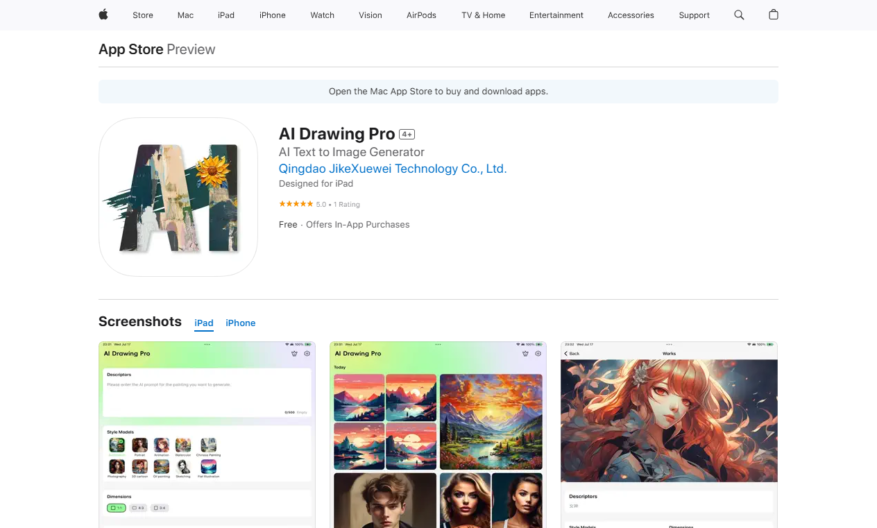
AI Drawing Pro is an AI-powered app that transforms your creative ideas into beautifully crafted works of art. By inputting text descriptions, users can generate stunning visual art across various styles, including 3D cartoon, animation, oil painting, watercolor, sketch, Chinese painting, flat illustration, photography style, and portrait.
How does AI Drawing Pro work?
Users simply type in their ideas, and AI Drawing Pro utilizes advanced AI technology to convert these descriptions into visual art. The app offers multiple artistic styles to choose from, allowing users to customize their creations.
Is AI Drawing Pro free to use?
AI Drawing Pro is free to download and offers in-app purchases. Subscription options include a weekly VIP package at $3.99 per week, an annual VIP package at $14.99 per year, and a lifetime VIP option at $29.99. These subscriptions provide access to premium features and unlimited creativity.
Can I customize the images generated by AI Drawing Pro?
Yes, AI Drawing Pro allows users to select from various artistic styles to tailor their creations. The app also provides an intelligent material library, offering extensive resources like wallpapers, avatars, and illustrations to inspire and customize your artwork.
Does AI Drawing Pro require an internet connection?
While the app's description does not explicitly state the necessity of an internet connection, it is likely that AI Drawing Pro requires internet access to process AI-generated images and access the material library.
Is AI Drawing Pro safe to use?
According to the app's privacy policy, the developer does not collect any data from this app, ensuring user privacy and safety.
What are the system requirements for AI Drawing Pro?
AI Drawing Pro requires iOS 16.1 or later for iPhone, iPadOS 16.1 or later for iPad, and macOS 13.0 or later with an Apple M1 chip or later for Mac. The app is also compatible with Apple Vision, requiring visionOS 1.0 or later.
Can I use AI Drawing Pro for commercial purposes?
The app's description does not specify the terms regarding commercial use of the generated images. Users are advised to review the apps terms of service or contact the developer to determine whether AI-generated images can be used for commercial projects.
How do I improve the quality of AI-generated images on AI Drawing Pro?
To enhance image quality, users can experiment with different artistic styles and refine their text descriptions. Subscribing to the VIP packages may also provide access to additional features that could improve the quality of the generated images.
How can I contact AI Drawing Pro support?
For comments and suggestions, users can contact the developer via email at xuewei_app@163.com.
Use cases
Healthcare
Doctors use this app to securely share medical images and reports with patients, enabling them to better understand their diagnosis and treatment plans, improving patient engagement and outcomes
Finance
Wealth managers utilize this app to share sensitive financial documents with clients, ensuring secure and compliant communication, while also enhancing the overall client experience
Retail
Sales associates employ this app to share product demos and tutorials with customers, increasing sales and reducing returns by ensuring customers understand product features and benefits
Manufacturing
Quality control teams leverage this app to share inspection reports and images with suppliers, streamlining the defect resolution process and reducing production downtime
Marketing
Brand managers use this app to share campaign assets and creative briefs with external agencies, ensuring secure and efficient collaboration, while protecting sensitive brand information
Education
Professors utilize this app to share multimedia course materials with students, creating a more engaging and interactive learning experience, while also protecting copyrighted content
Traffic and Engagement
Apr 2026 - Jun 2026
World wide
Monthly visitors (June)
112.9m
Page/Visit
1.6
Visit Duration
50s
Bounce Rate
0.8%
Pricing
Free
$0
AI Drawing Pro Embeds
Copied!
Let your community know you're live on Skillcurb! Just drop a badge on your site’s homepage with just a few clicks. Showcasing the badge helps increase your visibility and connects you with users actively exploring top AI tools.