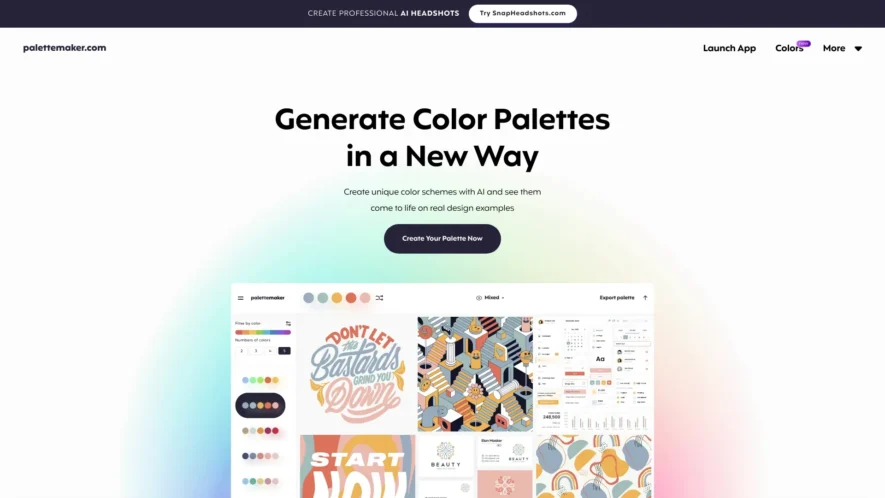
AI Color Palette Generator is a powerful and free online tool designed for creatives and color enthusiasts. It enables users to effortlessly create stunning color palettes and test their effectiveness on a variety of pre-made design examples. With core features such as live color previews on...
AI Color Palette Generator is a powerful and free online tool designed for creatives and color enthusiasts. It enables users to effortlessly create stunning color palettes and test their effectiveness on a variety of pre-made design examples. With core features such as live color previews on actual designs, filtering options based on color tones and the number of colors, and the ability to export palettes in multiple formats, this tool is perfect for both seasoned designers and non-designers alike. Its versatility makes it suitable for various applications, including UI/UX design, illustrations, web and app design, branding, logo creation, patterns, and posters. The AI Color Palette Generator is continuously updated to provide the best experience, making it essential for anyone looking to enhance their design projects. For more information about the tool and its features, visit the about us page. Connect with other users and discover new ideas by following the tool on Instagram.
Generate color palettes from images with AI-powered color extraction.
Create palettes from popular design platforms like Figma and Sketch.
Extract colors from website URLs with a single click.
Discover trending colors and palettes from a curated design community.
Get color palette inspiration from a vast library of popular companies.
Visualize color combinations with a 3D color wheel and palette simulator.
Export palettes in various formats, including CSS, SCSS, and PDF.
Access a library of pre-made color palettes and gradient combinations.
You Got Questions,We Got Answers
What is Palette Maker used for?
Palette Maker is a free online tool that allows users to create custom color palettes from images, colors, or even emotions, making it a great resource for designers, artists, and creatives alike.
What is the best way to use it?
Start by uploading an image or selecting a color, then adjust the settings to fine-tune the results, and finally, download or share your custom palette.
Can I upload any image?
Yes, you can upload any image in JPEG, PNG, or GIF formats, as long as it's under 5MB in size, and the tool will extract the dominant colors to generate a palette.
Are the palettes customizable?
Absolutely, the tool offers various settings to adjust the color extraction algorithm, allowing users to fine-tune the results to fit their specific needs and preferences.
Can I save my palettes?
Yes, you can save your palettes to your account, which is free to create, and revisit them later, making it easy to manage multiple projects and clients.
Do you offer any design resources?
In addition to the color palette generator, the website offers a blog with tutorials, design trends, and resources, making it a one-stop-shop for creatives.
Use cases
Healthcare
A medical illustrator uses PaletteMaker to create a custom color scheme for a patient education brochure, ensuring the visuals are accessible and engaging for patients with visual impairments
Finance
A financial analyst utilizes PaletteMaker to develop a consistent brand identity for a new investment product, ensuring the marketing materials and reports align with the company's overall visual brand
Manufacturing
A production designer employs the tool to select a palette for a new product line, guaranteeing the packaging and branding cohesively reflect the product's unique value proposition
Retail
An e-commerce manager leverages PaletteMaker to create a visually appealing and consistent brand image across the website, social media, and advertising, resulting in increased customer recognition and loyalty
Marketing
A creative agency uses PaletteMaker to develop a custom color scheme for a new campaign ensuring the visuals are attention-grabbing and consistent across all marketing channels and touchpoints
Education
A curriculum developer incorporates PaletteMaker into their design process to create accessible and engaging educational materials, including textbooks, worksheets, and digital resources, that cater to diverse learning needs.
Traffic and Engagement
Mar 2026 - May 2026
World wide
Monthly visitors (May)
131.3k
Page/Visit
2.6
Visit Duration
56s
Bounce Rate
0.5%
Pricing
Free
$0.00
AI Color Palette Generator Embeds
Copied!
Let your community know you're live on Skillcurb! Just drop a badge on your site’s homepage with just a few clicks. Showcasing the badge helps increase your visibility and connects you with users actively exploring top AI tools.