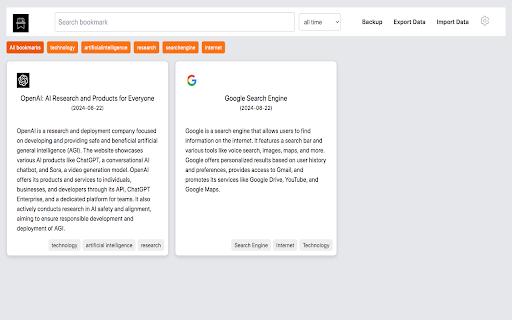
The ai bookmarker is a powerful Chrome extension designed to streamline the way you manage your bookmarks. Utilizing advanced AI technology, it allows users to efficiently organize and enhance their bookmark collections. By simply installing the plugin, you can import your existing bookmarks and let the...
The ai bookmarker is a powerful Chrome extension designed to streamline the way you manage your bookmarks. Utilizing advanced AI technology, it allows users to efficiently organize and enhance their bookmark collections. By simply installing the plugin, you can import your existing bookmarks and let the AI take over, categorizing and summarizing them for quick access. With features like smart categorization, you can organize a large collection of bookmarks without any hassle. The AI-powered summaries give you immediate insights into the content of your bookmarked sites. Plus, enjoy the convenience of a comprehensive search capability to locate your bookmarks in seconds. The extension also supports seamless import and export of bookmarks and includes auto backup along with cloud sync functionality. Whether you are a casual user or someone with an extensive collection, the ai bookmarker is the ultimate tool for an organized browsing experience.
Automatically saves web pages to the cloud for easy access.
Saves webpage screenshots and tags them for easy searching.
Organizes bookmarks by tags, title, and date for efficient retrieval.
Provides a full-text search function for bookmarked pages.
Allows users to add notes and annotations to saved pages.
Enables users to create custom tags and categorize bookmarks.
Automatically detects and saves article and blog post content.
Syncs bookmarks across devices and browsers for universal access.
You Got Questions,We Got Answers
What is AI Bookmarker?
AI Bookmarker is a Chrome extension that helps users bookmark web pages and articles with AI-powered features such as automatic tagging and summarization, making it easier to organize and review bookmarks
How does AI Bookmarker work?
AI Bookmarker uses natural language processing to analyze the content of web pages, and articles, and then generates relevant tags and summaries, which can be used to categorize and review bookmarks
Is AI Bookmarker free?
Yes, AI Bookmarker is a free Chrome extension, and it does not require any subscription or payment, users can simply install and start using it to organize their bookmarks
How to install AI Bookmarker?
To install AI Bookmarker, simply go to the Chrome Web Store, search for AI Bookmarker, and then click the "Add to Chrome" button, and then follow the prompts to complete the installation
What are the benefits of AI Bookmarker?
The benefits of AI Bookmarker include automatic tagging and summarization of bookmarks, which makes it easier to organize and review bookmarks, and also saves time and effort
Can I use AI Bookmarker on multiple devices?
Yes, AI Bookmarker is a Chrome extension, and it can be synced across multiple devices, laptops, and computers, as long as the user is signed in to the same Google account
How to uninstall AI Bookmarker?
To uninstall AI Bookmarker, simply go to the Chrome extensions page, click the "Remove" button, and then confirm the uninstallation, and the extension will be removed from the browser
Is AI Bookmarker secure?
Yes, AI Bookmarker is a secure Chrome extension, it does not collect or store any personal data, and it does not have access to any sensitive information, and it is regularly updated to ensure security and performance
Use cases
Healthcare
AI Bookmarker helps medical researchers quickly identify and organize relevant studies on new treatments, saving time and improving patient outcomes
Finance
AI Bookmarker assists financial analysts in categorizing and prioritizing market research reports, enabling data-driven investment decisions
Retail
AI Bookmarker enables e-commerce teams to efficiently categorize and analyze customer reviews, improving product development and customer satisfaction
Manufacturing
AI Bookmarker helps quality control teams quickly identify and document quality issues, streamlining defect resolution and reducing downtime
Traffic and Engagement
Mar 2026 - May 2026
World wide
Monthly visitors (May)
197.3m
Page/Visit
2.8
Visit Duration
1m 54s
Bounce Rate
0.6%
Pricing
Free
$0
ai bookmarker – Chrome Extension Embeds
Copied!
Let your community know you're live on Skillcurb! Just drop a badge on your site’s homepage with just a few clicks. Showcasing the badge helps increase your visibility and connects you with users actively exploring top AI tools.