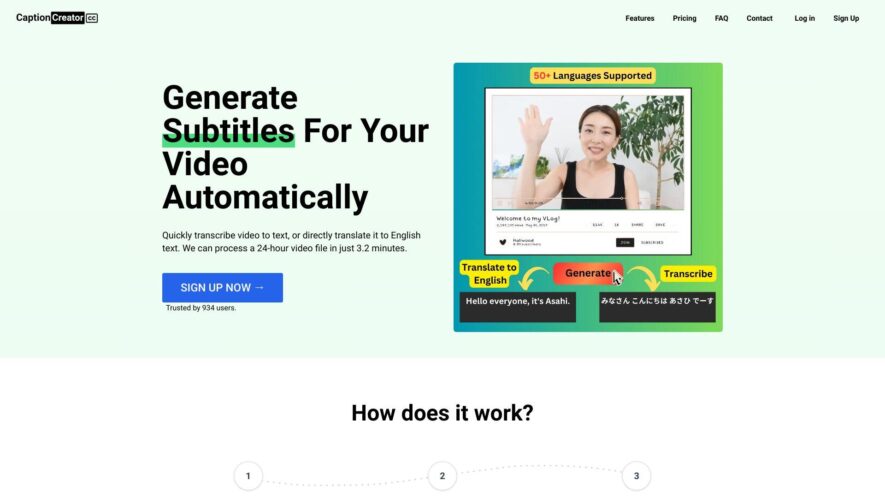
CaptionCreator.cc is a free online tool for creating captions and subtitles for videos, podcasts, and social media content. It offers an intuitive interface for uploading files, auto-generating captions, and editing text. The platform supports multiple languages, font styles, and formatting options. Users can export captions in...
CaptionCreator.cc is a free online tool for creating captions and subtitles for videos, podcasts, and social media content. It offers an intuitive interface for uploading files, auto-generating captions, and editing text. The platform supports multiple languages, font styles, and formatting options. Users can export captions in popular formats like SRT, VTT, and TXT. CaptionCreator.cc aims to make video content more accessible and engaging, with a focus on simplicity, speed, and accuracy.
Automatically generates captions for videos, podcasts, and audio files.
Supports multiple languages for global accessibility.
Allows customization of font, colors, and layout for personal branding.
Provides accurate transcription with high-quality audio processing algorithms.
Offers instant preview and editing capabilities for efficient workflow.
Includes SEO optimization for improved video indexing and visibility.
Enables easy export to popular video editing software and platforms.
Offers affordable pricing plans for individuals and businesses of all sizes.
You Got Questions,We Got Answers
What is CaptionCreator.cc?
CaptionCreator.cc is an online tool designed to automatically generate captions and subtitles for videos, making it easier for content creators to add accurate text to their videos.
Who can benefit from using CaptionCreator.cc?
CaptionCreator.cc is ideal for video content creators, social media managers, educators, marketers, and anyone who needs to add captions or subtitles to their videos quickly and efficiently.
How does CaptionCreator.cc work?
CaptionCreator.cc uses advanced speech-to-text algorithms to automatically generate captions for video files. Users can upload their videos, and the tool will create accurate subtitles in minutes.
Can I customize the captions generated by CaptionCreator.cc?
CaptionCreator.cc allows users to edit and adjust the captions, including timing, text, and formatting, to ensure they fit the videoâs content and style perfectly.
Does CaptionCreator.cc support multiple languages?
CaptionCreator.cc supports a wide range of languages for captioning, making it a versatile tool for global content creators.
Is CaptionCreator.cc free to use?
CaptionCreator.cc offers both free and premium plans. The free plan includes basic captioning features, while premium plans offer additional customization, export options, and faster processing times.
How can I export the captions?
CaptionCreator.cc allows you to export captions in various formats, including .srt, .vtt, and .txt, making it easy to integrate with different video platforms.
Is CaptionCreator.cc secure?
CaptionCreator.cc follows standard data protection protocols to ensure the safety of your content and personal information during the captioning process.
Use cases
Healthcare
hospitals use Caption Creator to generate accurate captions for medical videos, ensuring equal access for patients with hearing impairments and improving overall patient care and satisfaction
Finance
financial institutions utilize Caption Creator to caption online training modules, ensuring compliance with accessibility regulations and enhancing employee learning experiences
Retail
e-commerce companies leverage Caption Creator to add captions to product demos, and promotional videos, increasing engagement and sales among customers with hearing impairments
Manufacturing
industrial companies use Caption Creator to caption instructional videos, enhancing worker safety and efficiency by providing clear instructions and reducing misunderstandings
Marketing
digital marketing agencies use Caption Creator to caption social media videos, increasing views, engagement, and brand awareness among a wider audience
Education
online course providers utilize Caption Creator to caption educational videos, ensuring equal access to knowledge for students with hearing impairments and improving overall learning outcomes
Traffic and Engagement
Feb 2026 - Apr 2026
World wide
Monthly visitors (April)
5.5k
Page/Visit
1.6
Visit Duration
38s
Bounce Rate
0.6%
Pricing
Freemium
$10
CaptionCreator Embeds
Copied!
Let your community know you're live on Skillcurb! Just drop a badge on your site’s homepage with just a few clicks. Showcasing the badge helps increase your visibility and connects you with users actively exploring top AI tools.