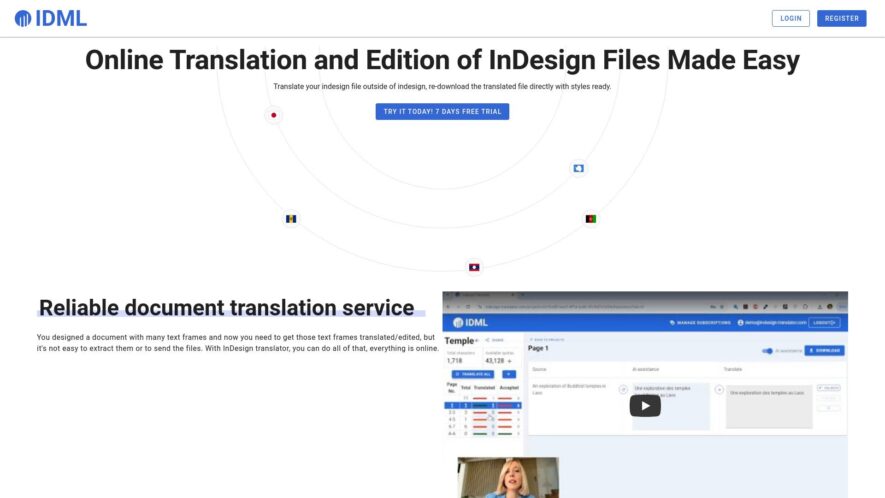
InDesign Translator is a cloud-based plugin that simplifies the translation process for designers and creative agencies, enabling them to export and import translated content directly within Adobe InDesign, without compromising design integrity. It supports over 300 languages, including right-to-left languages, and provides real-time collaboration features, automated...
InDesign Translator is a cloud-based plugin that simplifies the translation process for designers and creative agencies, enabling them to export and import translated content directly within Adobe InDesign, without compromising design integrity. It supports over 300 languages, including right-to-left languages, and provides real-time collaboration features, automated formatting, and customizable workflows. The plugin eliminates the need for manual copy-paste, reducing errors and saving time, making it an ideal solution for businesses requiring high-volume translation and localization services.
Automated translation of InDesign files into over 100 languages.
Support for complex formatting and layout preservation.
Real-time preview and editing of translated content.
Seamless integration with InDesign's workflow and plugins.
Advanced translation memory and terminology management.
Collaboration tools for multi-user and stakeholder feedback.
Customizable workflows and automation for high-volume projects.
Secure and GDPR-compliant data handling and storage.
You Got Questions,We Got Answers
What is InDesign Translator?
InDesign Translator is a plugin that enables users to export, translate, and re-import their InDesign files, ensuring layout and formatting remain intact, saving time and effort in the translation process.
How does it work?
The plugin exports the text from the InDesign file, allowing users to translate the desired content, and then re-imports the translated text, maintaining the original layout and formatting? Yes, the plugin ensures that the translated text is re-imported into the original InDesign file, preserving the layout, fonts, and formatting.
Is it compatible with my InDesign version?
The plugin is compatible with InDesign CC 2015 and later versions, including the latest InDesign 2022, ensuring that users can work with the latest features and updates.
Can I use it for large files?
Yes, the plugin is designed to handle large files, allowing users to export, translate, and re-import thousands of pages, making it an ideal solution for complex translation projects.
Do I need to know how to code?
No, the plugin is designed for non-technical users, providing an intuitive interface that guides users through the export, translation, and re-import process, eliminating the need for coding knowledge.
Does it support multiple languages?
Yes, the plugin supports multiple languages, allowing users to export, translate, and re-import files in various languages, including European, Asian, and Middle Eastern languages.
How long does the process take?
The plugin significantly reduces the time and re-import process, allowing users to complete projects in a fraction of the time it would take using traditional translation methods.
Is there a free trial available?
Yes, a free trial is available, allowing users to test the plugin's features and functionality, ensuring it meets their translation needs and requirements before purchasing a license.
Use cases
Healthcare
Pharmaceutical companies use InDesign Translator to quickly localize clinical trial materials, such as patient information sheets and informed consent forms, into multiple languages to reach diverse patient populations worldwide
Finance
Global investment firms leverage InDesign Translator to rapidly translate financial reports, ensuring compliance with international regulations and facilitating cross-border e-commerce transactions
Manufacturing
Industrial equipment suppliers utilize InDesign Translator to create multilingual user manuals, instruction guides, and technical specifications, streamlining international product distribution and support
Retail
E-commerce companies use InDesign Translator to translate product catalogs, marketing materials, and packaging, expanding their global customer base and staying competitive in international markets
Marketing
Advertising agencies employ InDesign Translator to translate and localize campaigns, including brochures, posters, and social media content, to effectively target diverse cultural audiences
Education
Universities and language institutions rely on InDesign Translator to create multilingual educational materials, including textbooks, workbooks, and online course materials, promoting language learning and cultural understanding
Traffic and Engagement
N/A
World wide
Monthly visitors (January)
N/A
Page/Visit
N/A
Visit Duration
N/A
Bounce Rate
N/A
Pricing
Paid
$12
Paper Polyglot Embeds
Copied!
Let your community know you're live on Skillcurb! Just drop a badge on your site’s homepage with just a few clicks. Showcasing the badge helps increase your visibility and connects you with users actively exploring top AI tools.