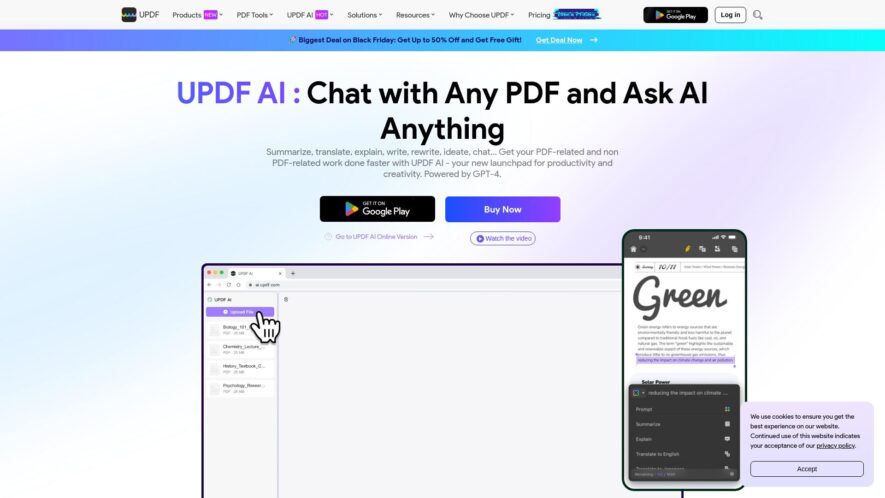
UPDF AI is a GPT-powered assistant integrated into the UPDF app, an all-in-one PDF editor. It offers features like summarizing PDFs, translating while preserving layouts, explaining content, converting PDFs to mind maps, and chatting with images. The UPDF AI is can be accessed within the UPDF app across Windows, macOS, iOS, and Android platforms, it can be also accessed online.
UPDF is an all-in-one PDF editor that allows users to edit, convert, compress, and organize PDF files with ease. It offers a user-friendly interface and supports various file formats, including Word, Excel, PowerPoint, and images. Key features include editing and annotating PDFs, converting PDFs to and...
UPDF is an all-in-one PDF editor that allows users to edit, convert, compress, and organize PDF files with ease. It offers a user-friendly interface and supports various file formats, including Word, Excel, PowerPoint, and images. Key features include editing and annotating PDFs, converting PDFs to and from other file types, compressing PDFs to reduce file size, and organizing PDF pages. UPDF is available as a desktop application for Windows and macOS, as well as a web-based version, making it accessible from anywhere.
Edit PDF files with advanced editing tools and formatting options.
Convert PDF to various file formats including Word, Excel, and PowerPoint.
Merge and split PDF files with ease and precision.
Protect PDF files with passwords, signatures, and encryption.
Annotate PDF files with sticky notes, highlights, and underlines.
Compress PDF files to reduce file size and improve sharing.
Organize PDF pages by rotating, cropping, and rearranging.
Recognize and extract text and data from scanned PDF files.
You Got Questions,We Got Answers
What is UPDF and what does it do?
UPDF is an all-in-one PDF editor that allows users to edit, convert, annotate, and organize PDF files with ease, making it an essential tool for individuals and businesses alike.
Can I use UPDF for free?
UPDF offers a free trial with limited features, and users to experience its capabilities before deciding to upgrade to a paid subscription for full access. .
Is UPDF compatible with my device?
UPDF is compatible with Windows, macOS, and iOS devices, ensuring that users can access and edit PDF files on their preferred device, with a seamless and user-friendly experience.
How do I annotate a PDF with UPDF?
UPDF allows users to annotate PDF files by adding text, shapes, and stamps, and also enables them to highlight and underline important text, making collaboration and feedback more efficient.
Can I convert PDF files to other formats?
UPDF enables users to convert PDF files to various formats, including Word, Excel, PowerPoint, and image files, making it easy to repurpose and reuse content.
Do I need to install software to use UPDF is a cloud-based application, which means that users do not need to install any software or plugins, and can access it directly from their web browser. Can I use UPDF for business purposes?
UPDF is designed to meet the needs of businesses and organizations, offering advanced features and tools that enable teams to collaborate, edit, and manage PDF files efficiently and securely.
Use cases
Healthcare
Doctors can use UPDF to annotate and share medical records with patients, ensuring they understand their diagnoses and treatment plans, improving health outcomes and reducing liability
Finance
Financial advisors can redact sensitive information in financial documents, ensuring compliance with regulations and protecting clients' privacy
Retail
Store managers can use UPDF to annotate and share inventory reports, streamlining inventory management and reducing waste
Manufacturing
Quality control teams can mark up and share inspection reports, improving product quality and reducing defects
Marketing
Marketing teams can collaborate on campaign materials, tracking changes and feedback in real-time, ensuring consistent branding and messaging
Education
Teachers can annotate and provide feedback on student assignments, improving student outcomes and enhancing the learning experience
Traffic and Engagement
Feb 2026 - Apr 2026
World wide
Monthly visitors (April)
1.5m
Page/Visit
1.9
Visit Duration
1m 26s
Bounce Rate
0.6%
Pricing
Freemium
$39.99
UPDF Embeds
Copied!
Let your community know you're live on Skillcurb! Just drop a badge on your site’s homepage with just a few clicks. Showcasing the badge helps increase your visibility and connects you with users actively exploring top AI tools.