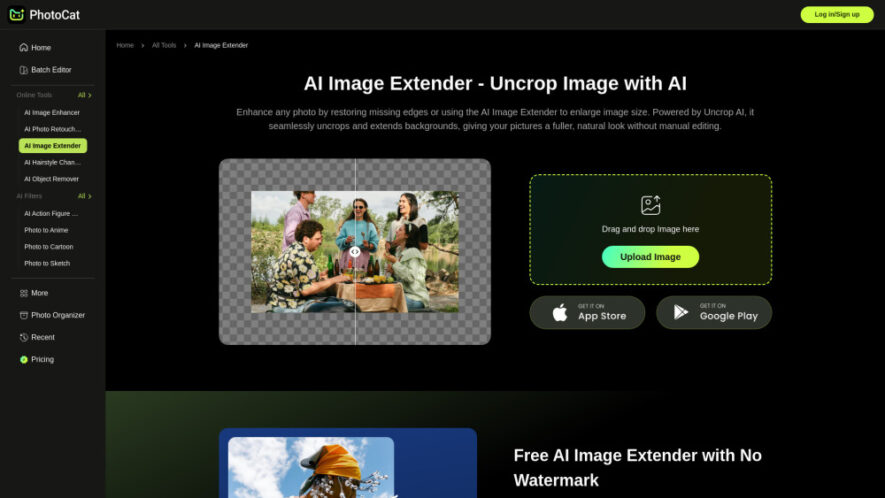
PhotoCat is an AI-powered image expansion tool that naturally extends photo backgrounds and uncrops images with realistic generative AI. It restores missing edges, enlarges canvases, and creates seamless background extensions while preserving image quality. With watermark-free downloads, 4K output, customizable canvas sizes, and preset dimensions for...
PhotoCat is an AI-powered image expansion tool that naturally extends photo backgrounds and uncrops images with realistic generative AI. It restores missing edges, enlarges canvases, and creates seamless background extensions while preserving image quality. With watermark-free downloads, 4K output, customizable canvas sizes, and preset dimensions for popular social media platforms, PhotoCat helps users create professional-looking images quickly for personal, creative, marketing, and e-commerce projects.
Expands image backgrounds naturally using advanced generative AI without visible distortions.
Uncrops photos seamlessly while preserving realistic textures, lighting, and image consistency.
Generates crystal-clear 4K output for professional-quality enlarged images every time.
Provides multiple preset canvas sizes optimized for popular social media platforms.
Allows custom canvas resizing with simple drag-and-drop border adjustments effortlessly.
Produces watermark-free expanded images ready for commercial or personal creative projects.
Maintains natural color balance and visual quality throughout AI image expansion.
Processes uploaded images quickly with intuitive interface suitable for all experience levels.
You Got Questions,We Got Answers
1. How does PhotoCat expand images without losing visual quality?
PhotoCat uses advanced generative AI to analyze surrounding image content before creating realistic extensions. The generated backgrounds match lighting, textures, colors, and perspective, producing natural-looking results while maintaining high-resolution quality without noticeable distortions.
2. Can PhotoCat create realistic background extensions for every uploaded image?
Yes, PhotoCat intelligently studies the original photo before extending missing areas naturally. While results depend on image complexity, the AI consistently generates smooth, visually consistent backgrounds suitable for creative, personal, and professional applications.
3. Which image dimensions work best for social media content creation?
PhotoCat includes preset canvas sizes designed for popular social media platforms. These optimized dimensions help images display correctly without unwanted cropping, ensuring better visual presentation across stories, posts, banners, profile covers, and promotional graphics.
4. Does PhotoCat support high-resolution image exports after AI background expansion?
Yes, PhotoCat supports high-resolution exports up to 4K quality. This ensures expanded images remain sharp, detailed, and suitable for professional printing, digital marketing campaigns, presentations, online stores, and large-format creative projects.
5. Is PhotoCat suitable for beginners without image editing experience or skills?
Absolutely. PhotoCat features a clean interface with simple upload, resize, and generate steps. Beginners can easily expand images without learning advanced editing software, making professional-looking image enhancement accessible for everyone within minutes.
6. Can I resize the canvas manually before generating expanded AI backgrounds?
Yes, users can manually adjust canvas dimensions by dragging image borders or selecting preset sizes. This flexibility allows customized compositions for marketing materials, personal photography, website graphics, presentations, and social media content.
7. Are downloaded expanded images free from watermarks after processing completely?
Yes, PhotoCat provides watermark-free downloads after processing completed images. Users can freely use their expanded visuals for business promotions, online stores, personal portfolios, creative designs, educational materials, and commercial publishing purposes.
8. What makes PhotoCat different from traditional image upscaling software tools?
Unlike image upscalers that only improve resolution, PhotoCat generates entirely new background content around images. It intelligently expands compositions while maintaining realistic visual consistency, making photos appear naturally larger instead of simply sharper.
Use cases
Ecommerce
Expand product photos naturally, creating additional space for promotional text, branding, and professional online store listings.
Marketing
Generate wider campaign visuals suitable for advertisements, banners, presentations, and promotional materials across multiple digital platforms.
Social
Resize images perfectly for stories, posts, covers, and banners without cropping important visual content or subjects.
Portraits
Extend portrait backgrounds naturally while preserving facial details, composition balance, and realistic environmental surroundings beautifully.
Landscape
Transform narrow scenery photographs into expansive panoramic images suitable for printing, framing, or digital display purposes.
Restoration
Recover missing image edges and incomplete compositions with AI-generated content matching the original visual appearance naturally.
Design
Create flexible canvas space for adding logos, headlines, graphics, or marketing elements without affecting the main subject.
Printing
Prepare enlarged, high-resolution images for posters, brochures, framed artwork, and other professional-quality printed materials.
Traffic and Engagement
May 2026 - Jul 2026
World wide
Monthly visitors (July)
694.6k
Page/Visit
2.01
Visit Duration
32s
Bounce Rate
53.95%
Pricing
Freemium
Contact for Pricing
PhotoCat Embeds
Copied!
Let your community know you're live on Skillcurb! Just drop a badge on your site’s homepage with just a few clicks. Showcasing the badge helps increase your visibility and connects you with users actively exploring top AI tools.