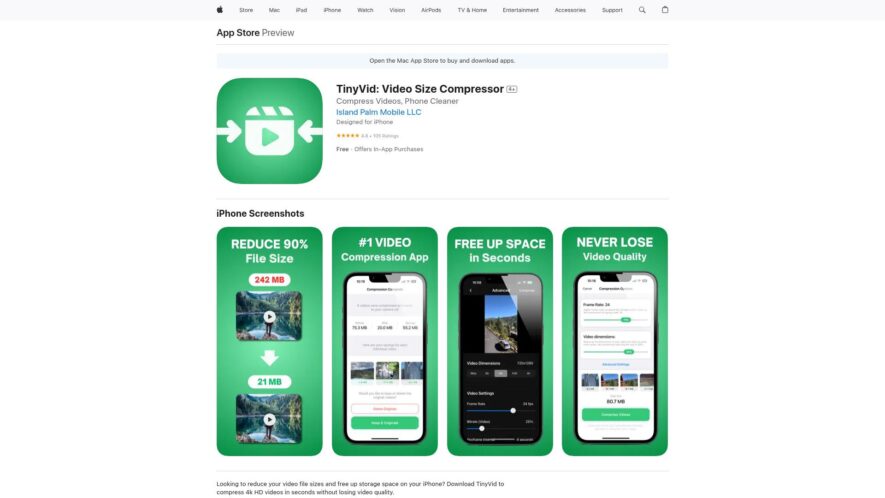
Compress Videos is a free iOS app that helps you reduce video file sizes and free up storage space on your device. With a simple and intuitive interface, you can easily select videos from your camera roll, choose a compression level, and compress them to save...
Compress Videos is a free iOS app that helps you reduce video file sizes and free up storage space on your device. With a simple and intuitive interface, you can easily select videos from your camera roll, choose a compression level, and compress them to save up to 90% of storage space. The app supports various video formats and resolutions, and you can also trim, merge, or split videos as needed. Compress Videos is a great tool for anyone looking to optimize their iPhone or iPad storage.
Reduce video file sizes without compromising quality.
Free up storage space by compressing large video files efficiently.
Batch compress multiple videos at once for convenience.
Maintain original video resolution while optimizing file size.
User-friendly interface makes compression quick and easy.
Control the compression level to balance quality and file size.
Preview videos before and after compression to compare quality.
Supports a variety of video formats for maximum compatibility.
Save and share compressed videos effortlessly.
Enhance device performance by freeing up storage space.
You Got Questions,We Got Answers
What is Compress Videos & Free Up Space?
Compress Videos & Free Up Space is a video compressor app that helps you reduce the size of your videos, freeing up storage space on your iPhone or iPad, while maintaining the original quality.
How do I compress a video?
To compress a video, simply select the video you want to compress, choose the compression level, and tap the "Compress" button. The app will then reduce the video size, saving you storage space.
Can I compress multiple videos at once?
Yes, you can select multiple videos to compress simultaneously, making it easy to free up storage space on your device quickly and efficiently. The app supports batch compression.
Will compressing a video affect its quality?
No, the app uses advanced algorithms to ensure that the compressed video maintains its original quality, so you don't have to worry about sacrificing video quality for storage space.
Can I share compressed videos?
Yes, you can share compressed videos directly from the app via email, messaging apps, or social media platforms, making it easy to share your compressed videos with others.
How much space can I free up?
The amount of space you can free up depends on the size and number of videos you compress, but on average, you can expect to free up several hundred megabytes or even gigabytes of storage space.
Is the app free to use?
Yes, the app is free to download and use, with optional in-app purchases for additional features or premium compression levels, giving you flexibility and control over your video compression needs.
Is my data safe with this app?
Yes, the app is designed with data security in mind, and your videos are compressed locally on your device, ensuring that your data remains private and secure, with no risk of data breaches or unauthorized access.
Use cases
Media
Reduce video file sizes for social media influencers to share high-quality content without exceeding platform upload limits, ensuring seamless engagement with their audience
Healthcare
Compress medical video recordings for telemedicine consultations, reducing storage costs and facilitating secure sharing of patient data between healthcare professionals
Education
Shrink video lecture files for online courses, enabling faster uploads and downloads, and improving overall learning experiences for students
RealEstate
Optimize video property tours for real estate agents, allowing them to showcase listings on websites and social media without sacrificing video quality or exceeding file size limits
Travel
Compress travel vlogs for adventure bloggers, enabling them to share stunning videos with followers while minimizing storage needs and data roaming costs
Marketing
Reduce video ad file sizes for digital marketers, ensuring fast loading times and improving overall campaign performance across various online advertising platforms
Traffic and Engagement
Apr 2026 - Jun 2026
World wide
Monthly visitors (June)
112.9m
Page/Visit
1.6
Visit Duration
50s
Bounce Rate
0.8%
Pricing
Freemium
$2.99
TinyVid Embeds
Copied!
Let your community know you're live on Skillcurb! Just drop a badge on your site’s homepage with just a few clicks. Showcasing the badge helps increase your visibility and connects you with users actively exploring top AI tools.