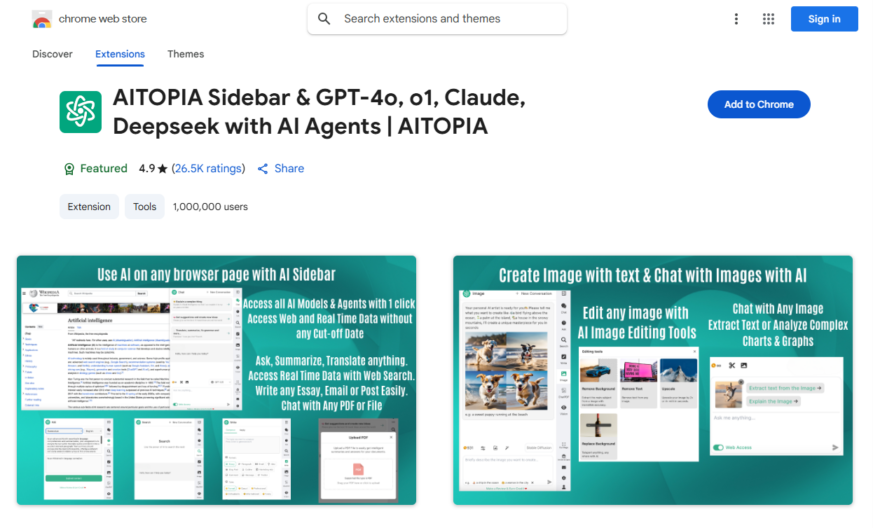
ChatGPT Sidebar is a Google Chrome extension that integrates the AI-powered ChatGPT language model into your browser, providing instant access to information and assistance. With a simple click, the sidebar appears, allowing you to ask questions, generate text, and explore topics without leaving your current webpage....
ChatGPT Sidebar is a Google Chrome extension that integrates the AI-powered ChatGPT language model into your browser, providing instant access to information and assistance. With a simple click, the sidebar appears, allowing you to ask questions, generate text, and explore topics without leaving your current webpage. Leveraging the latest GPT-4 model, this extension offers accurate and informative responses, making it an ideal tool for researchers, students, and anyone seeking quick knowledge or inspiration.
Access ChatGPT from anywhere with a convenient browser sidebar integration.
Get instant answers to complex questions with AI-powered conversational responses.
Explore a wide range of topics with in-depth knowledge and information.
Enjoy seamless interactions with a user-friendly and intuitive interface design.
Experience the latest advancements in language models with GPT-4 technology.
Get assistance with language-related tasks, such as writing and proofreading.
Quickly generate human-like text based on given prompts and topics.
Stay organized with the ability to save and revisit previous conversations.
You Got Questions,We Got Answers
What is ChatGPT Sidebar?
ChatGPT Sidebar is a browser extension that provides quick access to ChatGPT, enabling users to generate responses, summarize content, and assist with writing tasks. It integrates seamlessly into Chrome, making AI assistance readily available while browsing.
How does ChatGPT Sidebar work?
ChatGPT Sidebar works as an extension in the Chrome browser, allowing users to interact with ChatGPT without needing to switch tabs. Users can type queries or highlight text on a webpage to get instant AI-generated responses and information.
Is ChatGPT Sidebar free to use?
ChatGPT Sidebar offers both free and premium options. The free version provides basic functionalities, while the premium version unlocks advanced features, including more usage limits and improved AI responses.
Can I use ChatGPT Sidebar on different browsers?
ChatGPT Sidebar is designed mainly for Google Chrome. However, users may be able to utilize it on Chrome-based browsers like Microsoft Edge or Brave by installing the extension manually.
Does ChatGPT Sidebar store my chat history?
ChatGPT Sidebar does not store user conversations directly. However, depending on your settings and usage, OpenAI's data policies may apply. Users should review the privacy settings to manage data retention and security.
Can I customize ChatGPT Sidebar's settings?
Yes, ChatGPT Sidebar allows users to adjust preferences such as response behavior, shortcuts, and theme settings to enhance their experience. Some customization options may require a premium subscription.
Is ChatGPT Sidebar compatible with mobile devices?
ChatGPT Sidebar is primarily designed for desktop use through the Chrome browser. Mobile users may not have full functionality, but alternative methods such as accessing ChatGPT through the OpenAI website can be used.
How accurate are the responses from ChatGPT Sidebar?
ChatGPT Sidebar provides AI-generated responses based on OpenAIs GPT models. While it is highly accurate for most tasks, occasional inaccuracies may occur. Users are encouraged to verify critical information.
Can I integrate ChatGPT Sidebar with other tools?
ChatGPT Sidebar works alongside various online tools and platforms by providing instant AI assistance. However, direct integrations with external apps may be limited based on its functionality.
How can I get support for ChatGPT Sidebar?
Users can receive support by visiting the ChatGPT Sidebar page on the Chrome Web Store, accessing FAQs, or contacting the developers for assistance. Help resources and updates are regularly provided.
Use cases
Healthcare
Medical researchers use ChatGPT Sidebar to quickly analyze and summarize medical journals, accelerating discovery of new treatments and improving patient outcomes
Finance
Portfolio managers leverage ChatGPT Sidebar to generate concise summaries of market trends and news, enabling data-driven investment decisions
Retail
E-commerce customer support teams utilize ChatGPT Sidebar to respond to customer inquiries with accurate and personalized product information, increasing customer satisfaction
Manufacturing
Quality control engineers employ ChatGPT Sidebar to analyze equipment sensor data, identifying potential failures and optimizing production workflows
Marketing
Content creators use ChatGPT Sidebar to generate high-quality, engaging social media posts, boosting brand awareness and driving website traffic
Education
Teachers integrate ChatGPT Sidebar into their lesson plans, providing students with interactive, AI-driven learning experiences that enhance comprehension and retention
Traffic and Engagement
Apr 2026 - Jun 2026
World wide
Monthly visitors (June)
209.8m
Page/Visit
2.9
Visit Duration
1m 55s
Bounce Rate
0.6%
Pricing
FREE
$0
ChatGPT Sidebar with GPT-4 Vision & Image & Gemini by AITOPIA – Chrome Extension Embeds
Copied!
Let your community know you're live on Skillcurb! Just drop a badge on your site’s homepage with just a few clicks. Showcasing the badge helps increase your visibility and connects you with users actively exploring top AI tools.