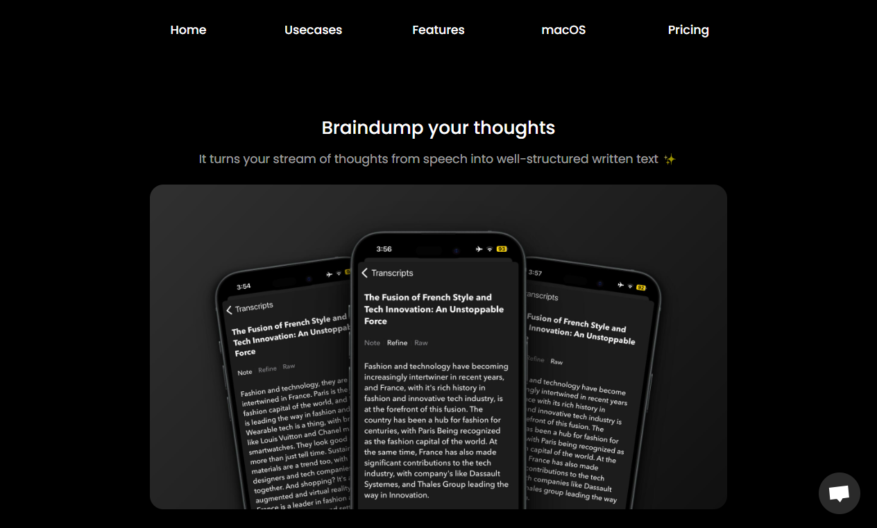
Audio Writer is an innovative tool designed to transform spoken words into written text effortlessly. By simply recording your voice, Audio Writer provides an accurate transcription that you can refine and structure according to your needs. Its core features include the ability to rewrite transcripts in...
Audio Writer is an innovative tool designed to transform spoken words into written text effortlessly. By simply recording your voice, Audio Writer provides an accurate transcription that you can refine and structure according to your needs. Its core features include the ability to rewrite transcripts in various styles, use pre-defined or custom presets, and support multiple languages, making it versatile for a range of users. Whether you are brainstorming ideas, journaling your thoughts, or creating compelling content, Audio Writer is an invaluable asset. The tool is particularly useful for enhancing productivity and organization in your writing process. With dedicated customer service available via email, users can easily reach out for support or inquiries. For those interested in exploring this powerful application, detailed pricing information is accessible through the main website. Regular updates on features and tips can be found through Audio Writer's social media presence. Overall, Audio Writer stands out as a convenient and efficient solution for anyone looking to elevate their writing experience.
Automatically transcribes audio files into editable text with accurate results.
Supports popular audio file formats like WAV, MP3, and M4A.
Allows users to upload files from local storage or cloud services.
Provides a user-friendly interface for easy audio file management and editing.
Enables real-time collaboration with team members through shareable links and tracking.
Offers customizable transcription settings for improved accuracy and efficiency.
Includes a built-in text editor with formatting options for easy proofreading.
Supports multiple languages and dialects for global accessibility and reach.
You Got Questions,We Got Answers
What is Audiowriter?
Audiowriter is an AI-powered tool that converts written text into high-quality audio files, saving users time and effort in creating engaging audio content for various purposes, such as podcasts, audiobooks, and voiceovers.
How does it work?
The platform uses advanced AI algorithms to analyze the input text, identifying the tone, pace, and pitch required to produce a natural-sounding voiceover, and then synthesizes the audio file in a matter of minutes.
Is Audiowriter free?
Audiowriter offers a free plan with limited features and a word limit, suitable for small projects or testing purposes, as well as paid subscriptions with additional capabilities and support for larger-scale audio production needs.
What formats are supported?
Audiowriter supports a range of audio formats, including WAV, MP3, and M4A, ensuring compatibility with popular audio editing software and platforms, allowing users to further refine and edit their audio files as needed.
Can I customize the voice?
Yes, Audiowriter provides a selection of high-quality, natural-sounding voices in various languages and accents, and users can adjust the tone, pace, and pitch to fine-tune the audio output to suit their specific requirements.
How long does it take?
The processing time depends on the length and complexity of the input text, but on average, Audiowriter can generate a high-quality audio file in a matter of minutes, making it a fast and efficient solution for audio content creation.
Use cases
Healthcare
Audiowriter app helps medical transcriptionists to efficiently transcribe patient records, doctor's notes, and medical documents, ensuring accuracy and reducing paperwork, allowing healthcare professionals to focus on patient care
Finance
Audiowriter's speech-to-text functionality enables financial analysts to quickly transcribe meeting notes, conference calls, and market research, streamlining data analysis, and improving decision-making
Retail
Sales teams use Audiowriter to capture customer feedback, product reviews, and in-store conversations, providing valuable insights for product development, marketing strategies, and customer experience improvement
Manufacturing
Quality control teams utilize Audiowriter to document production line issues, equipment maintenance, and quality assurance checks, reducing errors, and improving overall manufacturing processes
Marketing
Marketers leverage Audiowriter to transcribe focus group discussions, customer surveys, and competitor analysis, gaining actionable insights for campaign development, brand positioning, and market research
Education
Teachers and professors use Audiowriter to transcribe lectures, class discussions, and student feedback, creating accessible learning materials, and enhancing student engagement and academic performance
Traffic and Engagement
Mar 2026 - May 2026
World wide
Monthly visitors (May)
0.4k
Page/Visit
1.1
Visit Duration
N/A
Bounce Rate
0.5%
Pricing
Paid
$15
Audio Writer Embeds
Copied!
Let your community know you're live on Skillcurb! Just drop a badge on your site’s homepage with just a few clicks. Showcasing the badge helps increase your visibility and connects you with users actively exploring top AI tools.